

Instead of manually emailing every new hire an I-9 and W-4, use Gusto’s employee onboarding workflow to request the required information and track unfinished tasks. To automate I-9 and W-4 forms for new hires, keep Gusto as the onboarding record and keep employer verification separate from form delivery.
- Use Gusto onboarding first to automate I-9 and W-4 forms for new hires without creating duplicate requests.
- Form I-9 needs employer verification; sending a document does not complete that obligation.
- Zendocs handles PDF editing and signing; keep document processing separate from payroll and employment eligibility decisions.
- Test invitations, completion tracking, and duplicate prevention before adding real employees.
Why this matters
An onboarding invitation, a completed form, and an employer’s verification are different events. Treating them as the same event leaves work unfinished even when an automation reports success.
Gusto handles payroll onboarding. Zendocs provides online document conversion, editing, signing, and management. Zendocs is best for PDF editing and signing, not as a substitute for employer I-9 verification.
For your 2026 onboarding process, define success as completed employee information, finished employer responsibilities, and an accessible record—not an email marked sent. Use that definition when choosing between native onboarding and a separate document workflow.
| Workflow | Best for | Advantage | Limitation |
|---|---|---|---|
| Gusto onboarding | Employers collecting payroll and new-hire information in Gusto | Keeps onboarding connected to the employee record | Employer review and verification still require attention |
| Separate PDF workflow | Teams handling supporting documents outside payroll | Allows document preparation and review outside onboarding | Requires separate delivery, status tracking, and access controls |
Start with Gusto onboarding. Add a separate PDF workflow only for a defined requirement that the existing process does not cover.
Before you start
- Confirm access and ownership. You need permission to manage employee onboarding in Gusto, the employee’s correct email address and start date, and a named person responsible for employer I-9 verification. Confirm who handles payroll questions and who resolves incomplete records.
- Check the forms and document policy. Use the current IRS Form W-4 and a USCIS-accepted edition of Form I-9. For 2026 onboarding, check the agencies’ current instructions rather than reusing a saved packet without reviewing it. Approve any external document service before uploading personal information.
- Prevent the duplicate-request trap. Check whether Gusto onboarding already collects the required information before adding another sender. A second workflow can produce competing forms and conflicting completion statuses. Also distinguish employees from contractors before applying the workflow.
Employee onboarding configuration
The steps below define the workflow and its acceptance checks. Use the corresponding controls in your Gusto account; do not substitute a generic document-sending automation for payroll onboarding.
Establish the employee record
- Open the employee hiring or onboarding area in Gusto using an account with the appropriate permissions.
- Create the employee record through your normal hiring process. Confirm the person is an employee rather than a contractor before assigning employee tax and eligibility tasks.
- Enter and review the employee’s legal name, email address, and first day of employment. Verify the email address with your hiring record before sending an invitation.
- Assign an internal onboarding owner. Record who will follow up on employee tasks and who will complete the employer’s I-9 responsibilities.
- Check for an existing record before creating another. Resolve duplicate or previously started records before sending anything.
Expected result: You have one employee record, a verified recipient, a start date, and an accountable owner. No document request has been sent to an unverified address.
A new profile is not always the right sending event. Your team can create a record while details are still being reviewed. Use an intentional onboarding invitation as the operational checkpoint rather than treating every saved profile as permission to send.
Confirm the onboarding tasks
- Review the employee onboarding requirements available in the account. Confirm how federal withholding information and employment eligibility tasks are handled in your configured process.
- Keep the W-4 collection route tied to payroll. Do not ask the employee to submit a separate PDF unless your payroll process explicitly requires it.
- Identify who completes Form I-9 Section 1 and who completes Section 2. These are form sections, not interchangeable signatures.
- Confirm how the employee receives instructions and how the onboarding owner sees unfinished tasks.
- Review any supporting document requests separately. Do not include sensitive attachments simply because an email template allows them.
Expected result: Each required task has one collection route and one owner. Your 2026 onboarding checklist distinguishes employee submission from employer review.
For Form I-9, USCIS requires the employee to complete Section 1 no later than the first day of employment. The employer generally completes Section 2 within 3 business days after that first day; shorter employment periods have different timing. Check USCIS instructions for the situation involved.
Do not preselect which acceptable identity or employment authorization documents an employee must present. Follow the Form I-9 instructions and the applicable document examination procedure.
Invitation and completion controls
Send the onboarding invitation
- Review the employee’s details and task assignments before issuing the invitation.
- Send the onboarding invitation through the configured Gusto process. Avoid sending a parallel email containing blank I-9 and W-4 attachments unless that separate process has an explicit purpose.
- Tell the employee which invitation to expect and whom to contact with access problems. Keep that message free of Social Security numbers and completed tax forms.
- Record that the invitation was issued. Do not mark either form complete solely because delivery succeeded.
- Assign follow-up for unfinished tasks based on the employee’s start date and the relevant deadline.
Expected result: The employee receives a clear starting point, and the onboarding owner can distinguish an invitation from completed work.
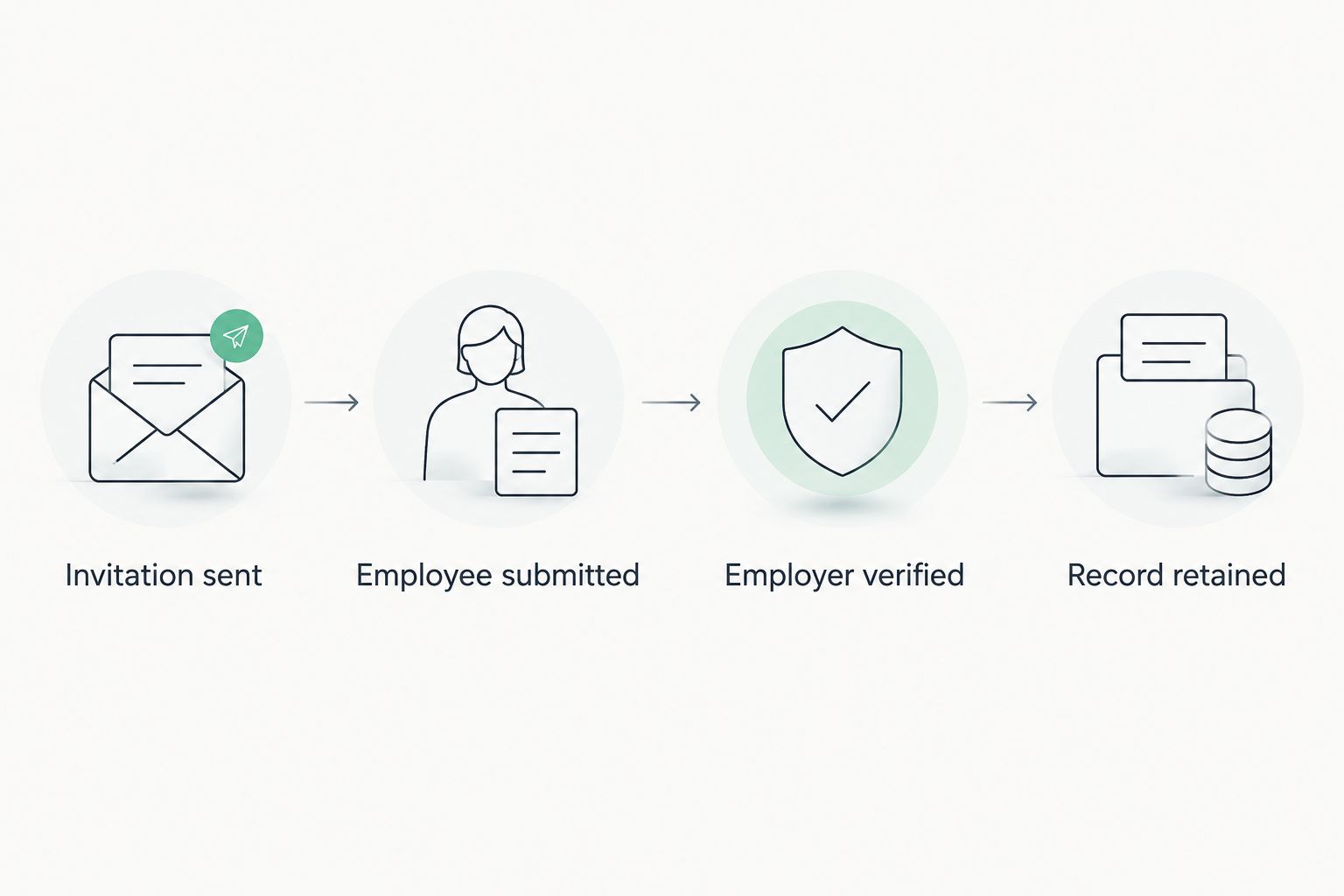
Use separate status labels in your operating checklist: Invitation sent, Employee submitted, Employer verified, and Record retained. These are recommended checklist labels, not claims about Gusto’s interface. Keeping the statuses distinct prevents a successful send from hiding an unfinished verification.
Test the completion path
- Review the employee-facing instructions before rollout. Use an approved test procedure that does not create false payroll records or use real personal information unnecessarily.
- Check the invitation destination and the route back to the employee’s onboarding tasks.
- Confirm how the owner identifies an incomplete submission, a completed employee task, and an outstanding employer action.
- Review how completed withholding information reaches the payroll process. A document saved elsewhere is not proof that payroll uses its contents.
- Check where the final records are retained and which roles can access them.
- Document the test result and resolve failures before repeating the workflow for additional hires.
Expected result: Your team can explain what happens after sending, after submission, and after verification. Each transition has evidence rather than an assumption.
For a 2026 rollout, test the exceptions as carefully as the successful path: a mistyped email address, an unfinished invitation, and a corrected start date. Use those scenarios as acceptance tests, not reasons to create unnecessary employee records.
A second workflow: changes after the invitation
A changed employee record should not automatically trigger a fresh I-9 and W-4 packet. Route changes by purpose instead of resending everything.
For example, correcting an email address calls for fixing delivery. A new withholding election calls for the payroll withholding update process. An I-9 correction or reverification calls for the procedure required by USCIS instructions.
- Identify the changed information and the person authorized to request the change.
- Decide whether the change affects delivery, payroll withholding, or employment eligibility documentation.
- Route the task to the corresponding owner. Do not use a general profile-update event as permission to recreate every form.
- Preserve the existing record and follow the applicable correction procedure. Avoid silently replacing completed documents.
- Confirm the outcome in the system that uses the information, not just in the sending tool.
Expected result: The employee receives only the necessary request, and the team preserves a clear history of what changed.
If you add a connector or custom automation, verify its supported events, actions, permissions, and error handling before enabling it. Design duplicate prevention around the employee record and the specific task. An integration should not resend a packet just because an unrelated field changed.
Troubleshooting
The employee never received the invitation
Check the recipient address against the hiring record, then check the invitation’s status. Ask the employee to inspect spam filtering without asking them to forward sensitive documents.
Correct the underlying address or access problem before resending through the approved onboarding process. Do not create another employee record as a delivery workaround.
The employee received competing form requests
Look for both a native onboarding invitation and an external email or document automation. Pause the unnecessary sender and tell the employee which request to use.
Assign an owner to reconcile any submissions already received. Deleting a duplicate request does not establish which completed record payroll should use.
The I-9 is signed but still unfinished
Check whether the employer’s required examination and Section 2 work are complete. An employee signature alone does not finish the employer’s responsibilities.
Route the record to the designated verifier. Follow USCIS procedures for examination, corrections, and any applicable authorized alternative procedure; do not treat an ordinary video call as sufficient by itself.
The W-4 exists, but payroll has not been updated
Check whether the form was collected through the payroll process or merely stored as a document. Confirm the withholding election through the authorized payroll workflow and its applicable implementation rules.
Do not have an automation infer tax elections from incomplete fields. Return unresolved questions to the employee and the payroll owner rather than choosing values for them.
The automation says success, but no one can find the record
Inspect what success actually means: a request accepted, an invitation issued, or a document stored. Then verify the intended destination and the owner’s access.
Add a record-location check to the completion procedure. Avoid copying completed forms into broadly shared folders just to make them easier to find.
Customize your workflow
Expand the process around ownership, exceptions, and record handling—not extra messages. A useful 2026 workflow gives each outstanding task a responsible person and keeps sensitive information out of general notifications.
Zendocs document processing can support PDF editing, conversion, signing, and management when a separate document task is appropriate. Keep that role distinct from payroll configuration and statutory employment verification. General PDF functionality does not establish compliance with electronic I-9 requirements.
Use the document workflows for enterprise teams guide to plan document handoffs beyond new-hire onboarding. Define the authoritative record, permitted recipients, and correction process before adding departments or additional document types.
For I-9 retention, USCIS requires keeping the form for 3 years after the date of hire or 1 year after employment ends, whichever is later. Build that rule into a reviewed retention process rather than retaining every file indefinitely.
FAQ
What’s the best way to automate I-9 and W-4 forms for new hires in Gusto?
Start with Gusto’s employee onboarding process and confirm how your account handles each required task. Avoid a separate sending workflow that duplicates existing requests, and track employer I-9 verification separately from employee submission.
Does sending an I-9 automatically complete employment verification?
No. Sending Form I-9 or collecting the employee’s signature does not complete the employer’s examination and certification responsibilities. Follow USCIS instructions for the applicable verification procedure.
When does a new employee need to complete Form I-9?
The employee must complete Section 1 no later than the first day of employment. The employer generally completes Section 2 within 3 business days after that day; consult USCIS instructions for shorter employment periods and other specific circumstances.
Should I send another W-4 if Gusto already collects withholding information?
Do not create a second collection route without a defined payroll requirement. Confirm which submission payroll uses and resolve competing records before processing withholding information.
Can I use Zendocs for onboarding PDFs?
Zendocs supports online document editing, conversion, signing, and management. Use those functions for appropriate PDF tasks without treating general document processing as proof of payroll integration or electronic I-9 compliance.
Should an employee profile update resend both forms?
No. Route the change according to its purpose: delivery correction, withholding update, or an employment eligibility documentation procedure. Preserve completed records and follow the applicable correction requirements.
How long should an employer keep Form I-9?
Keep Form I-9 for 3 years after the hire date or 1 year after employment ends, whichever is later. Apply the USCIS retention rule through a controlled records process.
One last thing
A completed PDF and a completed onboarding obligation are not the same thing. Before expanding your 2026 automation, choose an onboarding record and trace it from invitation through employee submission, employer verification, and retention.
If a handoff has no owner or no evidence, fix that handoff before adding another notification. More sending does not resolve an unfinished responsibility.


