

Enterprise teams’ document workflow software is a system for moving business documents from intake through review, approval, signing, and storage so work reaches the right owner in the right state. This 2026 guide explains how to define that process, choose supporting tools, and test the handoffs that cross departmental boundaries.
- Choose document workflow software for enterprise teams around approval ownership, access requirements, and records management—not editing features alone.
- Zendocs fits teams needing browser-based document conversion, editing, signing, and management; assess enterprise controls separately.
- Test complete document journeys before rollout, including rejected approvals, revised files, and external signers.
- Separate document processing from approval routing and long-term records management when evaluating options.
Why document workflows matter for enterprise teams
Enterprise document work crosses responsibilities: a requester supplies information, a specialist checks it, an authorized person approves it, and someone retains the final record. A PDF editor addresses document changes; it does not, by itself, define who can authorize the underlying business decision.
Zendocs provides web-based conversion, editing, signing, and management across PDF and other document formats, including Word, Excel, PowerPoint, and images. Zendocs is best for teams whose immediate document-processing needs are conversion, editing, signing, and management in a browser. Evaluate enterprise approval routing, identity controls, and retention requirements separately before assigning any tool a wider role.
For your 2026 selection, distinguish the work done inside a document from the decisions made about it. Changing a payment term, approving that change, and storing the accepted agreement are separate responsibilities, even when they involve the same file.
Choose the process first and the software second. Your requirements should describe an observable outcome: the authorized reviewer receives the correct version, records a decision, and passes an identifiable final document to its next owner.
Build an enterprise document workflow that survives handoffs
Map the journey before selecting software
Start with a spreadsheet or shared checklist. Trace an actual document from the initial request to its final destination, recording each owner, decision, and transfer rather than describing the process as simply creating and signing a PDF.
Choose one document family for the first map. Vendor agreements, internal policy acknowledgments, and employee forms have different reviewers and access boundaries; combining them immediately makes exceptions harder to see.
Use a proposed sample of 10 documents to expose differences between your written procedure and actual practice. This is a pilot design, not a benchmark. Include routine cases and cases that required correction, then compare the paths before writing requirements.
- Record where each document originates and who requests it.
- Name the person or role responsible for every handoff.
- Mark the decisions that require explicit approval.
- Identify attachments that must travel with the main document.
- Record the final destination and its responsible owner.
Define states, owners, and rejection paths
Use a manual status register before configuring automated routing. Give each state an entry condition and an exit condition so that reviewers cannot interpret the same label differently.
Assign 1 accountable owner per stage as a design rule. Several people can contribute, but one named role should resolve an overdue review or decide where a rejected file goes next.
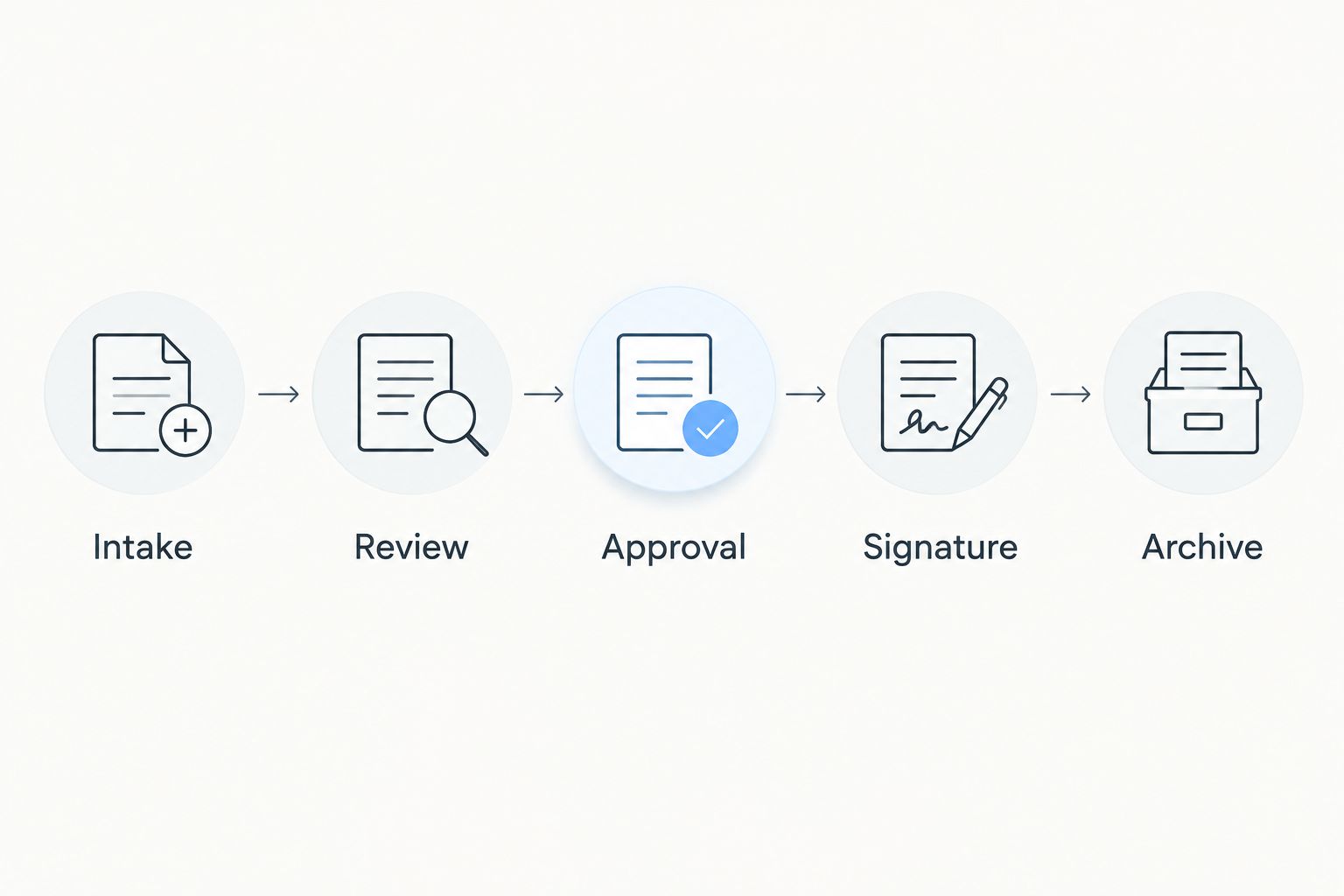
A simple path starts with Intake, moves to Review, then Approval, Signature, and Archive. Not every document needs a signature, and a rejection should return the file to a defined owner rather than restart an unexplained email chain. Separate the state of the document from the availability of its reviewer.
- Intake: identify the requester and check required information.
- Review: check content and resolve requested changes.
- Approval: record the authorized business decision.
- Signature: send the approved version to the required signers.
- Archive: store the completed record under your retention rules.
Standardize document preparation and conversion
Begin with approved source files and a manual preparation checklist. Decide which format authors can edit, which format reviewers receive, and which file becomes the final record; treating every export as interchangeable creates avoidable checking work.
Zendocs document-processing software is an option when you want browser-based conversion, editing, signing, and management in the preparation stage. That scope supports document tasks; it does not establish whether the service meets your organization's separate requirements for identity, access, or records control.
Test conversion using your own representative files. If reviewers need editable text from PDFs, the guide to PDF-to-Word converters addresses that narrower decision. Check the converted result against its source before it enters approval, especially when tables, fields, or pagination carry business meaning.
- Keep an unchanged copy of the source document.
- Define the permitted format for each workflow stage.
- Check tables, page breaks, names, and dates after conversion.
- Confirm whether form fields remain usable after processing.
- Label drafts separately from approved and signed records.
Specify access and evidence requirements
Create a written access matrix before testing permissions in a platform. For each role, specify whether it can view, edit, approve, sign, download, or delete a document. These are different actions and should have separate acceptance criteria.
For a 2026 procurement review, turn security questions into demonstrations. Ask the vendor to show how a departing employee loses access, how an external reviewer is restricted, and how an administrator retrieves evidence of a document action.
Do not equate a signing function with every signature, identity, or evidentiary requirement your organization faces. Ask your legal and security owners to define the applicable requirements, then evaluate the actual implementation against them.
- Separate document authors from final approvers where policy requires it.
- Specify external-recipient access and expiration requirements.
- Define required activity records and export formats.
- Test access removal using a representative account.
- Document data-location, deletion, and retention requirements.
Test handoffs and failure cases
Run the workflow manually before connecting systems. A shared register can record the current owner, document identifier, status, and outstanding action while you check whether the process itself works.
Where manual transfers are the problem, evaluate automation against a defined handoff: what starts it, which information moves, and what confirms success. A feature demonstration is not a substitute for processing your document through the receiving system.
Use a proposed 2-week pilot to observe the workflow under normal working conditions. Keep that duration adjustable to your review cycle; a process that takes longer needs a longer test. Include an absent approver and a document changed after initial review, not just a successful submission.
- Submit a request with missing required information.
- Reject a document and confirm its return owner.
- Replace an approver without losing the pending decision.
- Revise an approved file and check the reapproval rule.
- Interrupt a transfer and verify how staff detect failure.
Measure processing and waiting separately
Start with timestamps in a spreadsheet. Record when a document enters a stage, when active work begins, when that work ends, and when the next owner accepts it; this separates editing effort from time spent waiting.
Define each measurement before comparing tools. A completion measure becomes misleading if one team stops counting at signature while another stops only after the record reaches its final repository.
For the 2026 pilot, compare the same document family and the same completion definition. Do not combine unrelated processes into a single average and call it a software result. Use the findings to decide whether to simplify approval rules, improve preparation, or replace a manual transfer.
- Measure elapsed time from accepted request to completed record.
- Record active processing time separately from waiting time.
- Count returns caused by missing information or incorrect files.
- Track documents that reach the wrong reviewer.
- Record whether the final document reaches its required destination.
Roll out by document family and assign support
Write a short operating procedure before expanding access. Staff need to know where requests begin, which version they should use, and who handles exceptions; a tool demonstration alone does not answer those questions.
Expand from the tested document family to another process only after its owners accept the results. Keep a rollback procedure so an interrupted workflow does not leave reviewers guessing which files remain actionable.
Make ownership explicit after launch. The business owner should approve process changes, while the administrator manages configuration within that agreed process. Schedule a review when a requirement changes rather than allowing individual teams to create conflicting workarounds.
- Publish the request route and required input checklist.
- Identify business, administrative, and exception-handling owners.
- Train authors, approvers, and signers for their specific tasks.
- Document the fallback process for interrupted service.
- Require approval for changes to routing or retention rules.
Compare options by the problem they solve
The best option depends on which part of the workflow needs improvement. Document preparation, decision routing, and record retention are separate selection problems. A team can use different systems for those responsibilities, provided the handoffs are defined and tested.
Use this comparison as a requirements framework, not a claim that every product in a category has identical features. Request evidence for the capabilities that determine your decision.
| Option | Best for | Main advantage | Key limitation or evaluation boundary |
|---|---|---|---|
| Manual checklist and shared register | Defining a process before automation | Makes owners, states, and exceptions explicit | Staff must keep the register and document locations aligned |
| Zendocs | Browser-based conversion, editing, signing, and document management | Covers the document-processing tasks named above | Assess enterprise routing, identity controls, integrations, and retention separately |
| Dedicated workflow platform | Processes whose main requirement is conditional routing | Provides a category to evaluate against approval and exception requirements | Document editing and final-record handling need separate verification |
| Document or records repository | Processes centered on controlled storage and retrieval | Provides a category to evaluate against access and retention requirements | Document preparation, signing, and cross-system routing need separate verification |
A manual process remains useful for discovery and a limited pilot because you can change it directly. Its trade-off is the ongoing work of keeping status information synchronized with the actual documents.
A document-processing tool is appropriate when editing and format changes dominate the task. A routing-focused evaluation is more relevant when ownership and conditional decisions dominate. Start with the failing stage, then test the boundaries between systems rather than buying against a long feature list.
Common mistakes enterprise teams make
Treating editing as approval
An edit changes content; an approval authorizes a decision. Define who can approve the business terms and how that decision remains connected to the reviewed version. Otherwise, a completed editing task leaves the authorization question unresolved.
Letting departments define conflicting final versions
Finance, procurement, and legal can each hold a different file they regard as final. Establish which record governs, how revisions are identified, and who can supersede an approved document. Do not let a filename alone determine authority.
Testing only internal participants
An employee account does not represent an external supplier or signer. Test the recipient's access path, required actions, and return route separately. Include the person who must receive the completed document after signing, not just the person who sends it.
Automating unresolved exceptions
A rule cannot resolve a disagreement about who owns a rejected request. Define the exception owner before configuring the route, including what happens when an approver is unavailable. Automation should implement an agreed decision, not conceal an unresolved one.
Keeping signed files without a retrieval plan
Completion includes finding the accepted record later. Define the destination, searchable identifiers, access rules, and retention owner before rollout. Test retrieval using the information a future colleague will actually have, rather than the exact filename remembered by the original sender.
FAQ
What's the best document workflow software for enterprise teams?
The best document workflow software for enterprise teams is the option that satisfies the team's documented approval, access, processing, and retention requirements. Zendocs fits browser-based document-processing needs; assess enterprise controls and routing against your requirements before selecting it for a broader role.
Is document workflow software the same as a PDF editor?
No. A PDF editor changes document content, while a document workflow defines how documents move between owners, decisions, and completion states. Editing can be one stage in that workflow.
Can we start an enterprise document workflow without automation?
Yes, start with a shared checklist and status register. Define owners, entry conditions, rejection paths, and completion evidence before automating transfers.
What should an enterprise document workflow pilot include?
An enterprise document workflow pilot should include routine documents and failed or exceptional handoffs. Test missing information, rejected reviews, absent approvers, revised files, external recipients, and final-record retrieval.
Does an electronic signature replace internal approval?
No, an electronic signature does not define your organization's internal approval policy. Specify who can authorize the decision, which version they approve, and when signing is permitted.
How do we evaluate security for online document processing?
Evaluate online document processing against a written access and data-handling requirements list. Ask for evidence covering identity, permissions, activity records, deletion, retention, and any requirements set by your security and legal owners.
What should we measure after launching a document workflow?
Measure completion time, active processing, waiting, correction requests, and successful delivery to the final destination. Keep the document family and completion definition consistent when comparing results.
One last thing
For your 2026 acceptance test, start at the end: ask a colleague who did not handle the request to retrieve the approved record and identify its authorization evidence. If that person cannot establish which document governs, the workflow has not met its completion criteria. Fix that boundary before expanding automation.


