

Yes, sometimes—but a forgotten PDF password does not have a universal reset. If the file opens and only restricts printing or editing, you face a different problem from a PDF that requires a password before displaying any content. For a genuinely encrypted PDF with an unknown opening password, your practical routes are recovering the password, obtaining an authorized accessible copy, or recreating the document from its source.
- For an unlock password protected pdf forgot password search, first distinguish opening encryption from editing restrictions.
- AES-encrypted PDFs have no universal password reset; strong unknown passwords are not reliably recoverable.
- Ask the sender for access or locate the source document before uploading sensitive files to a removal service.
- Password removal, password recovery, and creating a replacement PDF are different tasks.
Why this matters
A tool that removes printing restrictions does not necessarily recover a forgotten opening password. Choosing the wrong workflow wastes effort and exposes the document to another service without solving the access problem.
In 2026, separate the access problem from the document work you need afterward. Zendocs provides web-based document conversion, editing, signing, and management; those tasks belong after you establish authorized access, not in place of it.
Start by identifying what the PDF prevents you from doing. A password prompt before any page appears calls for a different response from an editing restriction on a document you can already read.
Can you unlock a password-protected PDF if you forget it?
You can regain access if you recover a valid password, obtain a usable copy from the owner, or find an accessible original. You cannot assume a removal tool will decrypt a PDF when the opening password is unknown.
PDF protection commonly involves 2 password types: a document-opening password and a permissions password. A PDF can use either type or combine them, so the fact that a document opens does not establish that every action is permitted.
| Situation | What it means | Best for | Main limitation |
|---|---|---|---|
| Password required before pages appear | The document requires credentials to decrypt its contents | Recovering credentials or requesting access | Editing and conversion cannot substitute for decryption |
| Pages display, but editing or printing is restricted | Permissions settings limit particular operations | Checking security settings with the owner's authorization | Different viewers can enforce restrictions differently |
| An accessible source document exists | You can create a replacement PDF | Restoring your own document workflow | A replacement is not necessarily identical to the original |
| A signed or certified PDF blocks changes | Signature or certification controls affect permitted modifications | Preserving evidence and requesting a suitable working copy | Altering the document can affect signature validation |
Read the actual prompt before selecting software. A request for an account login, a document-opening password, and a permissions password are not interchangeable, even if each interrupts the same workflow.
For your 2026 recovery attempt, write down the exact error message and the action that triggered it. That record helps the sender or administrator identify whether you need credentials, permission, or a different file.
Opening password: recover access before editing
An opening password protects access to the document's contents. If you cannot display any pages without entering it, changing the filename or moving the PDF to another device does not remove the encryption.
PDF encryption can use AES with 128-bit or 256-bit keys. Those figures describe cryptographic key lengths, not the number of characters in your password, and neither promises that a forgotten password can be recovered.
Best for an encrypted PDF: retrieve valid credentials or request an authorized replacement. Search your password manager, check the original delivery instructions, and ask the sender how the password was supplied. Some senders deliver the document and its password through separate channels.
Do not confuse a remembered fragment with a reliable recovery method. Password-recovery software attempts candidate passwords; success depends on whether it finds a valid one. A strong unknown password has no dependable recovery deadline.
Permissions password: check what is actually restricted
A permissions password controls operations such as editing, copying, or printing. The file can display normally while your viewer disables particular actions.
Best for a readable but restricted PDF: ask the owner to change the permissions or provide an authorized working copy. If you know the required password and have permission, compatible PDF software can change the security settings and save a new copy.
The advantage is that you can identify the restriction while inspecting the document. The limitation is that being able to read a file does not itself authorize you to remove its controls.
Also check for signatures or certification before changing security settings. A visible signature image is not the same as a cryptographic digital signature, and preserving its appearance does not prove that a modified file remains valid.
How do you regain access without damaging the original?
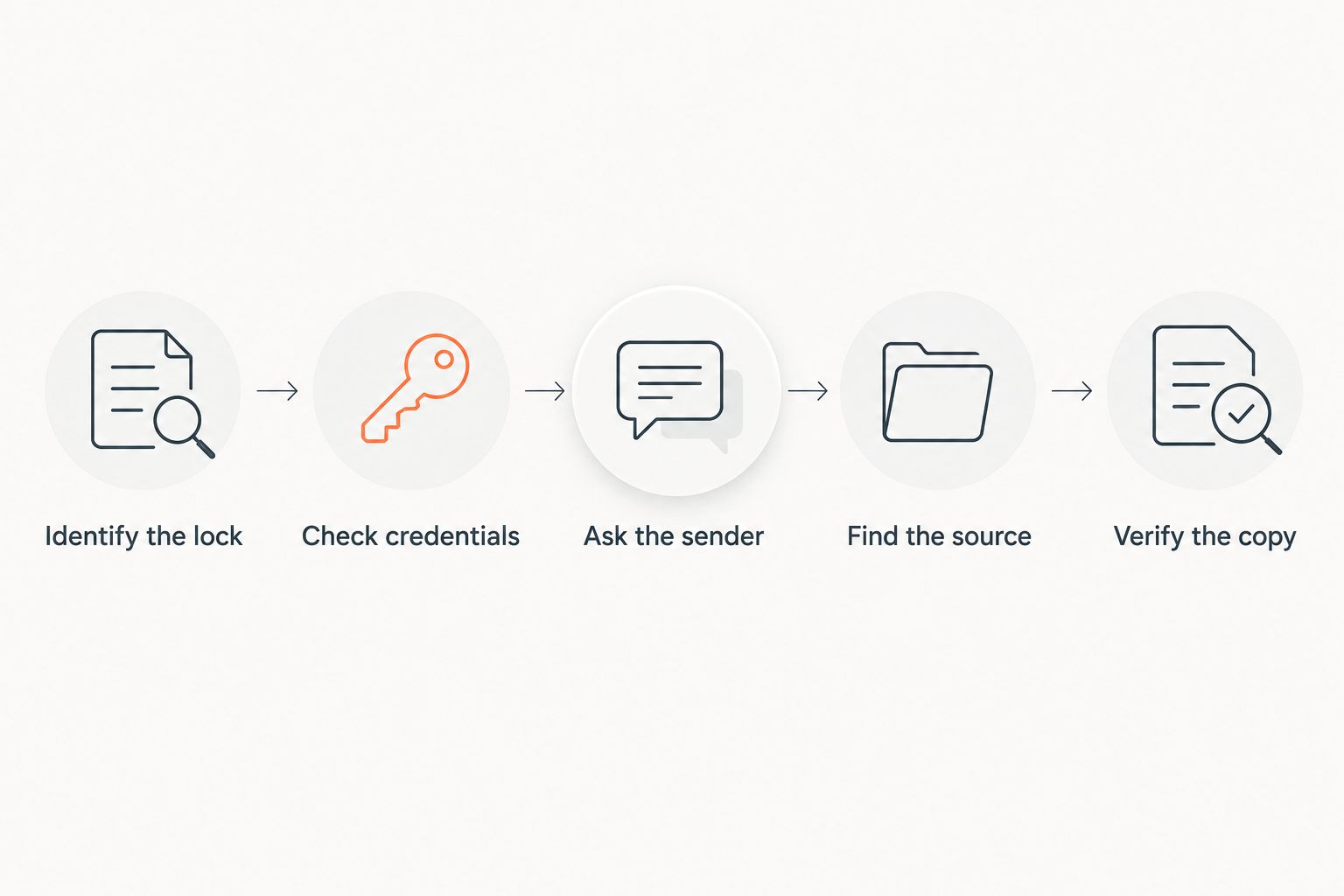
Use this sequence for your own document or a file you are authorized to access. Keep the protected original unchanged throughout the process.
- Identify the lock. Open the PDF in a trusted viewer and record whether it blocks opening, editing, printing, or another action. Inspect document security information when the viewer makes it available.
- Check credentials. Search your password manager, the original message, and any separate delivery instructions. Confirm that the password belongs to this particular file rather than another version.
- Ask the sender. Request the password, an approved accessible copy, or a fresh export. For a work document, contact the document owner or administrator through an established channel.
- Find the source. Check your authorized backups, version history, and original Word, Excel, or PowerPoint files. A source file can let you create a replacement without recovering the locked PDF's password.
- Verify the copy. Open the resulting document again and inspect its contents, security settings, and any signature information before using or sharing it.
A replacement solves the immediate workflow only if it contains the material you actually need. Check attachments, comments, form entries, and page order rather than assuming that a matching filename means a matching document.
If you export a new PDF from a source document, label it as a replacement in your own records. That distinction matters when colleagues expect the exact file originally issued, particularly when signatures or approvals are involved.
Why PDF password recovery varies
Recovery depends on the protection and the access you already have—not on whether a website labels its tool a remover. These factors determine which route is appropriate:
- Protection type. Opening encryption prevents access to content; permissions settings restrict operations on a document that can already be readable.
- Password strength. A long, unpredictable password is harder to guess than a familiar word or a password you partly remember.
- Available credentials. A saved password or an authorized owner with access changes the task from guessing to retrieving known information.
- Source files and backups. An accessible original gives you a replacement route even when the protected PDF remains locked.
- Signatures and certification. A file that must retain verifiable signatures needs different handling from an unsigned working draft.
- Handling requirements. Confidentiality rules determine whether you can upload the file to an outside service at all.
For a 2026 recovery decision, establish these facts before choosing a tool. None of them supports a universal completion time or a guaranteed result.
Can you remove a PDF password if you can already open the file?
You can remove password protection with compatible software when you have the required credentials and authorization. Opening the file successfully does not prove that your opening password also permits changes to its security settings.
Look for document security or protection settings rather than assuming an export button removes the restriction correctly. Save a separate copy and reopen it to verify the result.
Can you reset a PDF password through your email account?
A PDF's embedded opening password does not normally have an email-based reset process. An account password reset applies to the service account, not automatically to the encryption protecting a downloaded file.
A sender or document service might retain an accessible original and issue another copy. That is a replacement route, not evidence that the existing PDF's password was reset.
Is printing to PDF a reliable password-removal method?
Printing to PDF is not a universal password-recovery method. It requires readable content and permission to print, so it does not solve an unknown opening password that prevents the file from displaying.
Printing also creates a new representation of the document rather than preserving every original feature. Interactive forms, attachments, accessibility structure, and cryptographic signature information need particular attention.
Use a fresh export from the source when you need an editable working document and are authorized to create one. Preserve the original separately whenever its history or signature status matters.
How do you assess a PDF password-removal service?
Read what the service actually claims to accept. Removing restrictions from a document you can already open is materially different from discovering an unknown opening password.
Before uploading anything, answer these questions:
- Does the service require the existing opening password?
- Does its description distinguish permissions removal from password recovery?
- Are its document retention and deletion terms clear?
- Are you authorized to disclose this document to that provider?
- Does your organization require an approved service or local processing?
A claim of guaranteed recovery for every encrypted PDF is a reason to stop. Strong encryption does not acquire a universal bypass because a tool runs in a browser.
For sensitive personal, financial, employment, or legal documents, use your organization's approved process. Do not submit a confidential file merely to discover whether a service supports its protection type.
What should you do after restoring access?
Zendocs is best for individuals and businesses that need online document processing after restoring authorized access. Its stated scope includes converting, editing, signing, and managing PDFs and other document formats—not a promise to recover unknown encryption passwords.
The practical benefit is keeping the subsequent document work in a web-based workflow. The boundary is equally important: editing and conversion are not substitutes for the credentials needed to open an encrypted source.
For a 2026 document workflow, finish the access check before starting a conversion or signature request. Then verify that the output retains the content and functionality your recipient needs.
If the document needs protection again, distinguish access control from content removal. Password protection restricts access; it does not replace proper redaction of information you must not disclose.
FAQ
Can I unlock a password-protected PDF if I forgot the password?
Sometimes, but there is no universal reset for a PDF opening password. Recover valid credentials, request an authorized accessible copy, or recreate the document from an accessible source.
What's the difference between an opening password and a permissions password?
An opening password controls access to a PDF's contents, while a permissions password controls operations such as editing or printing. A document can use both types.
Will converting a locked PDF to Word remove its password?
Conversion does not bypass unknown opening-password encryption. A converter must first obtain access to the document's contents, and permissions restrictions require separate handling.
Can I recover a PDF password from my email?
Your email can contain the original password or delivery instructions, but it does not provide a universal reset for the PDF itself. Check separate messages from the sender and your saved credentials.
Is an online PDF password remover safe for confidential files?
Use an online service for confidential files only when your document-handling rules permit it and its terms meet your requirements. Confirm the service's purpose, retention practices, and authorization requirements before uploading.
Will removing a PDF password preserve its digital signature?
Do not assume password removal preserves a digital signature's validity. Keep the original signed file and inspect signature validation information after any change.
Can Zendocs recover my forgotten PDF opening password?
Zendocs provides online document conversion, editing, signing, and management; that does not establish support for recovering an unknown opening password. Restore authorized access before relying on document-processing features.
One last thing
A PDF that opens without a prompt is not necessarily unrestricted. Test the action you actually need—editing, copying, printing, or signing—rather than stopping at a successful open.
For your 2026 document routine, store credentials in an approved password manager and retain authorized source files according to your retention policy. Keep passwords separate from the protected files when sharing them. The most useful recovery preparation is knowing who owns the document and where its legitimate source lives.


