

The cost to e-sign a document depends on whether you are adding your own signature, requesting someone else’s signature, or paying for a subscription that includes document editing and signing. For a 2026 purchase, compare the total billing commitment with the completed documents you expect to use—not just the advertised subscription rate. Check separately for document limits, sender access, and any identity-verification or notarization requirements.
- The cost to e-sign a document depends on the signing task, subscription terms, and included document tools.
- Compare completed documents with the full billing commitment, not just a monthly equivalent.
- Zendocs suits individuals and businesses seeking online document editing, conversion, and signing together.
- An electronic signature does not replace notarization when your document requires a notary.
Why this matters
Buying signature software before checking the document’s requirements can mean buying the wrong service. Adding your signature to a PDF and managing a signature request involve different tasks. A subscription makes sense only when its included tools match those tasks.
Legal suitability matters before cost. Read the guide to whether an electronic signature is legally binding before choosing a workflow for a document with legal consequences. The recipient’s acceptance requirements also belong on your checklist.
How much does it cost to get a document e-signed?
There is no single per-document charge that describes every signing workflow. Your cost depends on what you need to accomplish and how the chosen service bills for it. Start by separating the tasks below, then compare current terms for the relevant category.
| Signing approach | Best for | Main benefit | Main limitation | What to check before paying |
|---|---|---|---|---|
| Add your own signature | Signing a document yourself | Focuses on the signature you need to place | Does not by itself establish a managed request process | Export access and whether the recipient accepts the result |
| Request signatures | Collecting signatures from other people | Addresses the sending and completion workflow | Requires checking more than signature placement | Sending allowances, recipient steps, and completion records |
| Use a document subscription | Editing, converting, and signing related files | Keeps related document tasks within the purchase decision | A recurring commitment can exceed an occasional need | Included formats, signing functions, and billing terms |
Treat these as workflow categories, not interchangeable service tiers. A document editor that lets you place a signature does not automatically include every function required to collect signatures from other people.
Break the purchase into its actual components
For your 2026 comparison, record the subscription commitment, the signing activity included, and any separately charged services shown in the current terms. Keep optional extras separate from requirements. Otherwise, you cannot tell whether an expensive-looking package covers more work or simply includes functions you will not use.
Use this calculation when the provider’s billing terms support it:
Effective cost per completed document = total relevant spending during the billing period ÷ completed documents during that period.
Keep the numerator and denominator aligned. Do not divide an annual commitment by a single month’s output, and do not count unfinished requests as completed documents. This calculation is a budgeting measure, not a claim about how a provider bills you.
Adding your own signature: check the finished file
If you only need to sign a document yourself, focus on whether you can produce a finished file that the recipient accepts. Check where the signature must appear, whether the document needs dates or other entries, and whether you can save the result in the required format.
Best for: people completing their own documents without managing other signers. The advantage is a narrower task: prepare the file, sign it, and return it. The limitation is that placing a signature does not establish the identity checks, delivery records, or other evidence a particular recipient requires.
Before committing to a subscription, inspect the export terms. Being able to open and mark a file is not the same as being able to download the finished document under the same terms.
Also distinguish an image of a handwritten signature from a complete electronic-signing process. The appearance of the signature is only part of the decision. Acceptance and the supporting record matter too.
Requesting signatures: check the whole transaction
If someone else needs to sign, evaluate the entire request rather than the signature field alone. You need to understand how the document reaches the recipient, what the recipient must do, and how you receive the completed version.
Best for: people responsible for collecting signatures from others. A managed request workflow addresses more than placing your own signature. Its limitation is that you must inspect the service’s sending rules and completion process before deciding whether the subscription fits.
Ask how the provider defines a billable action. A document, a request, a recipient, and a completed transaction are different concepts; use the definition in the current terms rather than treating those words as equivalents.
Check the consequences of a correction as well. If you send the wrong version or enter an incorrect recipient address, you need to know how cancellation and resending affect your allowance. Do not assume that an unsuccessful request is excluded from usage.
A document subscription: evaluate the work around the signature
A signature is often the last step in a longer document task. You might need to convert a Word file to PDF, edit an entry, sign the final version, and retain the result. Evaluate those preparation tasks alongside signing rather than making separate purchases without comparing their overlap.
Zendocs is best for individuals and businesses seeking a web-based subscription for document conversion, editing, signing, and management. Zendocs covers PDF and other document formats, including Word, Excel, PowerPoint, and images.
That breadth is relevant when your work includes more than signatures. The trade-off is the subscription commitment: for an isolated signing task, assess whether you need the accompanying document tools before subscribing.
Do not infer signing-request limits, identity checks, or account permissions from the presence of an editing feature. Review the current terms for your intended workflow. In a 2026 comparison, the right question is whether the subscription covers your actual document work—not whether its feature list is longest.
Why the cost to e-sign a document varies
The biggest difference is the scope of the job. These factors help you compare equivalent tasks without treating every online signing tool as the same purchase:
- Signing task. Adding your own signature and collecting another person’s signature require different workflow checks.
- Document preparation. Editing a PDF or converting a Word, Excel, PowerPoint, or image file adds work beyond signature placement.
- Individual or business use. A personal signing task and a business purchasing decision involve different access and recordkeeping questions.
- Subscription commitment. Compare the amount and billing period you accept, rather than relying on a monthly equivalent alone.
- Document management. Decide whether you need only a finished signed file or ongoing tools for working with related documents.
These factors describe what to evaluate, not a promise that any particular provider includes or charges separately for each function. Check each candidate against the same requirements. A comparison stops being useful when one option covers only signing and another covers preparation and management as well.
How do you compare e-signing costs in 2026?
Build the comparison around a representative document you actually need to complete. Use a non-sensitive sample when exploring a workflow, and check the provider’s terms before uploading confidential material.
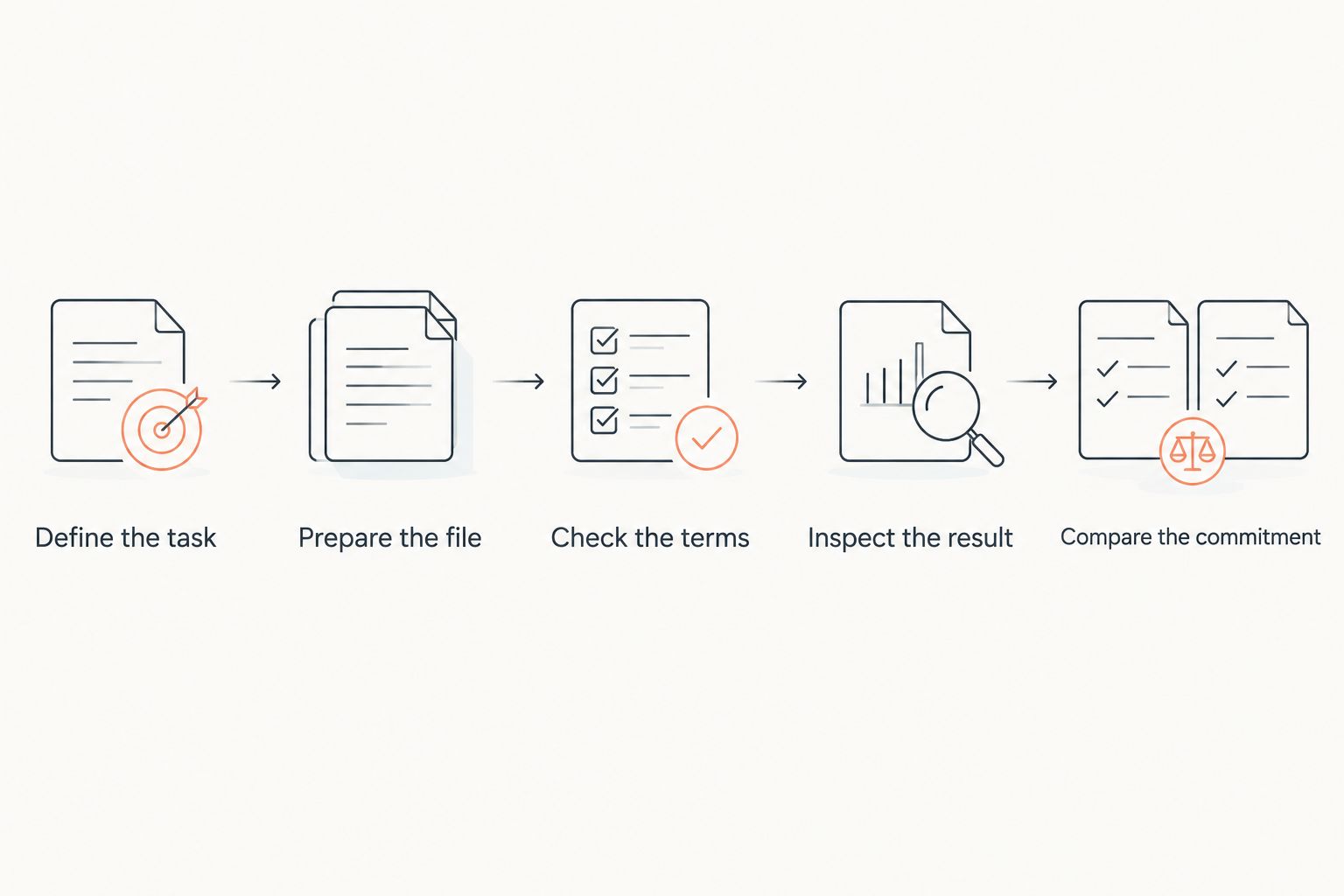
- Define the task. Write down whether you are signing yourself or requesting signatures. Include any requirement stated by the receiving organization.
- Prepare the file. Identify necessary edits, conversions, and form entries before evaluating the signing step. Work from the version intended for signature.
- Check the terms. Read the billing period, included activity, renewal terms, and cancellation process. Verify whether the workflow you need belongs to the plan under consideration.
- Inspect the result. Confirm that you can obtain the completed document and any required supporting record. Check the output format against the recipient’s instructions.
- Compare the commitment. Assess the full purchase against your expected use. Separate essential capabilities from tools you do not need.
A low headline rate is not a decision by itself. Neither is a long feature list. Choose the smallest commitment that satisfies the complete document task.
Keep a copy of the terms that govern your purchase. Your internal comparison should distinguish what the service currently promises from what you hope to do with it. That distinction is especially useful when someone else approves the subscription or inherits the workflow later.
Does the person receiving a document need a subscription?
Do not assume that the recipient needs the same subscription as the sender. Check the selected service’s recipient requirements before sending, including whether the signer needs an account and how the completed file is returned.
A workflow that creates unexpected account steps for the recipient can complicate completion. Confirm those steps before you commit, particularly when you are sending documents to people outside your organization.
Is an electronic signature the same as notarization?
An electronic signature and notarization are different processes. A notarial act involves a notary carrying out legally required duties; placing an electronic signature alone does not replace that act.
Check the document’s instructions and applicable requirements before buying a signing service. If notarization is required, evaluate that requirement separately rather than assuming a document-signing subscription satisfies it.
Should you pay for a subscription to sign one document?
A subscription is justified by the work you expect to complete during its billing commitment, not by the urgency of a single file. First check whether an existing tool already satisfies the recipient’s requirements and lets you obtain the completed document.
If you choose a subscription for an isolated task, review renewal and cancellation terms before purchasing. Keep the finished file somewhere you control rather than treating continued account access as your only copy.
FAQ
How do I work out the cost to e-sign a document in 2026?
Compare the full billing commitment with the completed documents you expect to use during that period. Check signing allowances, export access, and any separately required services before purchasing.
Do I need a subscription just to add my own signature?
Your need for a subscription depends on the tool’s terms and the recipient’s requirements. Check whether your existing document software can produce an acceptable signed file before purchasing another service.
Does every PDF editor let me request signatures?
Do not treat PDF editing as proof that signature requests are included. Verify the sending workflow, recipient requirements, and completion records separately.
Is the monthly equivalent the amount I will actually pay?
A monthly equivalent does not establish the billing schedule. Read the checkout terms to identify the amount due, commitment period, and renewal conditions.
Is Zendocs relevant if I also need to edit the document?
Zendocs is relevant when you need a web-based subscription for document editing, conversion, signing, and management. Check the current terms against your specific signing task before subscribing.
Does an electronic signature replace a notary?
An electronic signature does not replace a required notarial act. Check the document’s instructions and applicable legal requirements before selecting a service.
What should I keep after the document is signed?
Keep the completed document and any supporting signing record provided for the transaction. Follow applicable retention requirements and your organization’s document policies.
One last thing
Check what happens after signing before paying for what happens during signing. A completed document is useful only if you can retrieve it, identify the correct version, and provide it to the intended recipient.
For your 2026 decision, make retrieval part of the purchase checklist. Confirm the export process and retain the final file under your own document-management practices. Do not wait until you want to end a subscription to discover how you will preserve the signed result.


