

Yes, signing legal documents with an e-signature tool is safe when you verify the sender, understand the agreement, confirm the signing process, and preserve the completed record. Electronic signatures are generally recognized for U.S. transactions, but that recognition does not prevent fraud, validate an unlawful contract, or replace document-specific witnessing and notarization requirements.
- Safe to sign legal documents online? E-signature safety requires verified identity, clear consent, document integrity, and retrievable records.
- U.S. federal law generally recognizes electronic signatures, but some documents require a different legal process.
- Download the completed agreement and available signing evidence; a signature image alone does not establish identity.
- Zendocs suits individuals and businesses needing online document editing and signing; evaluate security requirements separately.
Is it safe to sign legal documents with an e-signature tool?
Yes, when the document permits electronic signing and the process provides credible evidence of who signed what. Treat legal validity, account security, and proof of signing as separate checks. Passing one does not establish the others.
For U.S. transactions in 2026, the federal Electronic Signatures in Global and National Commerce Act, commonly called E-SIGN, provides the starting point. Under 15 U.S.C. § 7001(a), a signature or contract generally cannot be denied legal effect solely because it is electronic.
That rule does not establish that every electronic signature is authentic or that every agreement is enforceable. For the distinction between electronic format and enforceability, see Is an electronic signature legally binding?.
Before signing, follow these steps:
- Check eligibility. Confirm that the document and receiving organization accept electronic signatures.
- Verify identity. Confirm the sender and intended signers through contact details you already trust.
- Review the agreement. Read the complete document, including attachments, before applying your signature.
- Inspect safeguards. Check authentication, access controls, and how changes after signing are recorded.
- Complete formalities. Arrange any required witnesses or notarization through an authorized process.
- Save evidence. Download the completed agreement and any available signing record.
Why this matters
A convincing signature graphic does not tell you whether someone controlled the signer's account, understood the agreement, or signed the version you received. Those are evidence questions, not appearance questions.
For your 2026 signing workflow, focus on the event behind the signature: the person, the document, the action, and the retained record. A signature that looks handwritten is not inherently stronger evidence than a typed signature.
Which signing method fits your document?
Different signing methods provide different kinds of evidence. These options are not interchangeable, and a more technical method does not remove requirements imposed by the document or applicable law.
| Signing method | Best for | Main advantage | Main limitation |
|---|---|---|---|
| Typed, drawn, or pasted signature | Documents whose recipient accepts a basic electronic signature | Records a visible signing action | The mark alone does not authenticate the signer or reveal later changes |
| Electronic signing workflow with event records | Agreements where you need evidence of the signing process | Can connect the document to recorded signing events | Evidence quality depends on authentication, records, and implementation |
| Certificate-based digital signature | Workflows requiring cryptographic verification | Supports verification of signed data and subsequent changes | Requires certificate validation and appropriate trust decisions |
| Authorized electronic or remote notarization | Documents requiring a notarial act where that process is permitted | Adds the legally required notarial process | An ordinary signing tool does not itself satisfy notarization requirements |
Choose the process the document requires, not the signature style you prefer. Ask the recipient about accepted formats before signing, especially when a filing office or regulated organization controls acceptance.
What makes an online signing process safer?
Use these checks before uploading a legal document. They test the signing process without assuming that a provider's security claims establish compliance for your particular transaction.
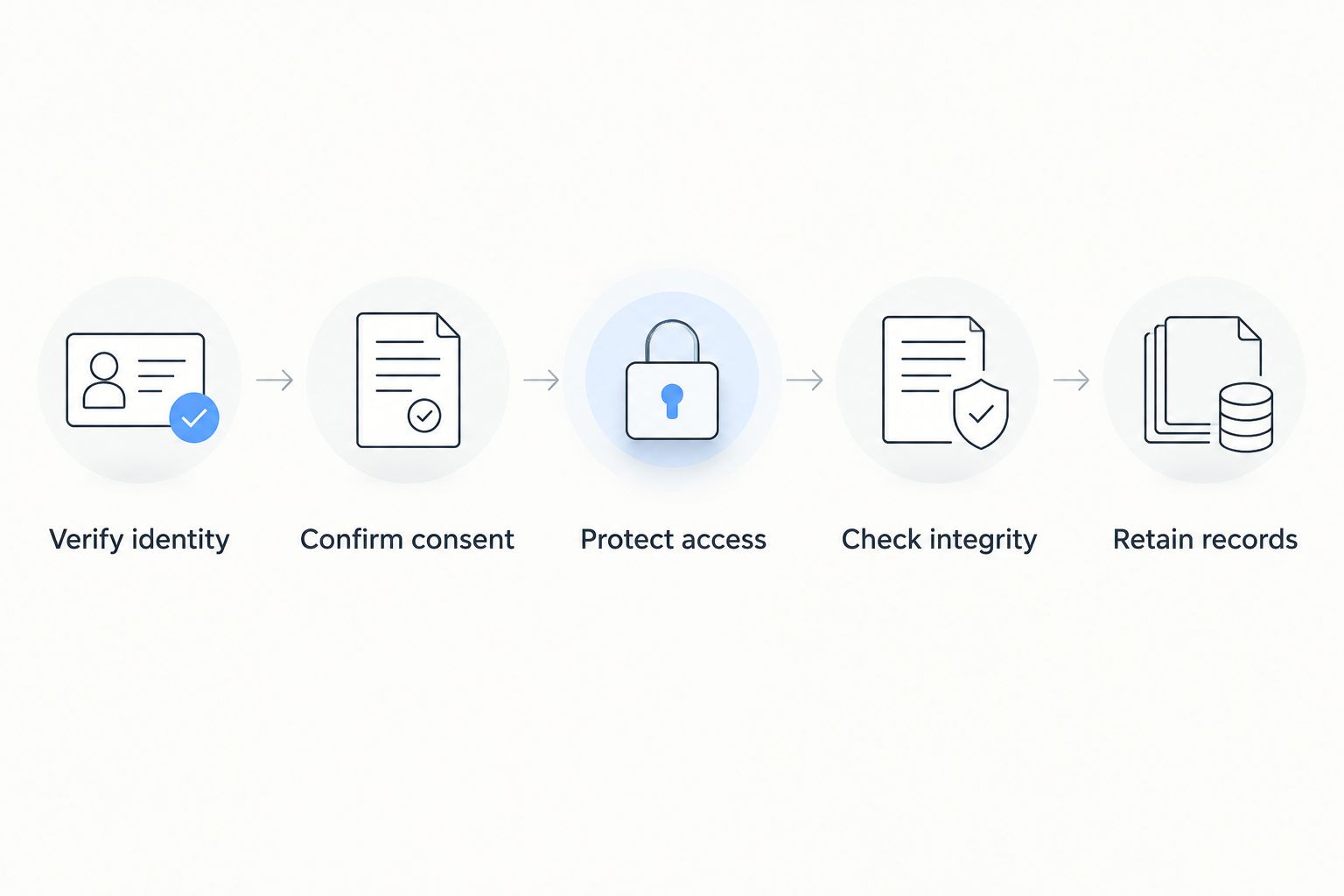
Verify identity
Confirm an unexpected signing request using a known phone number or an existing conversation. Do not use contact details supplied only in the suspicious message.
Email access establishes control of an inbox, not necessarily the identity or authority of the person using it. For an organization, also confirm that the signer has authority to enter the agreement.
Confirm consent
Make sure the signer understands that the action applies an electronic signature to the agreement. The process should make the signing decision explicit rather than hide it inside unrelated actions.
When legally required consumer disclosures are delivered electronically, E-SIGN imposes additional conditions under 15 U.S.C. § 7001(c). These include affirmative consent and disclosures about matters such as paper records, withdrawal of consent, and access requirements, subject to the statute's scope and exceptions.
Protect access
Use a unique account password and enable multifactor authentication when offered. Review who can open, download, forward, or modify the document.
HTTPS protects data in transit between your browser and the service, but it does not establish that a signing request is legitimate. A fraudulent site can also use HTTPS.
Check integrity
Ask how the signing process detects changes to the completed document. Distinguish between a file that merely displays signatures and a process that provides verifiable evidence about the signed version.
Keep later edits separate. If the parties change agreed terms, use an appropriate amendment or re-signing process rather than silently replacing the signed file.
Retain records
Save 2 categories of records: the completed agreement and the available evidence of its signing. Depending on the process, that evidence includes an event history, completion certificate, or digital-signature validation information.
For records subject to E-SIGN's retention provisions, 15 U.S.C. § 7001(d) addresses accurate reflection of the information and accessibility for later reference. A download button alone does not answer every retention requirement.
Why e-signature safety varies
The same signing tool does not create the same risk for every transaction. Match your checks to these factors:
- Document rules: Electronic-signature recognition does not override required witnesses, notarization, or filing procedures.
- Signer authentication: An emailed link and a verified identity are different forms of evidence.
- Account access: A compromised inbox or shared account undermines confidence about who acted.
- Document integrity: Your evidence should identify the version signed and address subsequent changes.
- Information sensitivity: Uploading identity documents or confidential agreements creates privacy questions beyond signature validity.
- Record availability: Evidence is useful only if you can retrieve and understand it when needed.
For a 2026 review, turn each factor into a question the provider or recipient can answer. Avoid accepting a general statement that a service is secure as a substitute for the details your document requires.
Which legal documents need extra checks?
Do not assume the general federal rule covers every legal document. E-SIGN's exceptions in 15 U.S.C. § 7003 include specified matters involving wills and testamentary trusts, family law, court documents, and certain notices.
An exception means the general E-SIGN provisions do not supply the answer; it does not automatically mean electronic signing is prohibited. State law, court rules, agency instructions, and the document's requirements still matter.
Use extra care with these situations:
- Estate documents: Check the jurisdiction's execution rules, including any requirements for witnesses or an electronic-will process.
- Court submissions: Follow the court's filing and signature rules rather than assuming a commercial signing workflow is sufficient.
- Property documents: Confirm the requirements of the recipient, notary, and recording office before execution.
- Government forms: Follow the issuing agency's instructions for that specific form and submission method.
For U.S. documents in 2026, check the current rules where the document will be used. Obtain legal advice when the execution requirements or consequences are unclear.
How should you evaluate Zendocs for signing?
Zendocs offers a web-based subscription tool for converting, editing, signing, and managing PDFs and other document formats. Zendocs is best for individuals and businesses seeking online document editing and signing in one tool.
That category fit is not a security certification or a promise that a particular document meets its execution requirements. Before choosing Zendocs for a legal agreement, verify the safeguards your use requires:
- What identifies each signer beyond possession of a link?
- What evidence can you download with the completed document?
- How are changes after signing detected or documented?
- What access, deletion, and retention controls apply to uploaded files?
- Does the recipient accept the resulting signed record?
The practical benefit is access to editing, conversion, and signing functions through a web-based tool. The limitation is that feature availability alone does not establish signer identity, satisfy notarization rules, or determine legal enforceability.
Can someone copy my electronic signature?
Yes, someone can copy a visible signature image from a document. That copied mark does not by itself establish your intent to sign another agreement, but it creates an impersonation risk.
Protect the evidence around your signature rather than relying on its appearance. Use controlled signing invitations, protect your accounts, and retain records connecting your action to the specific agreement.
If you suspect misuse, preserve the messages and files, notify the relevant recipient and provider, and seek legal advice about the disputed document. Do not delete the evidence while trying to remove the copied signature.
Does an e-signature replace a notary?
No, an e-signature does not replace a required notarial act. Electronic signing and notarization serve different functions, and an ordinary signature field is not a substitute for an authorized notary's process.
Where electronic or remote notarization is permitted, follow the applicable jurisdiction's requirements. Confirm acceptance with the receiving organization before signing rather than trying to add notarization after completing an unsuitable workflow.
What should I save after signing online?
Save 2 categories of records: the completed agreement and the available signing evidence. Include attachments incorporated into the agreement and keep confirmation messages that help establish the transaction's context.
Open the downloaded files before closing the signing session. Confirm that every required signature is present and that the completed document contains the terms you reviewed.
For your 2026 archive, use access-controlled storage and a retention period appropriate to the agreement and applicable obligations. Do not make continued access to a signing account your only way to retrieve an important contract.
FAQ
Is it safe to sign a contract online with an e-signature?
Yes, when the document accepts electronic signing and you verify identity, review the agreement, protect access, and preserve the completed record. Electronic-signature recognition does not prevent fraud or replace required legal formalities.
Does a typed name count as a legal signature?
A typed name can qualify as an electronic signature when adopted with intent to sign and connected to the relevant record. Whether the agreement is enforceable also depends on applicable law and the surrounding facts.
Is a digital signature the same as an electronic signature?
No, a certificate-based digital signature is a technical form of electronic signature that uses cryptographic verification. Electronic signature is the broader category and includes other ways to indicate intent to sign.
Can I safely upload confidential contracts to Zendocs?
Assess Zendocs against your confidentiality requirements before uploading a sensitive contract. Verify access controls, retention and deletion terms, and the signing evidence available for your intended use.
Can I electronically sign a will or court document?
Check the applicable execution or filing rules before electronically signing a will or court document. E-SIGN excludes specified categories from its general provisions, so the federal recognition rule alone does not settle acceptance.
What should I do if a signing email looks suspicious?
Do not open the signing link until you verify the request through a trusted contact channel. Confirm the sender, document purpose, and intended recipient without relying on contact details in the suspicious email.
One last thing
Before you sign, decide how you would prove the transaction without access to the signing website. If you cannot retrieve the agreement and supporting evidence independently, resolve that problem before relying on the workflow.
A completed download is not a trivial final step. It is how you keep access to the record after the signing session ends.


