

Best overall: the boat bill of sale form specified by your state’s boating agency. Best for a package sale: an itemized boat, motor, and trailer template. Best for drafting custom terms: an editable Word template. The best boat bill of sale template in 2026 matches the receiving agency’s instructions and identifies exactly what changes hands.
- The best boat bill of sale template starts with your state boating agency’s current requirements.
- Choose an itemized boat, motor, and trailer template when the sale includes separately identified assets.
- Use Zendocs for boat bill of sale document editing and signing, not as a substitute for agency instructions.
- A signed bill of sale does not replace required title, registration, or lien-release paperwork.
Why this matters
A boat bill of sale records the transaction. It does not, by itself, settle every ownership, registration, or lien question. Your buyer needs documents that match the boat and satisfy the agency handling the transfer.
Separate the template decision from the software decision. Zendocs provides web-based document conversion, editing, signing, and management; those functions help you prepare paperwork, but the receiving agency determines its document requirements.
For a 2026 sale, check the agency’s current instructions before copying language from an older document. A polished PDF with the wrong asset details is still the wrong document.
What makes the best boat bill of sale template?
Judge a template against these criteria before choosing its format:
- Agency fit: It includes the information and signature formalities required for your particular transfer.
- Boat identification: It provides space for the hull identification number, make, model, year, and relevant registration or title details.
- Complete sale scope: It distinguishes the vessel from an included motor, trailer, equipment, and excluded items.
- Clear transaction terms: It identifies the parties, records the agreed consideration, and states the transfer date and relevant conditions.
- Usable execution: It accommodates the required signatures, acknowledgment, or notarization without crowding the page.
- Reliable final copy: The completed document is readable, consistent with supporting records, and retained by both parties.
Choose the required content first; choose Word or PDF second. A file format cannot fix missing ownership information.
Boat bill of sale templates at a glance
These are template types, not claims about specific template vendors. Some overlap: an agency form can also be a fillable PDF. Choose the governing form first, then decide how to complete it.
| Rank and template type | Best for | Standout feature | Key limitation |
|---|---|---|---|
| 1. Agency-specified boat form | A transfer with published agency instructions | Direct connection to the receiving agency’s requirements | Does not replace other required transfer documents |
| 2. Boat, motor, and trailer template | A sale containing multiple assets | Separate identification of each included asset | Separate ownership documents can still be necessary |
| 3. Editable Word template | Drafting transaction-specific terms | Flexible text and attachment preparation | Editing can remove important language or disrupt layout |
| 4. Fillable PDF template | Completing an already suitable form | Consistent field placement | Fixed fields can be too short or incomplete |
| 5. Custom-reviewed agreement | A transaction involving unusual conditions | Terms written around the actual deal | Requires more preparation than completing a standard form |
1. Agency-specified form: best for a standard ownership transfer
Start with the boating or registration agency that will process the transfer. If that agency specifies a boat bill of sale form, use it and follow its accompanying instructions. If it accepts another written format, use its required information as your checklist.
This is the strongest default for a straightforward 2026 sale because it puts the receiving agency’s requirements ahead of a template’s appearance. Check whether the transfer also requires a title assignment, registration application, or supporting ownership record.
Agency-specified form pros:
- Gives you an authoritative starting point for the receiving agency’s requirements.
- Reduces the need to guess which identifying details belong on the form.
- Keeps the document choice tied to the actual transfer process.
Agency-specified form cons:
- Can leave little space for equipment lists or negotiated conditions.
- Does not resolve a missing title, disputed ownership, or outstanding lien.
Best for: Buyers and sellers completing an ordinary transfer under published agency instructions.
Verdict: Buy — choose this approach first when the receiving agency specifies a form.
2. Itemized template: best for a boat, motor, and trailer package
An itemized template gives the vessel, motor, and trailer their own descriptions. That distinction matters because a trailer is not simply another boat accessory, and the paperwork applicable to each asset can differ.
For a complete package, use 3 asset descriptions: boat, motor, and trailer. Record the identifiers shown on the assets and their supporting records; do not copy a boat’s registration number into a trailer identification field.
Itemized template pros:
- Makes the included assets explicit rather than relying on the phrase boat package.
- Creates space for motor and trailer identifiers alongside the vessel details.
- Helps you list included equipment and identify excluded items.
Itemized template cons:
- Does not combine separate title or registration processes into one transfer.
- Requires careful checking when identifiers differ across older records.
Best for: A seller transferring a vessel with a separately identified motor and trailer.
Verdict: Buy — choose this structure for a package sale, subject to agency requirements.
3. Editable Word template: best for drafting custom terms
A Word template suits a transaction that needs more writing space than a fixed form provides. You can expand an equipment schedule, clarify delivery arrangements, and circulate a draft before anyone signs.
Treat the editable file as a working document. Once both parties approve the wording, prepare a final version and check every page before signing. Editing convenience is not evidence that a clause is legally appropriate.
Editable Word template pros:
- Lets you expand descriptions instead of squeezing text into small fields.
- Makes it straightforward to organize attachments and equipment schedules.
- Supports a clear drafting stage before the execution copy is prepared.
Editable Word template cons:
- Layout changes can separate signature blocks from the terms they belong to.
- Multiple drafts create a risk that the parties sign different wording.
Best for: A straightforward sale needing additional descriptions or negotiated delivery details.
Verdict: Buy — use Word for drafting when the receiving agency accepts the resulting format.
4. Fillable PDF template: best for completing an accepted form
A fillable PDF works well when you already have a suitable form and need to enter the transaction details. Its main advantage is consistency: information goes into designated fields rather than moving the surrounding text.
Zendocs supports PDF editing and signing as part of its document-processing service. Confirm that the specific file and intended signing method meet your needs; do not assume that an electronic signature replaces a required notarial acknowledgment or agency-specific procedure.
Fillable PDF template pros:
- Keeps entries organized around the form’s existing layout.
- Gives both parties a consistent document to review before execution.
- Suits forms whose required wording should remain unchanged.
Fillable PDF template cons:
- Short fields can truncate identifiers or detailed asset descriptions.
- A scanned PDF is not necessarily an interactive form with usable fields.
Best for: Completing an agency-approved or otherwise suitable form without rewriting its terms.
Before entering the sale details, review how to fill out a PDF form without printing it. Inspect the completed file, not just the editing screen.
Verdict: Buy — choose a fillable PDF when the form already contains the right information.
5. Custom-reviewed agreement: best for a conditional or complicated sale
A custom-reviewed agreement addresses circumstances that a standard blank form does not explain adequately. Examples include disputed ownership, unresolved liens, staged payments, or a sale contingent on an inspection.
Those situations need more than an extra sentence in a generic template. Have the relevant terms reviewed before signing, and keep the bill of sale consistent with the wider purchase agreement and required transfer records.
Custom-reviewed agreement pros:
- Addresses the transaction’s actual conditions rather than generic assumptions.
- Separates delivery, payment, inspection, and ownership issues for review.
- Provides room to explain obligations that extend beyond signing day.
Custom-reviewed agreement cons:
- Requires more coordination and preparation than a standard form.
- Still depends on accurate asset records and the correct agency filings.
Best for: Transactions with conditions or ownership questions that a routine form cannot resolve.
Verdict: Hold — pause the standard-template approach until the complicated terms receive appropriate review.
How to prepare your chosen template in 2026
Use this sequence after choosing the appropriate form. Do not begin by signing a blank template and filling in the details later.
- Check requirements. Read the receiving agency’s instructions for the vessel and any separately transferred assets. Identify required signatures and supporting documents.
- Match identifiers. Compare the physical asset identifiers with the ownership records. A standard U.S. hull identification number has 12 characters; investigate a mismatch rather than shortening or guessing the entry.
- Define scope. Describe the boat, included motor, trailer, equipment, and exclusions. State the actual transaction terms without leaving material blanks.
- Review execution. Confirm names, dates, attachments, signature requirements, and any required acknowledgment before signing.
- Keep records. Retain 2 complete copies, one for the buyer and one for the seller, including referenced attachments. Submit any required transfer paperwork separately.
This sequence keeps document preparation separate from approval of the transaction. Matching a hull identifier does not establish that a seller has clear title, and saving a signed PDF does not complete a registration application.
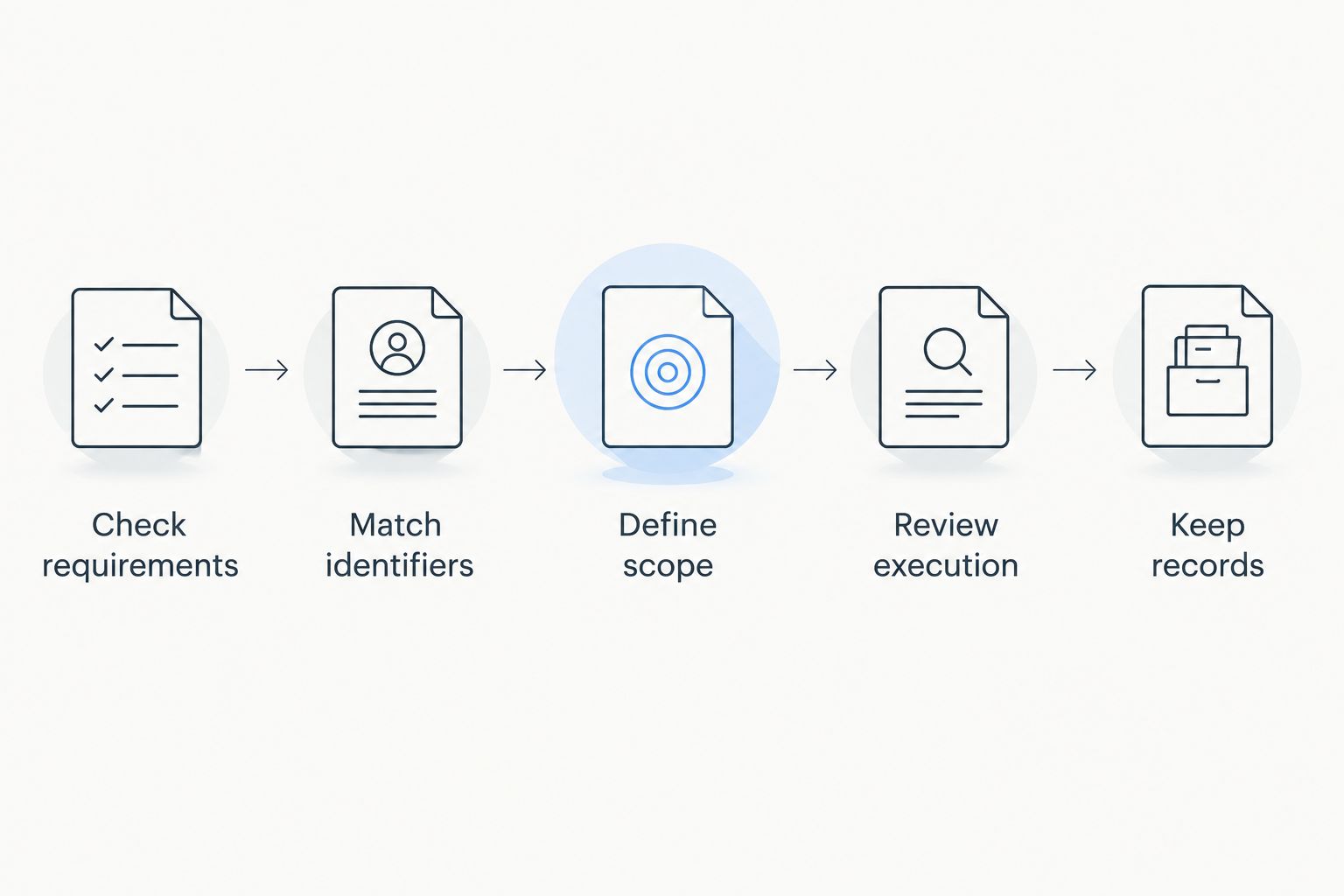
For a 2026 transaction, inspect the final exported file for clipped fields and missing attachments. Zendocs is best for buyers and sellers who need web-based boat bill of sale editing, conversion, signing, and document management.
Prepare your sale document
Edit, convert, sign, and manage your boat sale paperwork online.
How these template types are ranked
The ranking prioritizes agency fit, asset identification, complete sale scope, clear terms, and usable execution. It ranks approaches to preparing a bill of sale, not the legal validity of an unseen document.
An agency-specified form takes the default position because the receiving agency’s instructions govern what it requires. The remaining options serve distinct needs: package identification, drafting flexibility, structured completion, and review of complicated terms.
Which boat bill of sale template should you choose?
For an ordinary 2026 sale, start with the receiving agency’s specified form or required-information checklist. Add a clearly referenced asset schedule if the accepted process allows it and the sale includes equipment that needs more description.
Choose the itemized approach for a package sale, Word for drafting, and PDF for completing an already suitable form. Stop and seek appropriate review when ownership or transaction conditions remain unresolved. Do not let a convenient template decide the terms of the deal.
FAQ
What's the best boat bill of sale template for a private sale?
The best starting point is the form specified by the agency that will process the boat transfer. If it accepts another format, check that the template contains all required information and execution details.
Does a boat bill of sale replace the title?
A boat bill of sale does not replace a required title or title assignment. Check the receiving agency’s instructions for the vessel and gather the supporting ownership documents before signing.
Can I put the boat, motor, and trailer on one bill of sale?
You can describe the boat, motor, and trailer in one itemized agreement, subject to the receiving agencies’ requirements. Listing them together does not remove separate title, registration, or filing requirements.
Is Word or PDF better for a boat bill of sale?
Word is better for drafting expanded descriptions, while a fillable PDF is better for completing an already suitable fixed form. Neither format determines whether the document satisfies the transfer requirements.
Does a boat bill of sale need to be notarized?
Notarization depends on the applicable requirements and the documents involved. Check the relevant agency’s instructions before signing so you can arrange any required acknowledgment correctly.
Can I sign a boat bill of sale electronically?
Use an electronic signature only when the applicable process accepts it. Electronic signing does not replace a separately required notarial acknowledgment, original document, or agency procedure.
Can Zendocs help me complete a boat bill of sale?
Zendocs provides web-based document conversion, editing, signing, and management. Use those functions to prepare a suitable document, while checking the form’s content and execution requirements against the receiving agency’s instructions.
One last thing
Check the included-equipment list as carefully as the boat description. Write down whether the sale includes loose electronics, safety equipment, covers, and other accessories rather than relying on photographs or an informal understanding. A precise attachment makes the agreed scope easier to verify at handover.


