

Yes, multiple people can sign the same PDF online using an electronic-signature service that supports multiple recipients, with separate signature fields for each person. Everyone signs the same document through a shared signing process, but you must check the service’s recipient limits, signing order, and completion records before sending it.
- To let multiple people sign same pdf online, assign each signer separate fields and retain the completed record.
- Sequential signing follows a set order; parallel signing lets recipients sign without waiting for one another.
- A visible signature alone does not establish signer identity or preserve the document’s signing history.
- Zendocs suits individuals and businesses needing browser-based PDF editing and signing.
Why this matters
Collect signatures on one controlled document, not separate copies that you assemble afterward. If 2 signers each return a different attachment, you have separate files to reconcile rather than a single completed signing process. That creates avoidable questions about which version each person approved.
Zendocs provides web-based document conversion, editing, signing, and management. Choose your multi-recipient workflow by checking the specific routing and evidence features you need, rather than assuming every PDF signing tool includes them.
For your 2026 document workflow, the goal is straightforward: each intended person signs the agreed text, and you retain a readable final PDF with the available evidence of completion.
Can multiple people sign the same PDF online?
Yes. A multi-recipient electronic-signature workflow places each person’s signature on the same document and tracks their participation within the signing process. Signing the same PDF does not require everyone to use the same device or be present together.
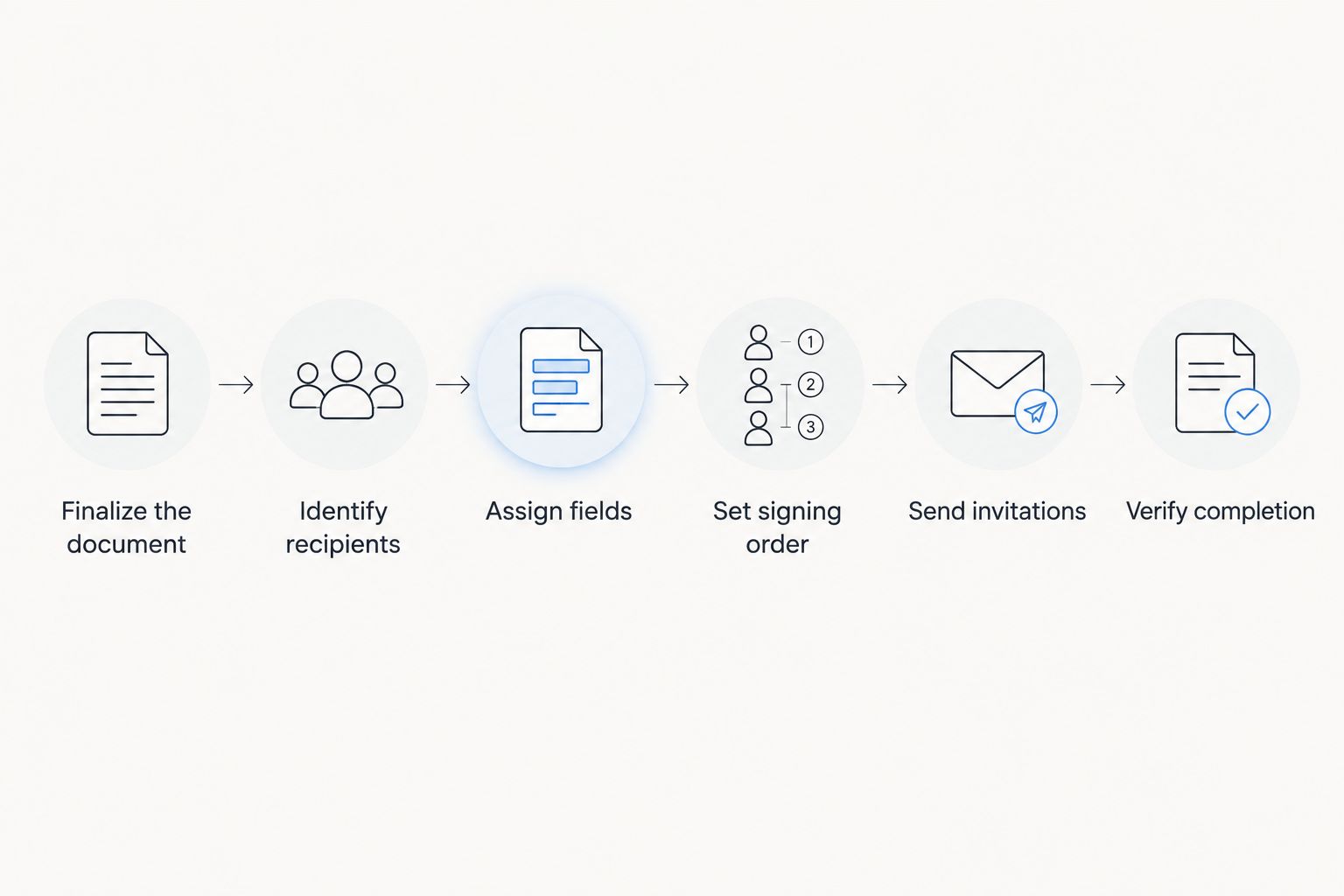
Follow this sequence:
- Finalize the document. Resolve wording, attachments, and blank business terms before requesting signatures. Keep an unsigned source copy separately.
- Identify recipients. Record each signer’s name, email address, and role. Distinguish someone who must sign from someone who only needs a copy.
- Assign fields. Give each signer the correct signature, date, initials, and other required fields. Check every page that needs action.
- Set signing order. Choose whether recipients sign independently or wait for earlier recipients to finish. Use the document’s approval requirements to decide.
- Send invitations. Review recipient details before sending. Each person should use the invitation intended for them, rather than a forwarded link belonging to someone else.
- Verify completion. Confirm that every required signer finished and that no required fields remain empty. Download the completed PDF and any available completion record.
A document with 3 required signers is not finished when only 2 have signed. Track the request’s completion status, not just whether a signature appears on the first page.
Sequential signing: best for required approval order
Sequential signing is best when a later signer must wait for an earlier signer. For example, your internal approval process might require a department lead to sign before an authorized company representative receives the request.
The advantage is control: the workflow follows a defined sequence. The drawback is dependency: an unanswered invitation holds up the recipients behind it.
Use sequential signing when order serves a real requirement. Do not add an approval gate simply because the software offers one; it creates another handoff without improving the underlying agreement.
Before sending, separate approval from signature. Someone who reviews wording is not automatically a party who must sign the completed document.
Parallel signing: best for independent signers
Parallel signing is best when recipients can sign independently without an approval sequence. Each recipient receives access without waiting for another signer to finish, while the service collects their signatures within the same signing request.
The advantage is fewer waiting dependencies. The drawback is that parallel routing does not enforce a business rule requiring one person’s authorization before another person acts.
Choose parallel signing when all recipients are reviewing the same final terms and nobody needs to approve another signer’s action first. Check that the service keeps recipients’ fields separate.
Which signing order should you choose?
For a 2026 workflow review, compare the business requirement rather than treating either routing method as universally better.
| Signing method | Best for | Main advantage | Main limitation |
|---|---|---|---|
| Sequential signing | Required approval order | Controls who receives the request next | One delayed signer holds up later recipients |
| Parallel signing | Independent signers | Removes unnecessary waiting between recipients | Does not enforce a required approval sequence |
Some services support combinations of sequential and parallel routing. Verify that capability before designing a process around it; a basic signing feature does not establish support for mixed routing.
Why multi-person PDF signing varies
The document and the signing service determine how much preparation your request needs. Check these factors before you send:
- Recipient limits. Confirm that the service supports every required signer within the workflow you intend to use. Do not confuse a document limit with a recipient limit.
- Signing order. Decide whether signatures are independent or depend on a prior approval. The wrong routing choice either adds waiting or removes a needed control.
- Field ownership. Assign each signature and required entry to the correct person. Shared access to a file is not the same as recipient-specific signing fields.
- Identity checks. Match authentication to the document’s sensitivity and applicable requirements. An invitation sent to an email address and a separate identity check provide different evidence.
- Document restrictions. Password protection, certification settings, or existing digital signatures can restrict changes. Check permissions before starting another signing process.
- Completion evidence. Determine what the service records and what you can export. Keep the final document together with the available signing history.
These are selection criteria, not promises about a particular product. Zendocs is best suited to individuals and businesses seeking browser-based document editing and signing. For a multi-person request, verify recipient assignment, routing, and completion records against your requirements before committing the document to that workflow.
What is the difference between a signature image and a signing record?
A signature image shows a mark on a page. A signing record documents events associated with the signing process, such as recipient actions and timestamps, depending on the service.
Both matter for different reasons. The mark makes the signature visible; the supporting record helps explain who participated and what happened during the request.
Pasting a scanned signature into a PDF is not equivalent to collecting that person’s consent through a signing workflow. Do not apply someone else’s signature image as a substitute for their own signing action.
Electronic signatures and certificate-based digital signatures also differ. A digital signature uses cryptographic methods to support integrity and signer verification; an electronic signature is the broader category. Do not assume a typed name, drawn signature, and certificate-based signature provide identical evidence.
For a 2026 signing policy, specify the evidence your organization needs, not just how the signature should look.
Are multiple electronic signatures on one PDF legally binding?
Multiple electronic signatures can form a binding agreement when the applicable legal requirements are satisfied. The number of signatures alone does not establish validity: intent, consent, authority, document type, and the governing rules still matter.
In the United States, the federal E-SIGN Act generally prevents denying a signature legal effect solely because it is electronic for transactions within its scope. It does not make every document suitable for every electronic-signature process or remove other legal requirements.
Use the guide to whether an electronic signature is legally binding to distinguish the signature format from the conditions surrounding the agreement. For documents requiring witnesses, notarization, or a prescribed filing method, confirm the relevant requirements before sending.
Can people sign the same PDF at the same time?
Yes, multiple recipients can participate in the same signing request without waiting for one another when the service supports parallel routing. That does not necessarily mean they share a live editing session or see one another’s actions as they happen.
Distinguish concurrent invitations from collaborative editing. For signatures, your priority is that every recipient signs the intended document and that the completed result contains all required signatures.
Can you add another signer after someone has signed?
Adding another signer depends on the service’s request-management features and the document’s current status. An active signing request and an already completed PDF are different situations.
If the request remains open, check whether the service permits adding recipients while preserving its history. If the request is complete, follow the service’s supported process for a new signing request or obtain advice about whether a separate amendment is appropriate.
Do not edit an executed agreement’s substantive terms and present it as the unchanged original. Preserve the signed version, make the revision clear, and collect the required approvals for the revised terms.
What should you check before sending in 2026?
Review the document as a recipient would. Check the names, roles, signature locations, and attachments, then confirm that the instructions explain exactly what each person must do.
For example, 2 signers might need 3 signature fields because one person signs an additional acknowledgment. Count required signing actions separately from people; the totals do not have to match.
Use this final check:
- Does each signer receive only the fields intended for that signer?
- Are required dates and acknowledgments included?
- Does the routing match the approval requirement?
- Are attachments included in the document being approved?
- Can you export the completed PDF and available signing evidence?
- Does everyone know who owns follow-up if a request stalls?
For your Zendocs workflow, treat these as acceptance criteria to confirm rather than features to assume. The same discipline applies to any browser-based PDF service.
FAQ
Can two people sign the same PDF online from different locations?
Yes, two people can sign the same PDF from different locations through a service that supports multiple recipients. Assign each person separate fields and send each person their own invitation.
Does everyone need an account to sign the PDF?
Account requirements depend on the signing service and the request’s authentication settings. Check the recipient experience before sending, especially when external customers or partners must sign.
Do all signatures have to appear on the same page?
No, signatures can appear on different pages of the same PDF. Assign every required signature field to the correct recipient and verify that the completed document includes all required actions.
Can I email the same PDF to everyone and merge the signed copies?
You can distribute separate copies, but merging their pages is not equivalent to collecting signatures within one controlled signing request. Combining or altering signed files can also affect validation of certificate-based digital signatures.
Can someone change the PDF after another person signs?
Editing permissions depend on the document and signing method. Changes can affect signature validation, so preserve the signed version and use a supported revision or amendment process.
How do I know everyone has finished signing?
Check that the request shows completion for every required signer, then inspect the final PDF for all required signatures and fields. Keep the available completion record alongside the document.
Is a signature image enough to prove who signed?
A signature image alone does not establish who applied it or whether that person consented. Use a signing process with authentication and records appropriate to the document’s requirements.
One last thing
Count signing roles before you count signature boxes. One person signing personally and the same person signing for a business represent different capacities, even if the handwriting looks identical. Make those capacities explicit in the document and field labels.
For your next 2026 request, settle the text first, assign the roles second, and send the invitations last. Keep 1 final PDF as the completed record, together with its supporting signing evidence, rather than relying on an inbox full of intermediate attachments.


