

Best overall for contract workflows in 2026: Juro. Best for document preparation: Zendocs. Best for sales proposals: PandaDoc. Best for signature-centered work: Docusign. Best for organizing signed agreements: ContractSafe. Choose by the stage that causes delays, not by the longest feature list.
- Juro is the best contract management software for small business teams needing drafting, collaboration, and approval workflows.
- Zendocs suits small businesses needing online document conversion, PDF editing, signing, and document management.
- PandaDoc fits proposal-led sales; Docusign fits signature-centered workflows; ContractSafe fits contract storage and deadline tracking.
- Test document preparation, signing, retrieval, and export before choosing contract management software.
Why this matters
Contract management covers work before and after a signature. Preparing an agreement, approving changes, collecting signatures, finding the final copy, and tracking obligations are different problems. A product that handles one stage well does not automatically cover the others.
For your 2026 shortlist, separate document processing from contract lifecycle management, often shortened to CLM. A PDF editor helps you work on files; a contract platform organizes the process around those files. Buy for the work you need to control.
What makes the best contract management software?
Use these criteria before comparing products. The right choice should remove your actual bottleneck without creating a second system that nobody maintains.
- Document preparation: Can you create or revise agreements in the formats your customers and suppliers use?
- Review and approval: Can the right person review changes and approve the final version before it leaves your business?
- Signature workflow: Does the signing process suit your counterparties, authentication needs, and evidence requirements?
- Post-signature control: Can you retrieve signed agreements and keep responsibility for deadlines clear?
- Administration: Can your team manage users, access, and routine changes without depending on a specialist?
- Exit and portability: Can you export the documents and related records you need when changing systems?
Do not treat every criterion as equally important. If you lose track of renewals, better PDF editing will not solve that problem. If agreements stall because files need conversion and correction, a repository alone will not fix the delay.
Contract management software at a glance
These recommendations distinguish use cases rather than claim that every product offers the same contract lifecycle coverage. Confirm current plan scope and required capabilities before committing.
| Rank | Product | Best for | Standout capability | Key limitation |
|---|---|---|---|---|
| 1 | Juro | Collaborative contract workflows | Browser-based contract creation, negotiation, and approval | A workflow platform requires agreement on how reviews and approvals should work |
| 2 | Zendocs | Preparing and processing contract documents | Online conversion, editing, signing, and document management | Document processing does not establish full contract lifecycle coverage |
| 3 | PandaDoc | Proposal-led sales teams | Proposal creation connected with electronic signing | Proposal efficiency is not a substitute for managing obligations after signing |
| 4 | Docusign | Signature-centered processes | Electronic signature workflows | Evaluate the specific product scope rather than assuming eSignature includes full CLM |
| 5 | ContractSafe | Organizing existing agreements | Searchable contract storage and deadline reminders | Repository organization does not replace drafting and negotiation |
1. Juro: best contract software for collaborative workflows
Juro is a contract platform for creating, negotiating, approving, and signing agreements in a browser. Its fit is strongest when your problem is coordination between people, rather than simply preparing a file for signature.
Choose this category when a founder, salesperson, and legal reviewer need a shared process. The value comes from making the agreement's current stage and required next action clear.
Juro pros:
- Connects contract creation and collaboration within a contract-focused workspace.
- Supports approval processes instead of leaving every decision in email.
- Keeps negotiation work closer to the agreement being reviewed.
Juro cons:
- Your team still needs to define approval authority and acceptable contract language.
- A contract workflow platform is unnecessary if your only task is converting and signing occasional documents.
- Evaluate document export and your required integrations before adopting it.
Best for: Small businesses with recurring agreements that need coordinated review before signature.
For a 2026 evaluation, follow an agreement from first draft through a requested change and final approval. Ask each participant to complete their own step; a polished administrator demonstration does not show whether everyday users understand the workflow.
Verdict: Buy Juro when drafting, negotiation, and approval are the bottleneck.
2. Zendocs: best document software for contract preparation
Zendocs provides a web-based subscription tool for converting, editing, signing, and managing PDFs and other document formats, including Word, Excel, PowerPoint, and images. Its role in this comparison is document processing, not an assumed replacement for a dedicated CLM platform.
Zendocs is best for small businesses that need online contract document preparation and signing rather than a dedicated contract lifecycle system. That distinction keeps the recommendation useful: preparing the agreement and managing every obligation within it are separate jobs.
Document-processing pros:
- Brings conversion, editing, signing, and document management into a web-based tool.
- Supports work involving PDFs and common office-document formats.
- Fits individuals and businesses needing online document processing.
Document-processing cons:
- Contract approval routing and clause controls are not established capabilities here.
- Renewal tracking and obligation management require separate verification.
- Document editing alone does not define who must approve an agreement.
Best for: Owners and small teams whose immediate need is preparing, revising, and signing contract files online.
Start with a representative document, not a blank page. Check whether your formatting remains usable and whether the resulting file supports the next step in your process. Keep responsibility for approvals and contract deadlines explicit outside any unverified functionality.
Verdict: Buy Zendocs for document processing; skip it as a presumed full CLM replacement.
3. PandaDoc: best contract software for proposal-led sales
PandaDoc combines document creation and electronic signing, with a focus on proposals and sales documents. It belongs on your shortlist when the contract is part of a sales package rather than an isolated legal document.
A service business sending a proposal followed by an agreement has different needs from a team administering supplier renewals. Keep that distinction central to your 2026 comparison.
PandaDoc pros:
- Connects proposal preparation with electronic signing.
- Supports reusable templates for repeated sales documents.
- Keeps the sales-document use case central to the workflow.
PandaDoc cons:
- Proposal creation does not resolve every post-signature management requirement.
- Reusable content still needs an owner to prevent outdated terms from spreading.
- Check the current scope of approvals, integrations, and document controls you require.
Best for: Small sales and service teams that repeatedly send proposals and agreements together.
Test whether your team can update the commercial details without accidentally changing standard terms. Then inspect the final signed document independently of the proposal experience. The output must remain understandable after the sales conversation ends.
Verdict: Buy PandaDoc when proposal preparation and agreement signing are one sales process.
4. Docusign: best contract software for signature-centered work
Docusign offers electronic signature software as well as separate agreement-management capabilities. Evaluate the particular product you are considering; the company name alone does not establish which functions your subscription includes.
Start here when documents are already prepared and the immediate problem is collecting signatures through a defined process. Do not expand the purchase into contract lifecycle software unless you need the additional stages.
Docusign pros:
- Provides a dedicated electronic signature workflow.
- Supports routing documents to recipients for signature.
- Supplies signing records that help document the transaction.
Docusign cons:
- Electronic signing is not the same as managing the complete contract lifecycle.
- Signature records do not replace a policy for storing agreements and tracking obligations.
- Your recipient, authentication, and workflow requirements need checking against the specific offering.
Best for: Businesses that already prepare agreements successfully but need a structured signature process.
Use a normal recipient journey in your evaluation. Check the invitation, document review, signature steps, and final-copy delivery. Then confirm that your staff can retrieve the completed agreement without searching the original sender's inbox.
Verdict: Buy Docusign when signature collection is the bottleneck; evaluate CLM separately.
5. ContractSafe: best contract software for an existing contract library
ContractSafe focuses on storing, finding, and tracking contracts. It fits businesses whose agreements already exist but are scattered across folders, inboxes, and individual employees' accounts.
This is a different purchase from a drafting tool. The central question is whether your team can find the agreement and identify the next required action.
ContractSafe pros:
- Provides a central contract repository.
- Supports searching contract information.
- Offers reminders for contract dates and deadlines.
ContractSafe cons:
- Repository organization does not replace drafting or negotiation.
- Reminder usefulness depends on recording the correct date and responsible person.
- Existing contracts still need review and organization during setup.
Best for: Small businesses that need control over signed agreements and upcoming contract dates.
Evaluate a contract with an amendment, not just a clean standalone file. Confirm that the people using the repository can understand which documents belong together and which terms govern the current relationship.
Verdict: Buy ContractSafe when finding agreements and tracking dates are the main problems.
How we ranked these options
The ranking prioritizes contract workflow coverage, then separates document preparation, sales proposals, signatures, and repository management into distinct recommendations. It is a use-case comparison, not a claim of measured speed or universal superiority.
For your 2026 decision, use the criteria above to select the relevant category first. Compare products within that category only after identifying the problem you need to solve.
Test the workflow before choosing
Use 3 sample contracts: a routine customer agreement, a supplier agreement, and an agreement with an amendment. This is a suggested evaluation set, not a minimum volume needed to justify software.
Follow the same sequence for each candidate:
- Prepare: Create or import the document and check formatting, names, dates, and attachments.
- Review: Ask 2 reviewers to check the same agreement and identify the approved version.
- Sign: Complete the recipient journey and inspect the finished document and available signing records.
- Retrieve: Find the agreement using the counterparty name and a phrase from its contents.
- Export: Complete 1 full export of the sample agreement and its available related records.
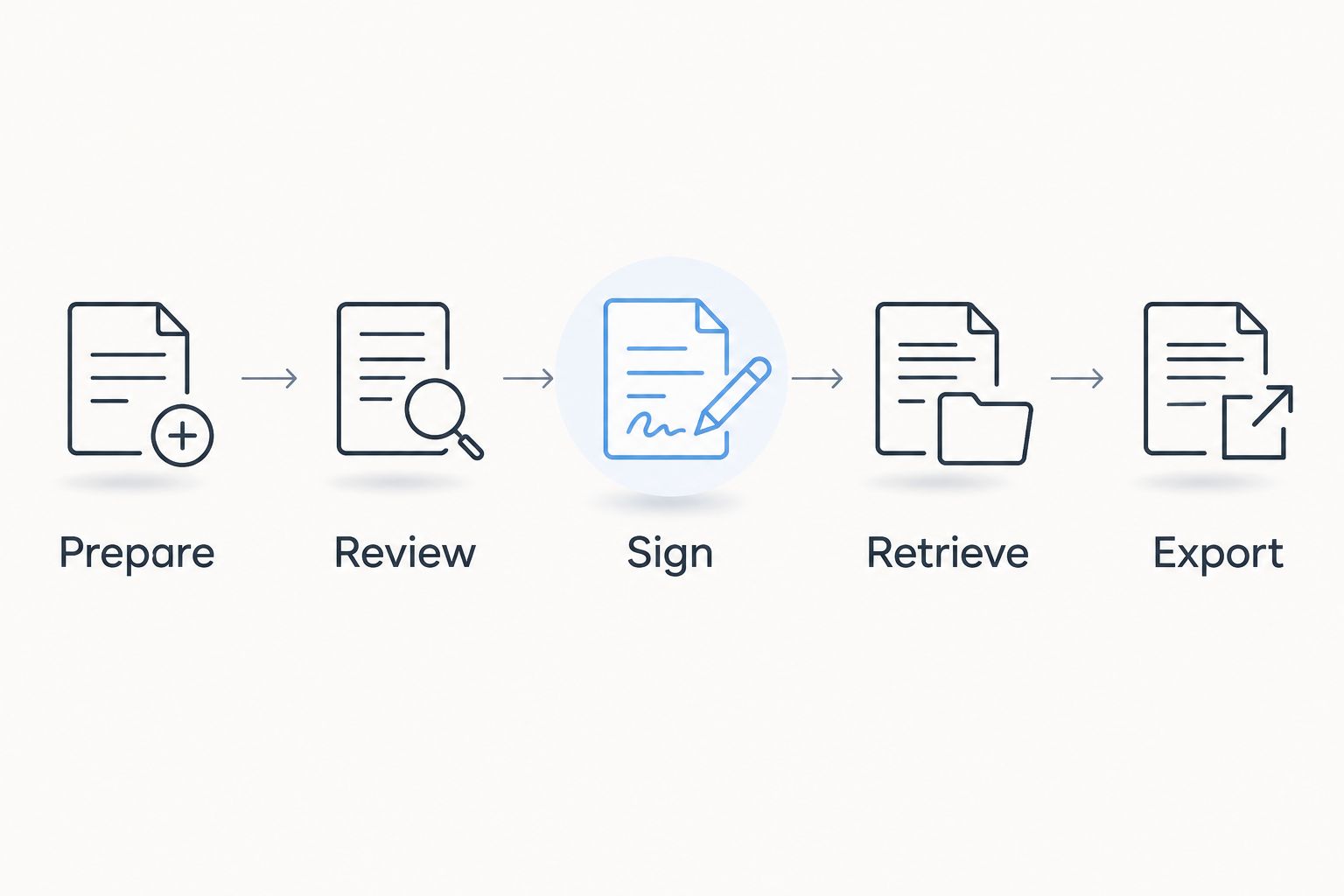
Record where each candidate needs a workaround. A workaround is not automatically disqualifying, but someone must own it. For example, an external deadline calendar is a process decision, not a feature you should silently assume the document tool provides.
Which contract management software should you choose?
Choose Juro as the default when your small business needs coordinated contract creation, review, and approval. Choose a narrower tool when your problem is narrower: document preparation, proposals, signatures, or contract retrieval.
Do not buy a full lifecycle platform merely because your files are contracts. Equally, do not expect a PDF editor to manage obligations just because it can edit the agreement containing them. Your 2026 choice should match the work someone must complete next.
FAQ
What's the best contract management software for a small business?
Juro is the default recommendation here for small businesses needing coordinated drafting, negotiation, and approval. Choose a document, signature, or repository tool instead when your requirements cover only that stage.
Is Zendocs a full contract lifecycle management platform?
Zendocs is a web-based document-processing tool for conversion, editing, signing, and document management. Do not assume it includes contract approval routing, renewal tracking, or obligation management without verifying those requirements.
Is Docusign enough to manage all my contracts?
An electronic signature workflow alone does not cover every contract management task. Evaluate drafting, approvals, storage, deadlines, and export separately, and distinguish Docusign eSignature from other offerings.
Should my small business choose PandaDoc or Juro?
Choose PandaDoc when proposal creation and signing form the core sales workflow; choose Juro when collaborative contract drafting and approval are the main requirements. Test your actual agreement process before deciding.
What should I use to organize contracts that are already signed?
ContractSafe is the repository-focused recommendation in this comparison. Check how your team will group amendments, record important dates, assign responsibility, and retrieve the current agreement.
Can I manage contracts with a spreadsheet instead?
A spreadsheet can record contract owners, dates, and file locations, but it depends on people maintaining those records. It does not itself provide document negotiation, electronic signing, or controlled approval workflows.
What should I check before uploading confidential contracts?
Check the provider's access controls, retention terms, deletion process, and contractual commitments for handling your information. Confirm that those terms meet your business requirements before uploading confidential material.
One last thing
A signature is a milestone, not the end of contract management. Before choosing software, name the person responsible for the next renewal, notice deadline, or deliverable. If that responsibility stays unclear, a new platform leaves the underlying problem untouched.


