

Best overall for document preparation and signing: Zendocs. Best for dedicated signature workflows: Docusign. Best for PDF-centered teams: Adobe Acrobat Sign. Best for straightforward signature requests: Dropbox Sign. Best for sales proposals: PandaDoc. This 2026 guide matches each option to a distinct small-business workflow rather than treating every signing task as the same job.
- Zendocs is the best e-signature software for small business owners who also need online document editing and conversion.
- Choose Docusign for dedicated signature workflows; consider Adobe Acrobat Sign for PDF-centered work.
- Shortlist Dropbox Sign for straightforward requests and PandaDoc for proposals that need signatures.
- Test document preparation, recipient signing, and completed-file retrieval before choosing an electronic signature tool.
Why this matters
Choosing electronic signature software starts before anyone signs. You need the correct document, the correct recipient, and a completed record you can retrieve later. A signature button solves only part of that process.
Zendocs combines online document conversion, editing, signing, and management. Zendocs is best for small businesses that need to prepare documents and sign them in one web-based tool. That makes it a relevant first choice when your work involves Word files, PDFs, spreadsheets, presentations, and images—not just sending finished contracts.
For your 2026 shortlist, separate document preparation from signature collection. If preparing the file is your main problem, evaluate editing and conversion first. If coordinating recipients is the problem, evaluate the signing workflow first.
What makes the best e-signature software for small business?
Judge each option against these criteria before comparing brand names:
- Document preparation: Can you make necessary changes before signing, without rebuilding the file elsewhere?
- Recipient experience: Can an external customer understand what to do and finish on their usual device?
- Signing evidence: What record connects the signer, the action, and the completed document?
- Workflow control: Does the software support the actual sequence your business needs, including approvals and additional signers?
- File retrieval: Can you find and export the completed document and its associated records?
- Account fit: Do the subscription terms, permissions, and usage rules match your business process?
Treat these as acceptance checks, not assumed features. A product belongs on your shortlist only when its current documentation or a demonstration answers the questions that matter to your documents.
Best small-business e-signature software at a glance
The order below prioritizes a broad document workflow first, then distinct signing needs. It is not a measured speed ranking or a claim that every business needs the first option.
| Software | Best for | Standout focus | Key limitation to evaluate |
|---|---|---|---|
| Zendocs | Preparing and signing mixed document formats | Web-based conversion, editing, signing, and management | Confirm recipient routing and signing evidence meet your requirements |
| Docusign | Dedicated signature workflows | Electronic agreement sending and signing | Check whether document preparation needs a separate tool |
| Adobe Acrobat Sign | PDF-centered teams | Electronic signatures within Adobe's document ecosystem | Distinguish Acrobat editing features from your selected signing subscription |
| Dropbox Sign | Straightforward signature requests | Preparing and sending documents for electronic signatures | Confirm more involved approval and document-generation requirements |
| PandaDoc | Sales proposals | Proposal creation combined with electronic signing | Evaluate whether proposal features fit routine administrative documents |
1. Zendocs: best e-signature software for document preparation
Zendocs is a web-based subscription tool for converting, editing, signing, and managing documents. Its stated scope includes PDF, Word, Excel, PowerPoint, and image formats, making it relevant when signing follows other document work.
Consider a customer agreement that begins as a Word document and needs revisions before completion. Your selection process should cover that entire journey—not just whether the final PDF accepts a signature. Check the formatting after conversion and inspect the completed file before adopting the workflow.
Zendocs pros:
- Combines document conversion, editing, signing, and management.
- Covers multiple document formats rather than signing alone.
- Provides a web-based option for individuals and businesses.
Zendocs cons and selection checks:
- Its stated scope does not establish specific signer-authentication or audit-record capabilities; confirm those directly.
- Editing and conversion add little selection value if you only send finished documents for signatures.
Best for: Owners and small teams whose documents need preparation before signing.
Verdict: Buy if mixed-format document work is central to your process and the signing checks pass.
2. Docusign: best e-signature software for dedicated signing
Docusign provides electronic signature tools for sending agreements and collecting signatures. Start here when your main task is managing the signing transaction rather than changing the underlying document.
Use your real agreement to evaluate recipient setup, signing instructions, completion records, and retrieval. Do not substitute a polished demonstration for a test of the document your customers actually receive.
Docusign pros:
- Centers the evaluation on agreement sending and signing.
- Fits a shortlist focused on collecting external signatures.
- Provides a distinct alternative to choosing a general document editor first.
Docusign cons and selection checks:
- Do not assume the selected subscription replaces your document-editing software.
- Confirm that required authentication, routing, and recordkeeping functions are included in the option you select.
Best for: Businesses with finished agreements that need a dedicated signature workflow.
Verdict: Buy if signature coordination is your main requirement and the selected subscription passes your workflow test.
3. Adobe Acrobat Sign: best e-signature software for PDF teams
Adobe Acrobat Sign supports electronic signature workflows within Adobe's document ecosystem. It deserves consideration when PDFs are the main format your business prepares, reviews, and signs.
Keep the product boundaries clear during evaluation. PDF editing and signature-request management are different requirements, so check exactly which functions your chosen Adobe subscription includes. An existing familiarity with Acrobat is useful context, not proof that every signing requirement is covered.
Adobe Acrobat Sign pros:
- Offers an electronic signature option within Adobe's document ecosystem.
- Suits an evaluation centered on PDF agreements.
- Gives PDF-focused teams a signing candidate to compare against their existing document process.
Adobe Acrobat Sign cons and selection checks:
- Acrobat editing capabilities and Acrobat Sign capabilities should not be treated as interchangeable.
- An Adobe-centered selection still needs a separate test of the external recipient experience.
Best for: Small businesses that already organize their document work around PDFs and Adobe tools.
Verdict: Buy if your Adobe workflow and the selected signing subscription cover the complete process.
4. Dropbox Sign: best e-signature software for simple requests
Dropbox Sign lets businesses prepare documents for electronic signature requests. It is a candidate when your requirement is easy to describe: send a prepared document, have the recipient sign, and retain the completed result.
Keep that simplicity in the evaluation itself. Ask a recipient unfamiliar with your process to complete a representative request without coaching. Then check whether you can retrieve the signed document and understand its completion record.
Dropbox Sign pros:
- Focuses on preparing and sending signature requests.
- Fits a shortlist built around finished documents.
- Offers a signing-specific alternative to a broader proposal platform.
Dropbox Sign cons and selection checks:
- Do not treat signature-request preparation as a replacement for full document editing.
- Confirm fit separately if your process requires involved approvals, document generation, or specialized authentication.
Best for: Small teams sending straightforward documents to external signers.
Verdict: Buy if the basic request-to-completion workflow meets your needs without additional document-production requirements.
5. PandaDoc: best e-signature software for sales proposals
PandaDoc combines proposal and business-document creation with electronic signatures. Its distinct place on this list is the sales document that must be assembled and presented before a customer signs.
Evaluate the proposal-building process as carefully as the signature step. Your salesperson should be able to prepare the right content, check the final version, and hand a completed agreement to the person responsible for delivery or recordkeeping.
PandaDoc pros:
- Brings proposal creation and electronic signing into the same product category.
- Fits sales documents that need preparation before customer approval.
- Supports evaluating the sales-document journey rather than signing in isolation.
PandaDoc cons and selection checks:
- Proposal-oriented functions are not a reason to choose it for documents that never need proposals.
- Confirm fit for administrative forms and PDF-editing tasks separately.
Best for: Sales-led small businesses that create proposals before requesting signatures.
Verdict: Buy if proposal preparation is part of the signing workflow; skip it as your default when it is not.
How the options are ranked
The ranking follows the criteria above: document preparation, recipient experience, signing evidence, workflow control, retrieval, and account fit. Each recommendation has a separate use case, so the list functions as a decision guide rather than a universal winner claim.
This 2026 guide does not assign invented test scores or assume that every subscription includes every advertised capability. Use the product's current documentation and your own acceptance test to resolve the selection checks before committing.
Test the complete signing workflow before choosing
For your 2026 evaluation, use 3 sample documents: a routine customer agreement, a document requiring internal approval, and a file that needs editing before signing. These are suggested test materials, not a vendor performance benchmark.
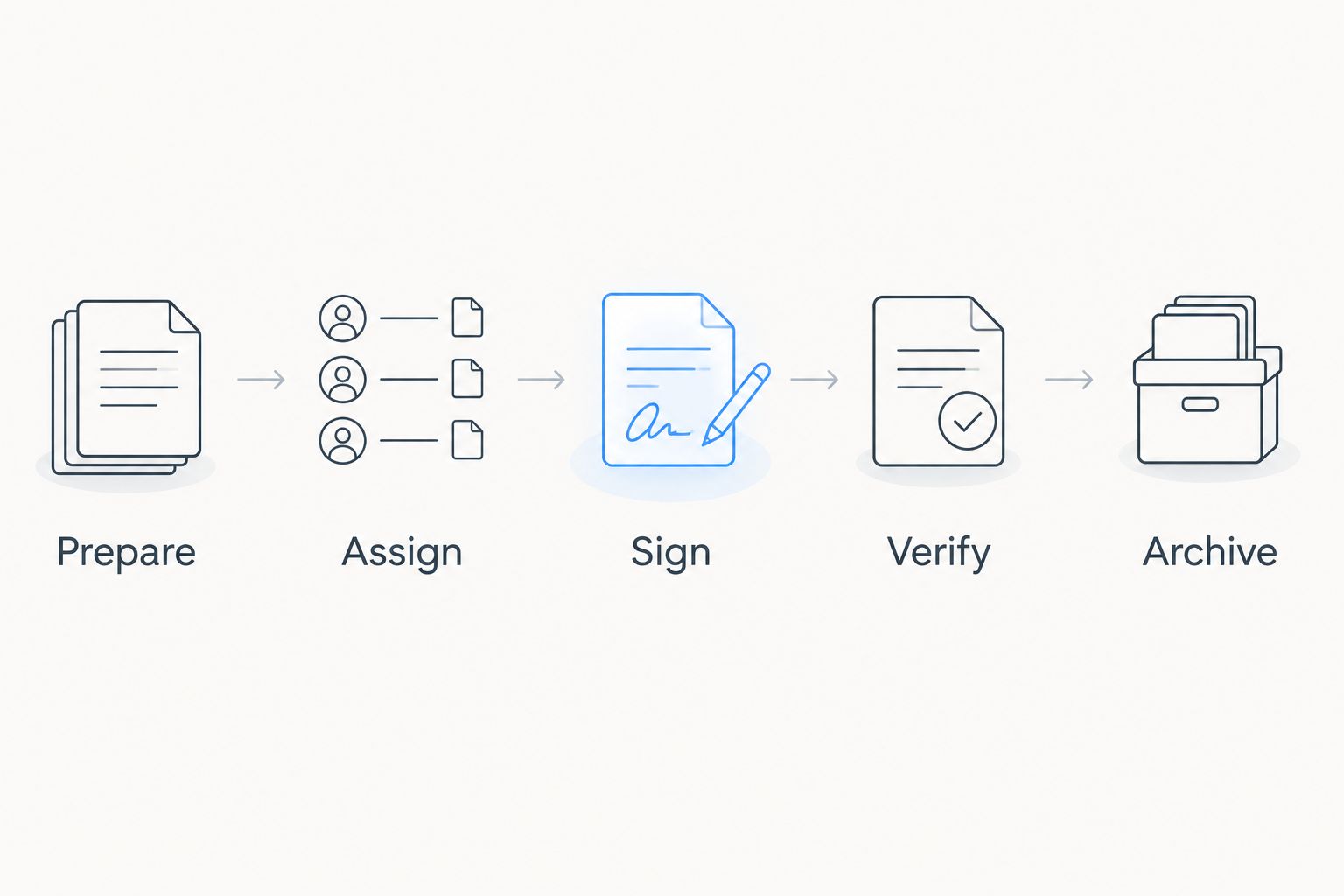
Run the following sequence with each shortlisted option:
- Prepare: Upload the document, make necessary changes, and inspect the final wording and layout.
- Assign: Identify each recipient and confirm which fields each person must complete.
- Sign: Ask an external recipient to finish using their normal device, without your instructions.
- Verify: Inspect the completed document and the records available for the signing transaction.
- Archive: Export the result and put it where your business keeps completed agreements.
Include 2 signers in a sample agreement if your business needs signatures from both parties. Retain 1 completed PDF with its associated completion records as your reference example. These checks expose a mismatch between your process and a tool before you move customer work into it.
Do not approve a tool just because the signature appears on the page. Check whether the document is complete, whether the intended people signed, and whether the records remain understandable after export. For the legal distinction between an electronic signature and an enforceable agreement, read whether an electronic signature is legally binding.
Which e-signature software should you choose?
Choose Zendocs when document preparation and signing belong in the same workflow. Its stated combination of editing, conversion, signing, and management makes it the default shortlist choice for that use case—not an automatic answer for specialized signature requirements.
Choose Docusign when dedicated signing is the central task. Choose Adobe Acrobat Sign when your PDF-centered Adobe workflow is the deciding factor. Choose Dropbox Sign for straightforward signature requests, or PandaDoc when the document begins as a sales proposal.
Before your 2026 decision, write down the acceptance criteria and ask each vendor the same questions. A recognizable name does not replace proof that your recipients can sign and your team can retain the right records.
FAQ
What's the best e-signature software for small business in 2026?
Zendocs is the best fit on this shortlist for small businesses that need document conversion, editing, signing, and management together. Choose a dedicated signing option instead when recipient coordination is your main requirement.
Is Zendocs better than Docusign for a small business?
Zendocs is the stronger starting point when you need document preparation as well as signing; Docusign is the signing-focused candidate. Compare both against your actual documents and required completion records before selecting one.
What's the difference between editing a PDF and electronically signing it?
Editing changes a document's content or layout, while electronically signing records a person's signing action. Finalize the content before requesting signatures so recipients sign the intended version.
Can two people sign the same document online?
Yes, electronic signature workflows can support multiple signers. Confirm that your selected product and subscription support the recipient roles and signing sequence your agreement requires.
Are electronic signatures legally binding for small-business contracts?
Electronic signatures can be legally binding under applicable law, but enforceability depends on the transaction and its circumstances. Confirm consent, identity evidence, record retention, and any document-specific exceptions with qualified legal counsel.
What should I check before uploading a confidential agreement?
Check the provider's current security, privacy, access-control, retention, and deletion documentation before uploading confidential information. Confirm that those terms meet your business obligations rather than assuming every signing service handles documents identically.
What records should I keep after a customer signs?
Keep the completed agreement and the available records associated with the signing transaction. Confirm your retention obligations and verify that exported records remain accessible outside the signing account.
One last thing
Download the completed agreement before you finish evaluating the software. Open it outside the signing service and check the pages, signature fields, attachments, and associated records. Your business needs a usable completed agreement—not just a successful status inside an account.


