

Best overall for matter-centered document work: iManage. Best for cloud-focused legal document management: NetDocuments. Best for combining case administration and documents: Clio. For 2026, choose a legal document management system when your main problem is controlling matter files; choose a document-processing tool when your main problem is editing, converting, or signing individual files.
- The best document management software for law firms depends on whether you need matter control, case administration, or PDF processing.
- Choose iManage for matter-centered legal document management; shortlist NetDocuments for a cloud-focused legal repository.
- Choose Clio for practice management with documents, or SharePoint for a Microsoft-centered document environment.
- Zendocs suits browser-based PDF processing; assess legal document management requirements separately.
Why this matters
A document repository, a practice-management system, and a PDF editor solve different problems. Buying one as a substitute for another leaves important work outside the system.
Start with the failure you need to fix. If staff cannot identify the approved draft or find all correspondence for a matter, prioritize document organization and control. If staff already know where files belong but struggle to prepare them, focus on processing tools; the PDF editing and e-signing for law firms guide covers that separate workflow.
Your 2026 shortlist should reflect those distinctions before you compare individual features. A long feature list does not establish whether a product belongs at the center of your firm's records.
What makes the best document management software for law firms?
Evaluate these six criteria before choosing a product:
- Matter organization: Can you collect documents and relevant correspondence around the correct client and matter?
- Access boundaries: Can administrators restrict access appropriately and remove it when responsibilities change?
- Version clarity: Can staff distinguish working drafts, approved documents, and signed copies without guessing?
- Retrieval: Can users find the right file using the information they actually remember?
- Daily workflow: Does the system fit how your team creates documents, handles email, and requests signatures?
- Exit readiness: Can you retrieve documents and the associated information your firm needs when moving systems?
Treat access controls and exit readiness as acceptance conditions, not tie-breakers. Ask each vendor to demonstrate your required workflow rather than accepting a general statement that the product supports document management.
Law firm document software at a glance
The order below follows distinct use cases, not a claim that every firm needs the same system. These 2026 recommendations separate legal repositories from broader practice software and file-processing tools.
| Software | Best for | Standout capability | Key limitation or buying consideration |
|---|---|---|---|
| iManage | Matter-centered legal document work | Legal document and email management | Requires decisions about filing, access, migration, and administration |
| NetDocuments | Cloud-focused legal document management | Cloud-based legal document repository | Existing files and access rules still need migration planning |
| Clio | Case administration alongside documents | Practice-management context around client and matter work | Evaluate document requirements separately from case-management features |
| Microsoft SharePoint | Microsoft-centered document environments | Configurable document libraries and collaboration | Legal matter structure requires deliberate configuration |
| Zendocs | Browser-based document processing | Converting, editing, signing, and managing document formats online | Assess legal repository controls separately from processing functions |
1. iManage: best legal DMS for matter-centered document work
Best for: Firms whose central requirement is managing legal documents and email around matters.
iManage is a document and email management platform used in legal work. Its relevance to this shortlist is the relationship between matter files and correspondence, rather than simply storing documents in folders.
Choose this category when your team needs a shared filing discipline across attorneys and support staff. Before committing, require a demonstration that follows a document from creation through revision, retrieval, and final filing.
iManage pros:
- Addresses legal document and email management together.
- Fits a matter-centered approach to organizing work.
- Provides a focused alternative to treating general shared storage as your legal repository.
iManage cons:
- Implementation still requires decisions about naming, access, filing, and ownership.
- A repository project is a heavier response than necessary if your only problem is preparing individual PDFs.
Ask the vendor to demonstrate an incorrectly filed email, a revised agreement, and an access change. Those scenarios expose operational fit more clearly than a prepared search demonstration.
Verdict: Buy for matter-centered document management after validating your filing and access requirements.
2. NetDocuments: best legal DMS for a cloud-focused repository
Best for: Firms seeking a cloud-based platform specifically for legal document management.
NetDocuments is a cloud-based document management platform for legal organizations. It belongs on your shortlist when you want a dedicated legal repository rather than a general collaboration site or an attachment store inside another application.
For a 2026 selection, separate the appeal of cloud delivery from the work of moving into it. Your firm still needs to decide which files move, how matters map across, and who can access each collection.
NetDocuments pros:
- Focuses on legal document management.
- Uses a cloud-based delivery model.
- Offers a distinct repository option when document management is the primary purchase.
NetDocuments cons:
- Cloud delivery does not remove the need to clean up inconsistent filing practices.
- Migration and access validation remain separate responsibilities from choosing the software.
Compare NetDocuments and iManage using the same sample matter. Ask both vendors to show retrieval, version handling, and restricted access using equivalent scenarios; otherwise, you are comparing presentations rather than workflows.
Verdict: Buy when a cloud-focused legal repository matches your requirements and migration plan.
3. Clio: best document option for practice-management context
Best for: Firms that want documents connected to broader client and matter administration.
Clio is legal practice-management software with document-management functionality. Its place in this comparison is the connection between documents and the surrounding case-management work.
Shortlist Clio when your buying decision includes matter administration, not just document storage. Do not assume that selecting practice-management software automatically resolves every requirement for a dedicated legal document repository.
Clio pros:
- Places documents within a legal practice-management environment.
- Suits an evaluation that includes client and matter administration.
- Lets you assess document handling alongside the firm's broader operational workflow.
Clio cons:
- Strong practice-management fit does not establish fit for every document-control requirement.
- Buyers focused only on a repository must evaluate functions outside the main scope of their purchase.
Run a document-specific demonstration even if the wider practice-management presentation looks convincing. Ask staff to find a particular revision, identify the signed copy, and explain which document becomes the matter record.
Verdict: Buy when practice management drives the decision; hold if your unresolved need is specialized document control.
4. Microsoft SharePoint: best for a Microsoft-centered environment
Best for: Firms prepared to configure document libraries within a Microsoft-based working environment.
Microsoft SharePoint provides document libraries, collaboration, permissions, and versioning. It is a general-purpose platform, not a legal matter-management system by default.
That distinction determines the work ahead. Your firm must define how clients and matters map to sites or libraries, who maintains access, and how staff distinguish working material from final records.
Microsoft SharePoint pros:
- Provides configurable document libraries.
- Supports permissions and versioning.
- Fits a document strategy built around Microsoft's collaboration environment.
Microsoft SharePoint cons:
- Matter structure and legal filing conventions require deliberate design.
- Flexible configuration creates ongoing ownership and administration responsibilities.
For your 2026 evaluation, ask who will own the structure after implementation. A platform that supports a sound design still needs someone accountable for keeping that design consistent as matters open and close.
Verdict: Buy when your firm has a clear configuration plan and an accountable administrator; hold without them.
5. Zendocs: best for browser-based document processing
Best for: Individuals and teams needing online conversion, editing, signing, and document-format handling.
Zendocs is a web-based subscription tool for converting, editing, signing, and managing PDF and other document formats, including Word, Excel, PowerPoint, and images. Its fit here is document preparation rather than an assumed role as the firm's authoritative legal repository.
Zendocs is best for law firms seeking browser-based PDF processing alongside an established filing system. Keep that role explicit: the tool used to prepare a document does not automatically become the place where the final matter record belongs.
Zendocs pros:
- Combines conversion, editing, and signing functions online.
- Handles PDF and other common document formats.
- Serves individuals and businesses needing web-based document processing.
Zendocs cons:
- Evaluate matter-level access, retention, and audit requirements separately; document processing alone does not establish them.
- Your firm still needs a defined destination and filing procedure for completed documents.
Before uploading client material, confirm that the service's current terms and controls satisfy your firm's requirements. Use nonconfidential samples to assess conversion quality and the preparation workflow first.
Verdict: Buy for a defined processing need; skip as a repository replacement unless your legal-management requirements are demonstrated.
How we ranked these options
The ranking follows the six criteria above and separates products by their primary role. Dedicated legal document management comes first, followed by practice-management context, configurable collaboration, and individual document processing.
This is a use-case shortlist, not a benchmark of measured speed, security, or conversion accuracy. A product earns its place in your firm by completing your required workflow, not by occupying a higher row in a comparison.
Run a practical selection test
Use this exercise before signing an agreement. For your 2026 evaluation, assemble 10 nonconfidential documents, involve 3 staff members, and allow 30 minutes for an initial workflow review. These are suggested test parameters, not vendor performance claims.
- Prepare samples: Include a draft agreement, a revised copy, a signed document, correspondence, and a scanned file.
- File documents: Ask users to place the samples in the appropriate matter structure without coaching.
- Find revisions: Give another participant a retrieval task and ask them to identify the current draft and signed copy.
- Check access: Have an administrator demonstrate how access is granted, restricted, and removed.
- Export records: Request an export demonstration and inspect what happens to names, organization, and associated information.
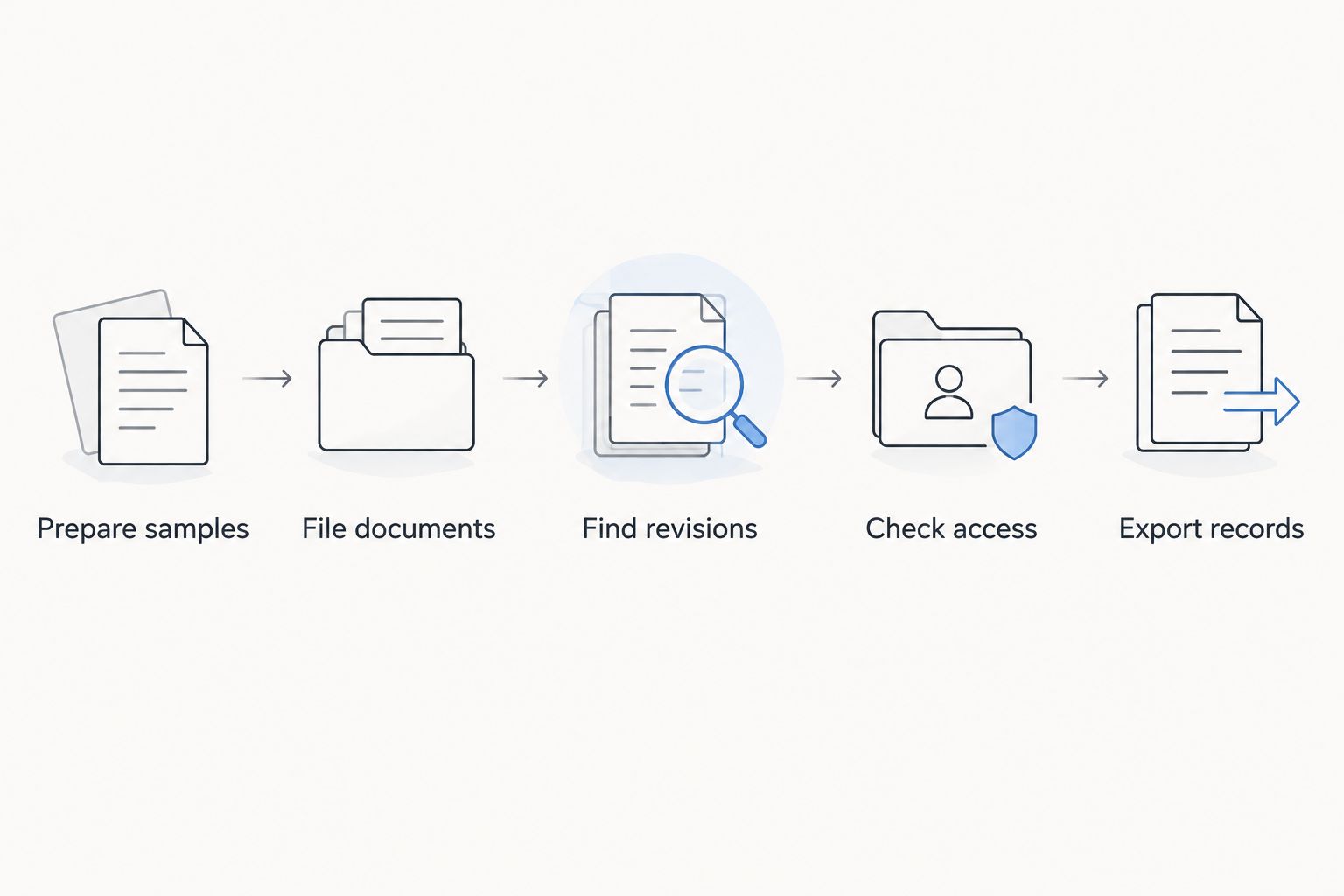
Record where participants hesitate or make different assumptions. If one person treats the signed copy as final while another keeps editing it, establish the filing rule before judging the software. A tool cannot resolve a policy your firm has not defined.
Which document management software should you choose?
Start with iManage if your undecided firm's main requirement is matter-centered document and email management. Compare NetDocuments using the same acceptance scenarios when cloud-focused legal document management is your priority.
Choose Clio when the decision centers on broader practice administration. Choose Microsoft SharePoint when your firm wants a configurable Microsoft-based environment and can own its structure. Choose Zendocs when the need is online document processing rather than replacing the matter repository.
For 2026, the decisive question is straightforward: Where will the authoritative matter record live, and how will staff know it is authoritative? Answer that before selecting the tools used to prepare individual files.
FAQ
What's the best document management software for law firms?
iManage is the default shortlist choice here for matter-centered document and email management. NetDocuments is the alternative to assess for a cloud-focused legal repository; validate both against your firm's access, retrieval, and export requirements.
Is Clio the same as a dedicated legal document management system?
No. Clio is legal practice-management software with document functionality, so assess its document controls separately from its broader client and matter administration capabilities.
Can a law firm use Microsoft SharePoint for document management?
Yes, Microsoft SharePoint provides document libraries, permissions, and versioning. Your firm must still design the matter structure, access model, filing conventions, and ongoing administration.
Can an online PDF editor replace a law firm's document repository?
PDF editing capability alone does not establish repository suitability. Evaluate matter organization, access controls, version handling, retention requirements, and exports separately from editing and signing.
Should a small law firm choose practice management or a legal DMS?
Choose according to the unresolved workflow, not firm size alone. Practice-management software addresses broader administration, while a dedicated legal DMS focuses the purchase on document and correspondence management.
What should a law firm test before choosing document software?
Test filing, retrieval, revision identification, access changes, and export using nonconfidential samples. Have actual users complete the tasks so the evaluation reflects everyday work rather than a vendor's prepared demonstration.
Does cloud document management remove the need for filing policies?
No. Cloud delivery does not decide who owns a matter file, which version is authoritative, or when access should end; your firm must establish those rules.
One last thing
Before approving a platform, ask someone other than the document's author to find the approved version and explain why it is authoritative. If the answer depends on asking the author, your workflow still needs a clearer filing rule. Make that rule part of implementation, not a cleanup task after launch.


