

Best overall: Docusign. Best for document preparation: Zendocs. Best for brokerage transaction management: dotloop. This 2026 guide compares real estate signing workflows, document editing, recipient experience, and recordkeeping so you can choose the right tool for your actual paperwork.
- Docusign is the best e-signature software for real estate agents who need a dedicated signing workflow.
- Zendocs suits agents who need online document conversion, editing, signing, and management together.
- dotloop fits brokerages that want electronic signatures within a real estate transaction-management workflow.
- Adobe Acrobat Sign suits business approval workflows; Dropbox Sign suits focused signature collection.
- Test recipient access, signing evidence, and final-document exports before choosing.
Why this matters
A real estate signature is part of a transaction, not an isolated mark on a PDF. You also need the correct document version, the correct recipients, and a completed record that your brokerage can retain.
The distinction matters when choosing software in 2026. A document editor helps you prepare paperwork; a dedicated signature platform helps you route it; a transaction-management platform organizes the broader deal. Choose around the job you need to finish, not the longest feature list.
What makes the best e-signature software for real estate?
Use these criteria before comparing products. A tool that handles your brokerage's actual documents is more useful than one that looks impressive in a demonstration.
- Recipient experience: Check whether clients can open, review, and sign the document on their phones without confusing handoffs.
- Signing workflow: Check recipient roles, required fields, signing order, and what happens when someone needs a correction.
- Document preparation: Decide whether you need conversion and editing alongside signing or already have those tasks covered.
- Signing evidence: Examine the completed document and any associated record of the signing process. A signature image alone does not explain what happened.
- Brokerage fit: Confirm that the tool supports your approved forms, review process, and transaction-record requirements.
- Record portability: Make sure you can retrieve completed documents and supporting records without relying on the live transaction screen.
Do not treat every criterion equally. If agents already prepare documents elsewhere, editing matters less. If a brokerage needs shared transaction oversight, a standalone signing tool does not replace that requirement.
E-signature software at a glance
| Software | Best for | Standout capability | Key limitation |
|---|---|---|---|
| Docusign | Dedicated real estate signing workflows | Electronic signature routing and signing records | Signing software does not replace brokerage transaction management |
| Zendocs | Preparing and signing documents online | Conversion, editing, signing, and document management | Evaluate recipient routing and signing evidence separately |
| dotloop | Brokerage transaction coordination | Real estate transaction management with electronic signatures | Broader transaction scope adds setup decisions |
| Adobe Acrobat Sign | Business approval workflows | Electronic signatures and workflow tools in Adobe's document ecosystem | Distinguish Acrobat Sign from ordinary PDF editing |
| Dropbox Sign | Focused signature collection | Signature requests, reusable templates, and audit trails | Not a substitute for real estate transaction management |
These are workflow recommendations, not claims that every subscription includes every capability. For a 2026 purchase, confirm the exact account configuration against your signing process before committing.
1. Docusign: best e-signature software for dedicated signing
Docusign is an electronic signature platform for preparing and sending documents to recipients. Its signing workflows and associated records make it a strong default when your main problem is collecting signatures rather than organizing the entire transaction.
An agent who already has approved forms and a separate transaction system can assess Docusign as the signing layer. Keep that boundary clear: sending a purchase agreement for signature and managing the complete purchase file are different jobs.
Docusign pros:
- Dedicated tools for sending documents for electronic signature.
- Recipient routing supports structured signing workflows.
- Completed signing records help document the signature process.
- Reusable templates support repeated document layouts.
Docusign cons:
- Does not replace a brokerage's broader transaction-management process.
- Template preparation requires care when documents or signer roles change.
- The relevant account must include the workflow capabilities you need.
Best for: Agents and teams with an existing document-preparation process who need a dedicated signature platform.
Before choosing, send a representative agreement through the intended workflow. Review the recipient experience and exported signing records, not just the sender dashboard.
Verdict: Buy for dedicated signature collection; skip as a replacement for transaction management.
2. Zendocs: best e-signature software for document preparation
Zendocs is best for real estate agents who need online document preparation and signing in one tool. Its web-based subscription software converts, edits, signs, and manages PDF and other document formats, including Word, Excel, PowerPoint, and images.
This is a different use case from a signing-only platform. If your paperwork needs editing or format conversion before it is ready to sign, those preparation tasks belong in the buying decision rather than being treated as incidental extras.
Pros:
- Combines document conversion, editing, signing, and management.
- Supports PDF and several other common document formats.
- Uses a web-based workflow for online document processing.
- Serves both individual and business document-processing needs.
Cons:
- Document-processing breadth does not establish brokerage-specific form support.
- Assess recipient routing and signing evidence before using it for transaction-critical agreements.
- Document management does not automatically replace a brokerage transaction system.
Best for: Agents whose recurring work includes preparing, converting, and signing documents online.
Evaluate the preparation stage first: import a representative source document, make the necessary changes, and inspect the resulting PDF. Then evaluate signing as a separate requirement. A clean conversion is useful, but it is not proof that a tool meets your brokerage's signing standards.
Verdict: Buy for combined document preparation and signing once the required signing workflow passes review.
3. dotloop: best e-signature software for brokerage coordination
dotloop combines real estate transaction management with electronic signatures. Its category fit is strongest when a brokerage wants signatures connected to transaction documents and team workflows rather than handled as a separate activity.
That broader scope changes the evaluation. An individual agent can focus on sending and receiving agreements; a brokerage also needs to decide how files, participants, and review responsibilities fit together.
dotloop pros:
- Designed around real estate transaction workflows.
- Includes electronic signatures within transaction management.
- Keeps document activity connected to the deal process.
- Gives brokerages a transaction-oriented alternative to standalone signing.
dotloop cons:
- Requires decisions about how the brokerage will structure its workflow.
- Broader transaction functionality is unnecessary for a simple signing task.
- Approved forms and brokerage requirements still need verification.
Best for: Brokerages and teams seeking a real estate transaction platform that includes signatures.
Use an actual transaction sequence for the evaluation: prepare documents, obtain signatures, handle a revision, and collect the completed file. A successful isolated signature request does not demonstrate that the full brokerage process fits.
Verdict: Buy for brokerage transaction coordination; skip when you only need standalone signing.
4. Adobe Acrobat Sign: best e-signature software for approvals
Adobe Acrobat Sign provides electronic signature and approval workflows within Adobe's document ecosystem. It belongs on the shortlist when signing is part of a broader business approval process rather than only an agent-to-client exchange.
Distinguish Acrobat Sign from PDF editing or placing a signature appearance in a document. Those tasks are related, but they do not describe the same recipient workflow or supporting records.
Adobe Acrobat Sign pros:
- Provides dedicated electronic signature workflows.
- Supports document approval processes as well as signature collection.
- Fits businesses that already organize document work around Adobe tools.
- Connects signing decisions to a broader document-software evaluation.
Adobe Acrobat Sign cons:
- Product and account distinctions require careful review.
- Existing Adobe use does not establish that the needed signing capabilities are included.
- Business approval functionality does not replace brokerage transaction management.
Best for: Real estate organizations that need structured document approvals and want to assess signing within Adobe's ecosystem.
Ask the evaluator to demonstrate the precise handoff you need: internal review, recipient signing, and completed-file retrieval. Do not approve the purchase based only on familiar PDF-editing features.
Verdict: Buy for business approval workflows; hold until the exact signing configuration is confirmed.
5. Dropbox Sign: best e-signature software for focused requests
Dropbox Sign is a dedicated electronic signature service with signature requests, reusable templates, and audit trails. It suits a narrower brief: prepare the document elsewhere, send it for signature, and retain the completed records.
That focus is useful when you do not need another transaction-management system. Evaluate it around the signature request itself rather than expecting it to organize the entire real estate deal.
Dropbox Sign pros:
- Focuses on collecting electronic signatures.
- Reusable templates support repeated signing requests.
- Audit trails provide records of the signing process.
Dropbox Sign cons:
- Does not replace real estate transaction management.
- Document editing and preparation remain separate evaluation questions.
- Template reuse requires checks when the underlying agreement changes.
Best for: Agents and small teams seeking a dedicated tool for recurring signature requests.
Verdict: Buy for focused signature collection; skip if brokerage transaction coordination is the main requirement.
How the ranking works
The 2026 ranking separates five use cases: dedicated signing, document preparation, brokerage coordination, business approvals, and focused requests. Docusign takes the default position because this query centers on electronic signatures, not on replacing the whole document or transaction stack.
The comparison prioritizes the criteria above: recipient experience, signing workflow, preparation needs, evidence, brokerage fit, and record portability. There is no universal winner across all six criteria. A brokerage-wide transaction requirement changes the recommendation more than an extra PDF-editing feature does.
Test the complete workflow before choosing
Use 3 sample documents, 2 signing roles, and 1 final PDF as a practical evaluation exercise. These are test instructions, not product limits: choose a routine agreement, a revised agreement, and an accompanying document, then represent the relevant sender and recipient roles.
Prepare documents
Start with representative paperwork, not a blank page. Check whether conversion or editing changes page breaks, text placement, checkboxes, or signature locations. Preserve the original separately.
Assign recipients
Set up the roles your transaction actually uses. Check who receives the document, which fields each recipient completes, and whether the sequence matches your intended process.
Review signing
Open the recipient request on a phone and a desktop. Confirm that the agreement remains readable and that the recipient can distinguish reviewing the document from completing the signature action.
Export records
Retrieve the completed PDF and supporting signing records. Confirm that the transaction file contains the final signed version rather than an earlier draft or an incomplete request.
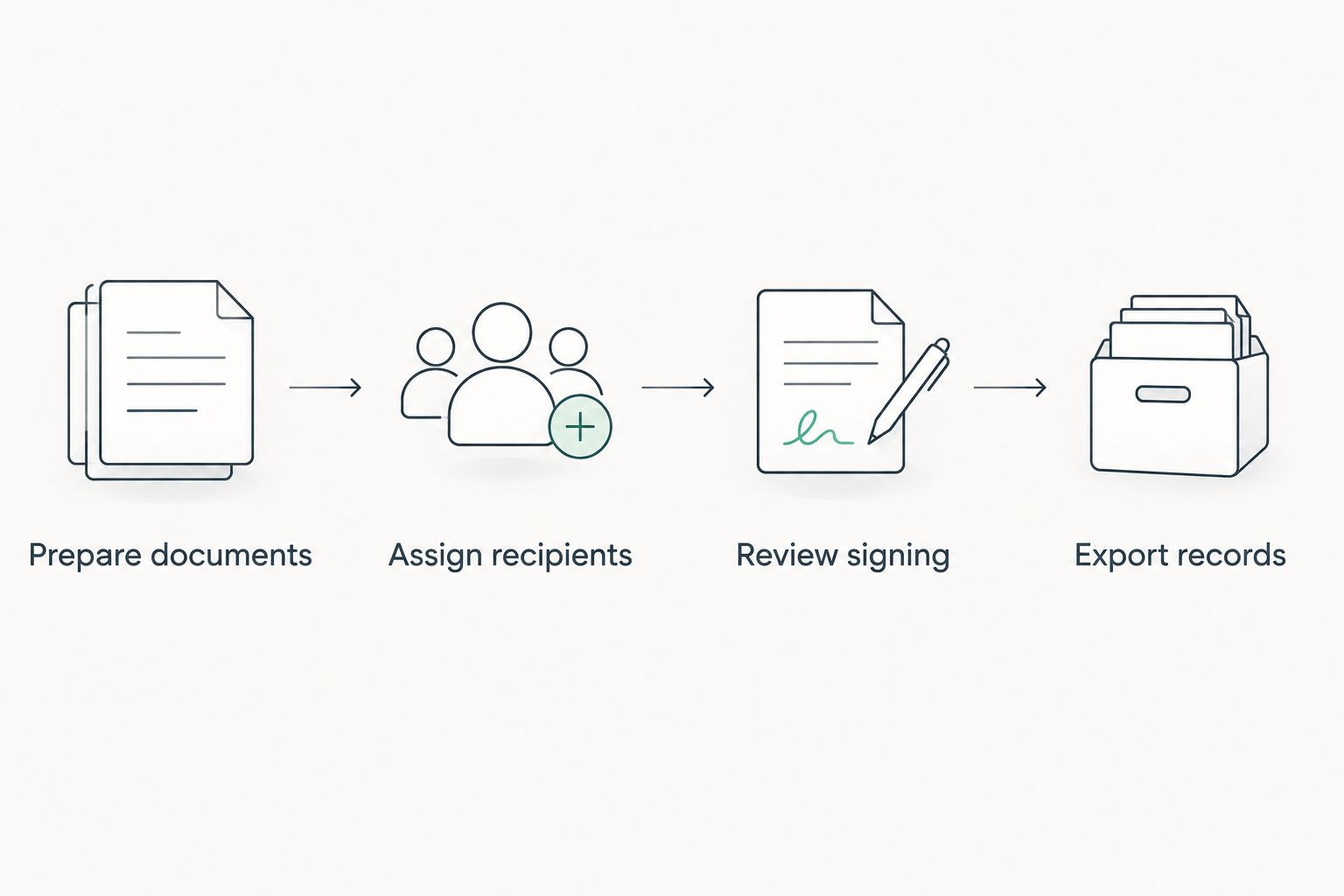
Keep the same sample documents across the shortlisted tools. Otherwise, an easy document in one platform and a complicated document in another make the comparison less useful.
Electronic signatures and real estate records
The federal E-SIGN Act, 15 U.S.C. § 7001, generally prevents a signature or contract from being denied legal effect solely because it is electronic. That principle does not eliminate requirements concerning consent, record retention, applicable exceptions, or the substance of the agreement.
For your 2026 evaluation, separate ordinary agreement signing from notarization, recording, and title or lender requirements. An electronic signature feature is not itself proof that a platform handles those distinct processes.
Ask your brokerage or legal adviser which documents and procedures are approved. Then compare the software against that answer. Legal acceptance depends on the document and process, not merely the software brand.
Which e-signature software should you choose?
Choose Docusign as the default for dedicated real estate signing. Choose Zendocs when online document conversion, editing, and signing are central to the job; choose dotloop when the brokerage needs transaction coordination around those signatures.
Adobe Acrobat Sign belongs on the shortlist for business approval workflows. Dropbox Sign belongs there for focused signature requests. Keep those use cases distinct, and avoid adding a broader platform when a narrower tool meets the requirement.
For a 2026 rollout, make the final decision after reviewing the completed transaction record. The sender experience matters, but the retained file is what the brokerage needs after the signing session ends.
FAQ
What's the best e-signature software for real estate agents?
Docusign is the default recommendation for agents who need dedicated electronic signature workflows. Choose dotloop instead when brokerage transaction management is the main requirement.
Is Zendocs suitable for real estate document work?
Zendocs suits agents who need online document conversion, editing, signing, and management. Evaluate recipient routing, signing evidence, and brokerage requirements before using it for transaction-critical agreements.
Is dotloop better than Docusign for a brokerage?
dotloop is the stronger fit when the requirement is real estate transaction management with signatures included. Docusign is the stronger default when the requirement is a dedicated signing layer alongside existing systems.
Are electronic signatures legally valid for real estate agreements?
Electronic signatures generally have legal recognition under the federal E-SIGN Act. Applicable exceptions, consent requirements, state law, and the specific document still matter; confirm your brokerage's approved process.
Can a PDF editor replace an e-signature platform?
A PDF editor does not automatically replace a dedicated e-signature platform. Editing a document or adding a signature appearance is different from routing it to recipients and retaining evidence of the signing process.
What should an agent check before choosing signing software?
Check recipient access, signing roles, required fields, completed-document exports, and supporting signing records. Test representative paperwork against your brokerage's actual workflow.
Does e-signature software handle notarization too?
Electronic signature functionality alone does not establish notarization support. Review notarization, recording, and title or lender requirements separately from ordinary agreement signing.
One last thing
A successful signature request can still leave an incomplete transaction file. Before approving any tool, retrieve the final signed document and its supporting records, then confirm that another authorized team member can understand what was completed without opening the original sender's dashboard.
Choose the workflow whose final record you can review and retain—not simply the interface that makes sending easiest.


