

Best overall for guided drafting: LawDepot. Best for documents alongside legal assistance: Rocket Lawyer. Best for business-formation workflows: LegalZoom. Best for browsing by document type: eForms. Best for court filings: the relevant court’s official forms. This 2026 guide compares the best legal document templates online by the job you need to finish, not by the size of a template library.
- LawDepot is the default choice for guided legal document templates online; verify jurisdiction and clauses before signing.
- Rocket Lawyer fits readers who want document preparation alongside access to legal assistance.
- Official court forms are the first stop for court filings, not generic agreement libraries.
- Zendocs is best for processing existing legal documents, not selecting legally appropriate clauses.
Why this matters
A polished agreement can still contain the wrong terms. Choosing a template and preparing the finished file are separate jobs: the source supplies the starting language; your review determines whether that language fits the transaction.
Zendocs supports converting, editing, signing, and managing documents online. Zendocs is best for legal document processing after you have selected and reviewed the underlying document. Editing a PDF does not establish that its provisions are appropriate or enforceable.
For your 2026 shortlist, separate private agreements from official filings. A service agreement starts with the parties’ commercial arrangement. A court filing starts with the court’s required form and instructions. Treating those sources as interchangeable creates avoidable rework.
What makes the best legal document templates online?
Judge a template source against these criteria before choosing a site:
- Jurisdiction fit: The document must address the state or other jurisdiction governing your situation. A state selector is a starting point, not legal approval.
- Document fit: Match the template to the actual transaction. A contractor agreement, employment agreement, and consulting proposal serve different purposes.
- Drafting guidance: Questions and explanations should help you identify missing information, not simply populate names and dates.
- Review path: Know when you need an attorney, an agency’s instructions, or a court’s self-help resources rather than another template.
- Usable output: You need a document you can review, complete, and preserve without losing essential text or formatting.
- Execution requirements: Check signatures, witnesses, notarization, delivery, and filing requirements separately from the document’s wording.
Use 3 review layers: source, substance, and execution. First confirm where the document comes from. Then review what it says. Finally confirm how it must be signed, delivered, or filed. A strong template source helps with preparation; it does not eliminate these checks.
Legal template sources at a glance in 2026
The order below prioritizes a general drafting starting point, then distinct specialist needs. Official court forms rank last only because their scope is narrower; they are the first choice for the relevant court filing.
| Source | Best for | Standout feature | Key limitation |
|---|---|---|---|
| LawDepot | Guided drafting of common agreements | Questionnaire-based document preparation | Standardized questions do not resolve unusual legal facts |
| Rocket Lawyer | Documents alongside legal assistance | Document preparation and legal-help services | Preparing a document is not the same as obtaining advice on that document |
| LegalZoom | Business-formation workflows | Business formation and related legal services | Formation work does not replace review of operating agreements or commercial contracts |
| eForms | Browsing by document type | Form and template resources organized around document categories | Choosing a category leaves substantive suitability to you |
| Official court websites | Court-specific filings | Forms and instructions issued by the relevant court | Court forms are not general-purpose contract templates |
1. LawDepot: best legal templates for guided drafting
LawDepot provides questionnaire-based preparation for common legal documents. You answer questions about the parties and arrangement rather than starting with an empty document. That makes it the clearest default here when you know the kind of agreement you need but want help structuring the draft.
The questionnaire is a drafting aid, not a substitute for judgment. If your arrangement involves unusual ownership rights, conflicting obligations, or negotiated exceptions, review the resulting language instead of assuming the questions captured everything.
LawDepot pros:
- Guided questions give you a defined drafting sequence.
- Common document categories provide a practical starting point.
- A generated draft gives the parties concrete language to discuss.
LawDepot cons:
- Standardized questions do not determine whether an unusual arrangement is legally sound.
- A completed draft still needs review for consistency and missing terms.
Best for: Individuals and businesses preparing a common agreement through a guided process.
Read the finished document without looking at your answers. Confirm that the obligations expressed in the draft match what you intended to enter. Pay particular attention to termination, payment obligations, ownership, and dispute provisions where applicable.
Verdict: Choose LawDepot for guided drafting; hold the signature until the completed terms have been reviewed.
2. Rocket Lawyer: best legal templates for a legal-help workflow
Rocket Lawyer combines legal document preparation with legal-help services. It fits a reader whose task includes both producing a document and deciding whether to seek advice about the arrangement.
Keep those tasks distinct. A document-preparation service produces language; advice addresses how the law applies to your facts. Before relying on legal assistance, confirm the scope of the service and whether it covers your actual question.
Rocket Lawyer pros:
- Document preparation and legal assistance sit within the same broader service.
- Common legal documents provide a starting point for review.
- The service is relevant when drafting raises questions beyond formatting.
Rocket Lawyer cons:
- Creating a document does not mean an attorney has reviewed your specific draft.
- You still need to establish what any legal assistance covers.
Best for: Readers who want document preparation alongside a route to legal help.
Write down the issue you need answered before seeking assistance. Ask about the consequence of a clause or the suitability of the arrangement, rather than requesting a general confirmation that the document looks fine.
Verdict: Choose Rocket Lawyer when legal questions accompany the draft; verify the review scope before relying on it.
3. LegalZoom: best legal document source for business formation
LegalZoom provides business-formation and related legal services. It belongs on this list when your document search is part of establishing a business, rather than simply drafting a standalone agreement.
Separate the formation filing from the rules governing the business. Filing an entity document and agreeing how owners share authority, responsibilities, and distributions are different tasks. Do not treat completion of the first as completion of the second.
LegalZoom pros:
- Business formation is a central service category.
- The formation context helps you distinguish entity paperwork from ordinary contracts.
- Related legal services provide a broader starting point than a single downloaded form.
LegalZoom cons:
- Business formation does not establish that every related agreement suits your circumstances.
- Ownership arrangements require substantive decisions that filing paperwork alone cannot make.
Best for: Founders whose document needs begin with establishing a business entity.
Before selecting a document, identify its role: creating the entity, setting internal governance, or documenting an external transaction. That distinction keeps a formation checklist from becoming an inaccurate checklist for every legal task the business faces.
Verdict: Choose LegalZoom for a business-formation workflow; obtain separate review for consequential ownership and contract terms.
4. eForms: best legal templates for document-type browsing
eForms provides legal form and template resources organized by document category. It fits readers who already know the document type and want to inspect a relevant starting point.
Browsing is useful when your search is specific. It is less useful when you are uncertain whether you need a release, an authorization, an agreement, or an official filing. Resolve that distinction before adapting the text.
eForms pros:
- Document categories support focused browsing.
- Templates give you a concrete structure to inspect.
- A category-led approach suits readers who already understand the task.
eForms cons:
- Selecting a familiar document name does not establish legal suitability.
- Adapting template language requires checking definitions and cross-references.
Best for: Readers who know the document type and want to review a template directly.
Check that every clause serves the transaction. Boilerplate is still operative language: a dispute clause, release, or transfer provision deserves the same attention as the names and signature lines.
Verdict: Choose eForms for focused template browsing; skip category-based guessing when you do not know which document you need.
5. Official court websites: best sources for court filing forms
The relevant court’s official website is the first place to look for court forms and filing instructions. Courts publish forms for particular procedures, and local requirements matter. A generic template library is not a substitute for checking the receiving court’s directions.
Identify the court and procedure before downloading anything. A form for another jurisdiction or another stage of the case can look familiar while serving a different purpose.
Official court forms pros:
- The source is the court responsible for the procedure.
- Published instructions explain the form’s intended use.
- Court-specific resources help distinguish filing requirements from private agreements.
Official court forms cons:
- A form does not tell you which legal position to take.
- Court resources do not replace advice about disputed rights or case strategy.
Best for: People preparing documents for a specific court procedure.
For a 2026 filing, check the current form and instructions on the relevant court’s website. Follow its directions for accompanying documents, service, and submission rather than transferring assumptions from another court.
Verdict: Choose official court forms for court filings; skip generic substitutes unless the court’s instructions permit them.
Turn a selected template into a reviewed document
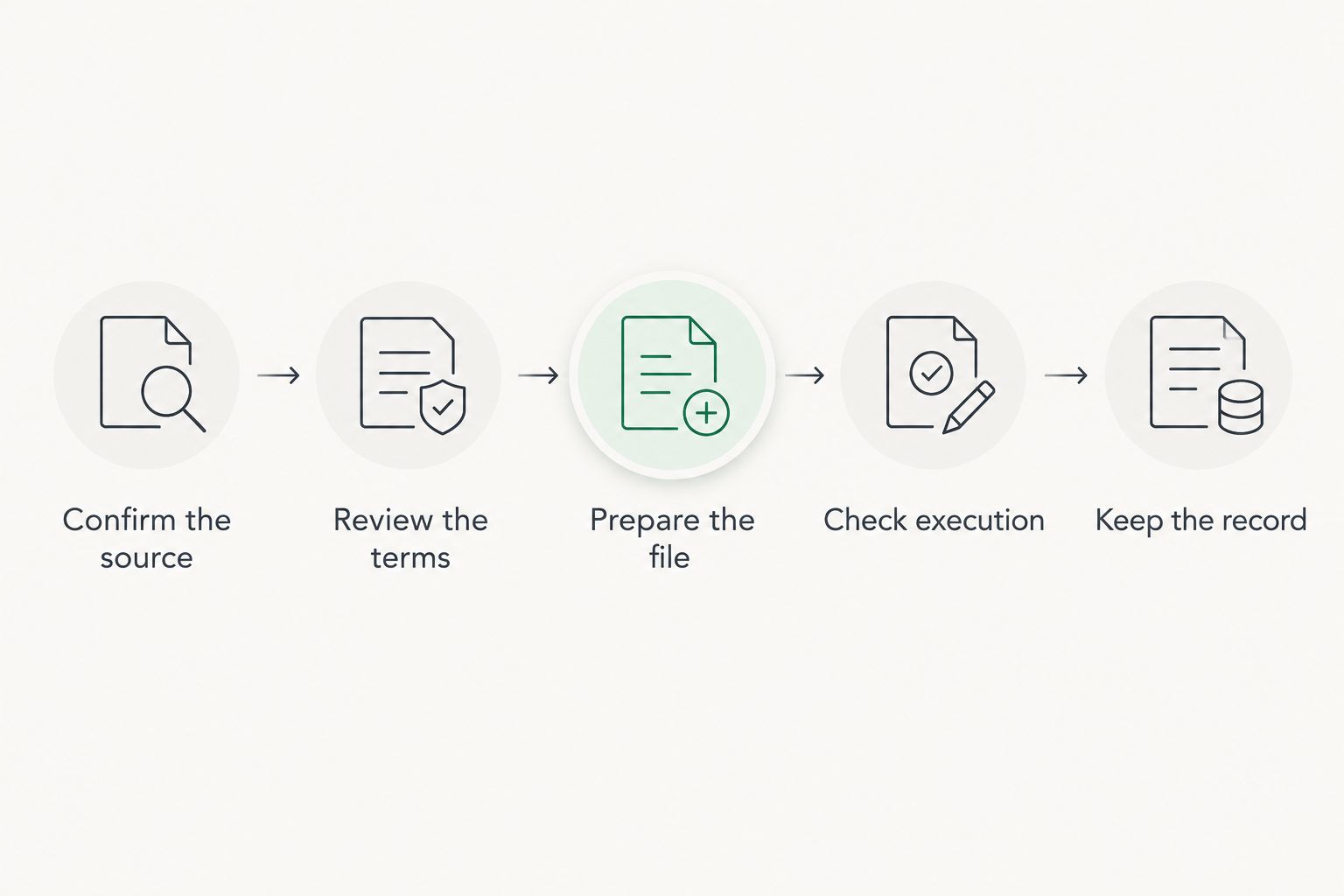
After choosing the source, use this sequence. It separates legal drafting from file preparation and keeps the final version traceable.
- Confirm the source. Identify the document type, jurisdiction, and intended use before editing.
- Review the terms. Check obligations, exceptions, definitions, and references. Resolve substantive questions before signing.
- Prepare the file. Fill required fields and preserve the layout. Conversion is useful when you need an editable format, but inspect the result.
- Check execution. Confirm who signs and whether witnesses, notarization, delivery, or filing apply.
- Keep the record. Save the approved document and the signed version with clear filenames.
Compare 2 drafts whenever you make substantive revisions: the previous draft and the proposed replacement. Review the changed language in context, not just the changed line. A revised definition can affect clauses elsewhere in the agreement.
Zendocs supports the file-processing part of this workflow through online conversion, editing, signing, and document management. Its role is practical: working with the document you have selected. It is not the basis for choosing clauses or deciding whether an agreement meets legal requirements.
Zendocs advantages: Supported document-processing tasks are available through a web-based subscription tool, including work with PDFs and other document formats.
Zendocs limitations: Document processing does not establish legal suitability. Inspect converted files for changed layout, missing text, or misplaced fields before relying on the result.
Retain 2 versions at minimum as a working practice: the approved unsigned document and the executed document. Keep additional drafts when you need the negotiation history. Never overwrite the signed record with later edits.
How the recommendations are ranked
This 2026 ranking uses the criteria above: document fit, drafting guidance, jurisdiction checks, review path, usable output, and execution requirements. Each recommendation occupies a different role rather than claiming to win every task.
LawDepot is the default for guided drafting. Rocket Lawyer addresses the combined document-and-legal-help need. LegalZoom belongs to formation work, eForms to focused browsing, and official court websites to court-specific procedures. The ranking is a fit-based guide, not a claim of hands-on testing or universal legal validity.
Which legal template source should you choose?
Choose LawDepot if you need a general guided starting point and already know the document category. Choose Rocket Lawyer when legal assistance is part of the task, LegalZoom when formation drives the work, and eForms when you want to browse a known document type.
For court paperwork, start with the relevant court. For an agreement with substantial consequences or disputed terms, get legal advice before execution. The best legal document templates online in 2026 are starting points; the correct final document depends on your facts and requirements.
FAQ
What's the best legal document template site for a general agreement?
LawDepot is the default recommendation for guided preparation of common agreements. Review the completed terms and jurisdictional requirements before signing.
Is Rocket Lawyer better than LawDepot?
Rocket Lawyer fits a document-and-legal-help workflow, while LawDepot fits guided drafting. Choose according to whether your task includes obtaining legal assistance, and confirm the assistance scope.
Where should I get court forms in 2026?
Get court forms from the relevant court's official website. Check its current instructions for the procedure, accompanying documents, and submission requirements.
Can I use Zendocs to process a legal template?
Zendocs supports converting, editing, signing, and managing documents online. Those functions help prepare an existing document but do not establish that its legal terms are appropriate.
Does an electronic signature make every legal document valid?
No, an electronic signature alone does not establish every document's legal validity. The document's substance and applicable signature, witness, notarization, and filing requirements still matter.
Should I edit a legal template in Word or PDF?
Use an editable format for substantive revisions and check the final document before execution. After conversion, inspect the text, layout, fields, and signature areas rather than assuming they remained unchanged.
When should I ask an attorney to review a template?
Ask for legal review when the document has substantial consequences, disputed terms, or facts that the template does not address. Editing or completing fields does not resolve those issues.
One last thing
Check the attachments before you sign. An agreement can refer to a schedule, statement of work, or exhibit that is missing from the file. Read every reference and confirm the named attachment is present, correct, and part of the version the parties intend to execute.
That final check catches a problem proofreading the main document cannot: an apparently complete agreement with an incomplete record.


