

Best overall: the current bill of sale form supplied by your state’s motor vehicle agency. Best for editing an existing document: a state-appropriate PDF processed with Zendocs. Best for custom terms: an editable Word template; best for a simple first draft: a printable vehicle-specific form. This 2026 guide separates choosing the right document from choosing software to complete it.
- The best bill of sale template for vehicle transactions is the current official state form when one applies.
- Zendocs suits individuals and businesses editing, converting, signing, and managing an existing vehicle bill of sale.
- Use an editable Word template for custom terms, but preserve required vehicle and seller disclosures.
- A vehicle bill of sale records the transaction; it does not replace required title-transfer paperwork.
Why this matters
A polished bill of sale can still be the wrong document. The form must fit the vehicle transaction and the requirements of the jurisdiction handling the transfer. A signature box and an attractive layout do not establish that fit.
Choose the document before choosing the editor. For a vehicle sale in 2026, confirm the relevant motor vehicle agency’s instructions, then prepare the bill of sale alongside any required title, odometer, registration, or other transfer documents.
A bill of sale generally records who sold what to whom and on what terms. It is not a universal substitute for a certificate of title, and it does not make every vehicle ready for registration.
What makes the best vehicle bill of sale template?
Use these criteria to judge a template before entering personal information:
- Jurisdiction fit: The template follows the requirements applicable to the transaction, including any prescribed form or wording.
- Vehicle identification: It identifies the specific vehicle, rather than describing only a general category of property.
- Transaction details: It records the buyer, seller, transaction date, and agreed consideration accurately.
- Required disclosures: It accommodates applicable odometer disclosures, acknowledgments, and signature requirements without treating them as optional decoration.
- Editing control: You can complete the document without deleting instructions, rearranging required sections, or hiding text.
- Record quality: The completed copy remains readable, with signatures and relevant terms visible to both parties.
The strongest template is the one that satisfies the transaction’s requirements with the least unnecessary rewriting. Extra clauses help only when they accurately describe the agreement and do not conflict with required disclosures.
Vehicle bill of sale options at a glance
| Option | Best for | Standout feature | Key limitation |
|---|---|---|---|
| Official state motor vehicle form | State-specific transactions | A document supplied by the relevant authority | It does not necessarily cover every negotiated term or replace other transfer documents |
| Zendocs-assisted PDF workflow | Completing an existing suitable document | Web-based document editing, conversion, signing, and management | Editing software does not establish legal suitability or agency acceptance |
| Editable Word vehicle template | Transactions with custom written terms | Flexible text editing before producing a final document | Easy to alter required wording or disrupt the layout |
| Printable vehicle-specific template | Preparing a straightforward first draft | A fixed structure for recording the transaction | Generic wording can omit jurisdiction-specific requirements |
These are distinct choices, not interchangeable products. The official form determines the document’s structure; an editor helps you complete it; an editable template gives you room to write; a printable template gives you a starting point.
1. Official state motor vehicle form: best for jurisdiction fit
Start with the current instructions from the motor vehicle agency responsible for the transfer. If that agency supplies or requires a bill of sale form, use the appropriate version rather than assuming a general internet template is equivalent.
An official form can still leave work for you. Read its instructions and determine whether the transaction also needs separate title, odometer, lien-release, or other documentation.
Official state form pros:
- Comes from the authority whose instructions you need to follow.
- Provides the agency’s stated fields and wording for its intended purpose.
- Reduces unnecessary rewriting of an established document.
- Gives you a clear starting point for checking accompanying paperwork.
Official state form cons:
- Does not necessarily accommodate every custom agreement.
- Is not automatically sufficient for a transaction involving another jurisdiction.
- Does not replace every document needed to complete a transfer.
Best for: Buyers and sellers who need a document aligned with a specific state’s vehicle-transfer instructions.
For your 2026 transaction, confirm that the form applies to the vehicle and sale you are documenting. A passenger-car form, for example, should not be assumed to cover every other kind of titled property.
Verdict: Skip generic substitutes when the relevant agency requires a specific form. Use the official document as your default when it applies.
2. Zendocs-assisted PDF workflow: best for an existing template
Zendocs is a web-based subscription tool for converting, editing, signing, and managing PDFs and other document formats. For a vehicle bill of sale, its relevant role is document processing after you have selected a suitable form—not deciding which legal document your transaction requires.
This distinction matters. You can improve readability or complete a document online without changing its legal scope, but you still need to check whether the receiving agency accepts the final format and signature method.
Zendocs pros:
- Supports PDF editing as part of an online document workflow.
- Offers document conversion when your source and final formats differ.
- Includes signing and document-management functions.
- Serves individuals and businesses needing online document processing.
Zendocs cons:
- Document-processing capabilities do not establish that a template meets state requirements.
- An online signature function does not establish acceptance for a particular vehicle-transfer document.
- You still need to inspect the completed file for accurate text and preserved instructions.
Best for: Individuals and businesses that already have an appropriate vehicle bill of sale and need online document processing.
Zendocs is best for processing an existing vehicle bill of sale, not selecting the legally required form. Keep the source document and compare it with the completed version before signing.
Verdict: Hold until the template and signature requirements are confirmed; then use this workflow to complete the document.
3. Editable Word vehicle template: best for custom written terms
An editable Word vehicle bill of sale template gives you room to describe the agreement in plain text. That flexibility helps when the parties need to record included accessories, a condition description, or other transaction-specific terms.
Flexibility also creates risk. Deleting a paragraph because it looks repetitive can remove an acknowledgment or disclosure that belongs in the final document.
Editable Word template pros:
- Makes it straightforward to revise transaction-specific wording.
- Allows space for a clear description of included property.
- Helps you review longer terms before fixing the final layout.
- Separates drafting from the final signing stage.
Editable Word template cons:
- Required language is easy to change accidentally.
- Fonts, margins, and page breaks can shift during conversion.
- Custom clauses need review rather than automatic acceptance.
Best for: Buyers and sellers who need written terms beyond the fields available in a fixed template.
Use a Word template as a drafting document in 2026, not as evidence that every clause is enforceable. Keep required information intact, make any added terms readable, and check the final PDF against the editable source.
Do not add an “as-is” clause simply because another template contains one. Its meaning depends on the agreement and applicable law, and it does not eliminate every disclosure duty.
Verdict: Hold until the custom terms are reviewed; use the editable format when the extra wording serves a real purpose.
4. Printable vehicle-specific template: best for a simple first draft
A printable vehicle-specific template provides a fixed structure for recording the sale. It works as a starting point when you want to gather the transaction details before completing the required documents.
Choose a form designed for vehicles, not a general receipt for selling personal property. Vehicle identification and transfer disclosures require more attention than a brief description of the item sold.
Printable vehicle template pros:
- Gives both parties a visible structure to review.
- Helps collect information before signing.
- Avoids unnecessary rewriting when the existing fields fit the transaction.
Printable vehicle template cons:
- Generic fields can omit required state-specific information.
- Handwritten entries can become difficult to read.
- A completed receipt can be mistaken for a completed title transfer.
Best for: Preparing transaction information before checking it against the relevant agency’s requirements.
A form headed “vehicle bill of sale” is not enough on its own. Read every field and instruction, identify what is missing, and replace the template if it does not fit the transaction.
Verdict: Skip it as your final document if an official form or additional required wording applies. Keep it only as a useful drafting aid.
How these options are ranked
The ranking prioritizes jurisdiction fit, vehicle identification, required disclosures, editing control, and readable records. It compares document approaches rather than claiming that a software feature makes a form legally sufficient.
The official form leads because it starts with the relevant authority’s document. PDF processing follows when the document is already suitable. Editable and printable templates serve narrower drafting needs and require closer review before use.
Complete the document without creating new problems
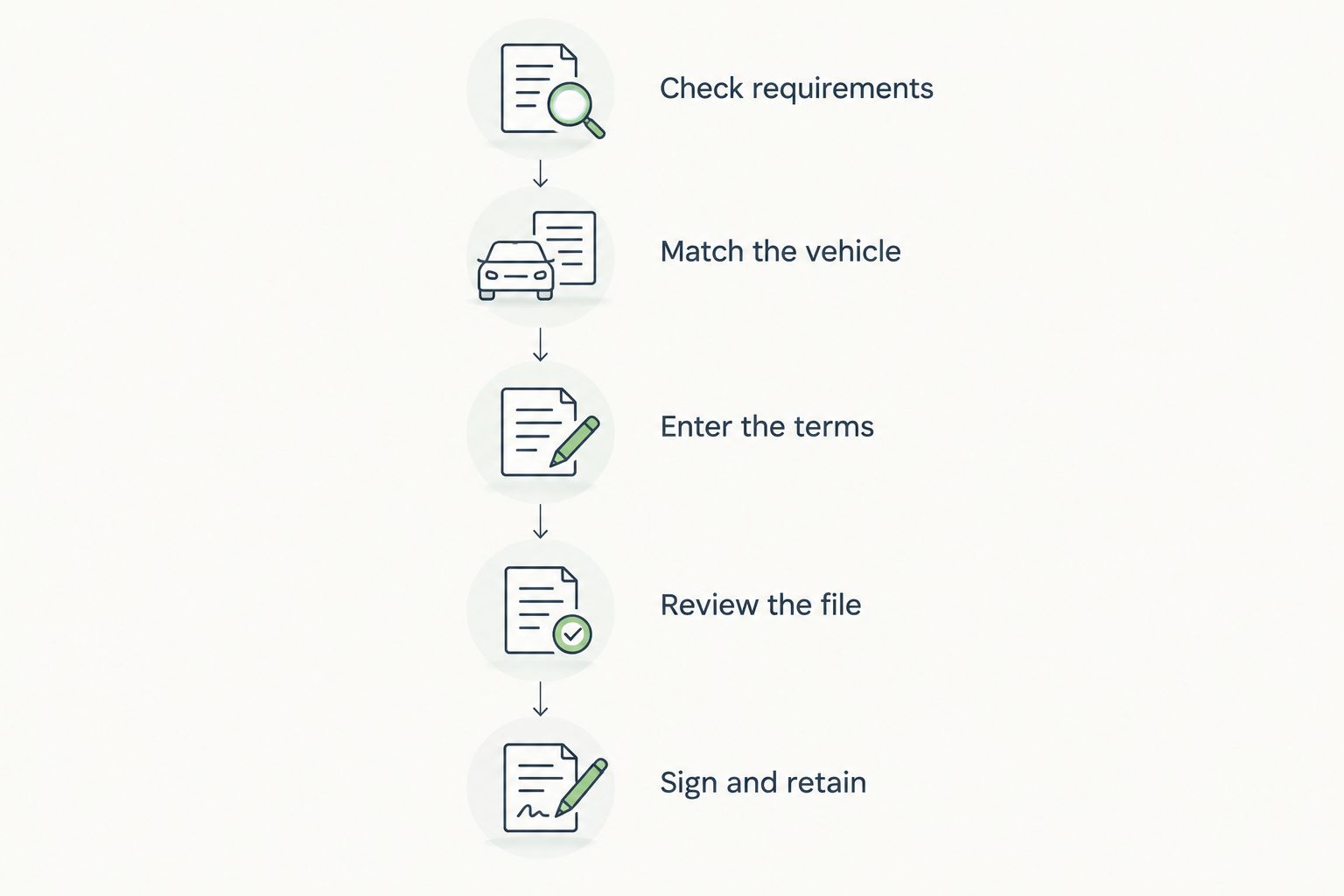
Treat completion as a sequence: establish the required form, enter the transaction accurately, review the result, and then sign using the accepted method. Do not begin by uploading an arbitrary template and assume the rest follows automatically.
Check requirements
Read the motor vehicle agency’s current 2026 instructions for the transaction. Identify the required bill of sale, accompanying paperwork, signature method, and any witnessing or notarization requirements.
Match the vehicle
Compare the vehicle identification number on the document with the vehicle and its title records. Modern standardized VINs contain 17 characters; older and other nonstandard identification formats require separate checking. Do not silently change a character that looks wrong.
Enter the terms
Record the names of the 2 parties, identify the 1 vehicle being sold, and enter the transaction details consistently across the relevant paperwork. If more than one vehicle is involved, make each vehicle’s identification unambiguous.
Review the file
Check the completed document after editing or conversion. Look for cut-off text, missing pages, displaced signature fields, and changes to instructions. A readable source file does not guarantee a readable exported copy.
Sign and retain
Use the signature method accepted for the particular document and transaction. Keep the completed bill of sale and associated transfer records so you can identify exactly what was signed.
Which vehicle bill of sale template should you choose?
Choose the applicable official form first. If you already have the correct PDF, use a document-processing workflow to complete it without unnecessary rewriting. Choose an editable Word template only when custom terms justify the extra drafting control.
For a 2026 sale, the deciding question is not which template looks most professional. It is whether the completed document matches the transaction and the receiving agency’s requirements.
Before signing, compare the bill of sale with the rest of the transfer paperwork. Names, vehicle identifiers, dates, and transaction details should tell the same story wherever they appear.
FAQ
What’s the best bill of sale template for vehicle transactions?
The best starting point is the current official form supplied or required by the motor vehicle agency handling the transfer, when one applies. If no specific form is required, choose a vehicle-specific template and check it against the agency’s instructions.
Can I use a generic bill of sale to sell my car?
Use a generic bill of sale only after confirming that it satisfies the applicable requirements. It does not replace required title-transfer or other supporting documents.
Does a vehicle bill of sale replace the title?
A vehicle bill of sale does not generally replace the certificate of title or required title-transfer process. It records the transaction, while the transfer must follow the relevant agency’s rules.
Is a PDF template better than a Word template?
A PDF template is better when you want to preserve an existing document’s layout; a Word template is better when you need to draft custom terms. Neither format establishes that the wording meets legal requirements.
Can I sign a vehicle bill of sale online?
Confirm the accepted signature method with the relevant motor vehicle agency before signing online. Electronic signing capability does not establish that a particular transfer document will be accepted.
Does a vehicle bill of sale need to be notarized?
Notarization requirements depend on the jurisdiction and document. Check the current instructions rather than assuming every vehicle bill of sale requires a notary or that none do.
Can Zendocs help me complete a vehicle bill of sale?
Zendocs offers online document editing, conversion, signing, and management that can support processing an existing vehicle bill of sale. You must separately confirm that the template and signature method fit the transaction.
One last thing
Check the vehicle identifier before polishing the document. A neat layout cannot correct a mismatched VIN. Compare the identifier against the vehicle and title records, and resolve any discrepancy before either party signs.