

Best overall: Jotform. Best for conversational questionnaires: Typeform. Best for straightforward data collection: Google Forms. This 2026 guide compares the best online form builder software by the work you need to finish, including when a document-processing tool such as Zendocs belongs alongside your forms.
- Jotform is the best online form builder software default for varied intake forms and branching questionnaires.
- Choose Typeform for conversational questionnaires, Google Forms for straightforward collection, or Microsoft Forms for Microsoft-centered teams.
- Choose Tally when you prefer building forms in a document-style editor.
- Zendocs is best for users who need document conversion, editing, signing, and management alongside online forms.
Why this matters
An online form builder collects structured answers. A PDF editor changes a document. An electronic-signature tool handles signing. Those jobs overlap in business workflows, but they are not interchangeable.
Choose the wrong category and you create extra work: retyping answers, rebuilding an existing document, or collecting information without deciding where it goes next. Start with the output you need, not the most attractive form preview.
For your 2026 shortlist, decide whether success means a spreadsheet row, a completed questionnaire, or an edited and signed document. That distinction matters more than a long feature list.
What makes the best online form builder software?
Use these criteria before choosing a product:
- Question design: Can you express the questions clearly using the appropriate field types?
- Conditional logic: Can respondents bypass questions that do not apply to them?
- Response handling: Can you review, export, and pass answers to the person responsible for acting on them?
- Respondent experience: Does the form remain understandable on a phone, including instructions and validation messages?
- Workflow fit: Does the form belong in your existing spreadsheet, collaboration, or document process?
- Administrative control: Can you manage ownership, access, and ongoing maintenance without depending on one employee?
Treat the final criterion as a selection requirement, not a feature to assume. Confirm the controls attached to the subscription and account configuration you intend to use.
Best online form builders at a glance
This 2026 comparison assigns each option a distinct job. The order reflects a general-purpose starting point followed by more specific preferences, not measured performance scores.
| Software | Best for | Standout feature | Key limitation |
|---|---|---|---|
| Jotform | Varied business intake | Broad field selection and conditional logic | More configuration to manage than a basic questionnaire |
| Typeform | Conversational questionnaires | One-question-at-a-time presentation | Sequential presentation is not ideal for every long form |
| Google Forms | Straightforward data collection | Connection with Google Sheets | Limited control over presentation |
| Microsoft Forms | Microsoft-centered teams | Response workflows with Excel | Less presentation flexibility than design-focused builders |
| Tally | Document-style form creation | Block-based editing | A document-like editor is not everyone's preferred design method |
The best choice is the one that handles your actual questions and resulting work. A signup form and a detailed application do not need the same interface.
1. Jotform: best online form builder for varied business intake
Jotform creates online forms using a visual builder, different field types, and conditional logic. It is the strongest default on this list when your intake requirements extend beyond a short questionnaire.
Best for: Businesses collecting different kinds of information through reusable forms. Start here when your process includes branching questions, supporting information, and a clear handoff after submission.
Jotform pros
- Different field types support more than simple text answers.
- Conditional logic helps separate relevant and irrelevant questions.
- A visual builder lets you assemble a form without writing its interface from scratch.
Jotform cons
- More configuration means more settings to maintain.
- Branching forms require careful testing across alternative answers.
- A simple signup does not need all the complexity the builder supports.
Build one representative form before committing your wider process. Include the awkward question, the optional section, and the response export rather than testing only a name-and-email form.
Verdict: Buy Jotform for varied business intake after the full submission-to-handoff test passes.
2. Typeform: best online form builder for conversational questionnaires
Typeform is known for presenting questions in a conversational, one-at-a-time format. Choose it when question order and the respondent's experience are central to the questionnaire.
Best for: Guided questionnaires where each answer leads naturally to the next question. A structured discovery questionnaire is a better match than a form users need to scan as a whole.
Typeform pros
- Sequential presentation gives each question its own space.
- Logic supports different routes through a questionnaire.
- The format encourages a deliberate question-and-answer structure.
Typeform cons
- Sequential screens are a poor fit when respondents need an overview.
- Reviewing related answers requires attention to the return path.
- Presentation alone does not solve unclear questions or unnecessary fields.
Write the questionnaire before styling it. If users need to compare several related fields while answering, test whether the conversational format helps or interrupts that task.
Verdict: Buy Typeform for guided questionnaires; skip it when respondents need a full-form overview.
3. Google Forms: best online form builder for simple collection
Google Forms creates questionnaires, surveys, and quizzes, with responses that can connect to Google Sheets. It is a direct choice when collecting usable answers matters more than controlling every visual detail.
Best for: Straightforward questionnaires whose answers belong in a spreadsheet. Choose it for a process you can describe without a complicated routing diagram.
Google Forms pros
- Response collection connects naturally with Google Sheets.
- Common question types cover ordinary questionnaires.
- Quiz functionality suits basic knowledge checks.
Google Forms cons
- Presentation controls are limited compared with design-focused builders.
- A spreadsheet still needs an owner and an operating process.
- Document editing and signing remain separate tasks.
Decide how you will use the response sheet before distributing the form. Assign responsibility for reviewing new entries, correcting mistakes, and closing completed requests.
Verdict: Buy into Google Forms as your workflow choice for straightforward spreadsheet-based collection; skip it for highly customized presentation.
4. Microsoft Forms: best online form builder for Microsoft teams
Microsoft Forms creates surveys, polls, and quizzes and supports working with responses in Excel. Its clearest use case is a team that already organizes its day-to-day work around Microsoft applications.
Best for: Microsoft-centered teams collecting internal feedback or structured answers. Familiar response handling is the reason to shortlist it, rather than visual customization.
Microsoft Forms pros
- Survey and quiz formats cover common internal collection needs.
- Responses can be opened in Excel for further analysis.
- Branching supports questionnaires with different answer paths.
Microsoft Forms cons
- Presentation flexibility is limited compared with design-led alternatives.
- Excel output does not replace assigning and tracking follow-up work.
- External response settings need checking before distribution.
Test the form as the intended respondent, not just as its owner. An internal employee questionnaire and an external application have different access requirements, even when their questions look similar.
Verdict: Buy into Microsoft Forms for Microsoft-centered collection; skip it when custom presentation is the deciding requirement.
5. Tally: best online form builder for document-style editing
Tally uses a document-style, block-based approach to creating online forms. It suits people who prefer composing a page of questions rather than arranging a traditional field canvas.
Best for: Form authors who want to build questions in a writing-oriented editor. Choose it when the editing experience makes your form easier to maintain.
Tally pros
- Block-based editing keeps form creation close to writing a document.
- Conditional logic supports different respondent paths.
- Embedded forms let you place collection within an existing webpage.
Tally cons
- The editing model will not suit every form author.
- Branching still adds maintenance work as questions change.
- Document-style authoring does not make the result a PDF-editing workflow.
Ask the person who will maintain the form to build the pilot. A convenient setup experience matters less if routine edits become confusing for the actual owner.
Verdict: Buy Tally for document-style form authoring; skip it if your team prefers a conventional visual canvas.
Where Zendocs fits in an online form workflow
Zendocs is best for users who need document conversion, editing, signing, and management alongside online forms. Its stated role is web-based document processing, not a substitute for the dedicated form builders ranked above.
Best for: Individuals and businesses whose work continues in PDF, Word, Excel, PowerPoint, or image formats. Keep the collection step separate from the document-processing step when evaluating your workflow.
Zendocs pros
- Provides web-based document processing.
- Covers conversion, editing, signing, and document management.
- Addresses work involving PDF and other document formats.
Zendocs cons
- Document processing is a different job from designing an online questionnaire.
- Choosing it does not settle your response-collection requirements.
- A workflow involving both categories still needs a defined handoff.
If your starting point is an existing PDF, read about converting a PDF into a fillable form before rebuilding the content as a web questionnaire. Choose the format the recipient actually needs.
Verdict: Buy for the document-processing job; skip it as a replacement for a dedicated online form builder.
Test the entire workflow before choosing
Use the same pilot for every shortlisted builder in 2026. Keep the questions and expected output consistent so you compare the tools rather than different form designs.
Draft questions
Write only the questions needed to complete the next task. Give each field a clear label and explain unfamiliar terms beside the question rather than in a separate instruction document.
Test branches
Submit 10 trial responses using fictional information. Include 2 answer paths: one that triggers follow-up questions and one that bypasses them. These are practical test targets, not vendor performance benchmarks.
Check devices
Review the form in 3 device contexts: a phone, a tablet, and a desktop. Look for awkward instructions, difficult selections, and validation messages that fail to explain the correction.
Review output
Export or inspect the resulting answers. Check whether dates, choices, and long responses remain understandable to someone who has not seen the form.
Assign ownership
Name the person responsible for new submissions and the person responsible for maintaining the questions. Document what happens when either person changes roles.
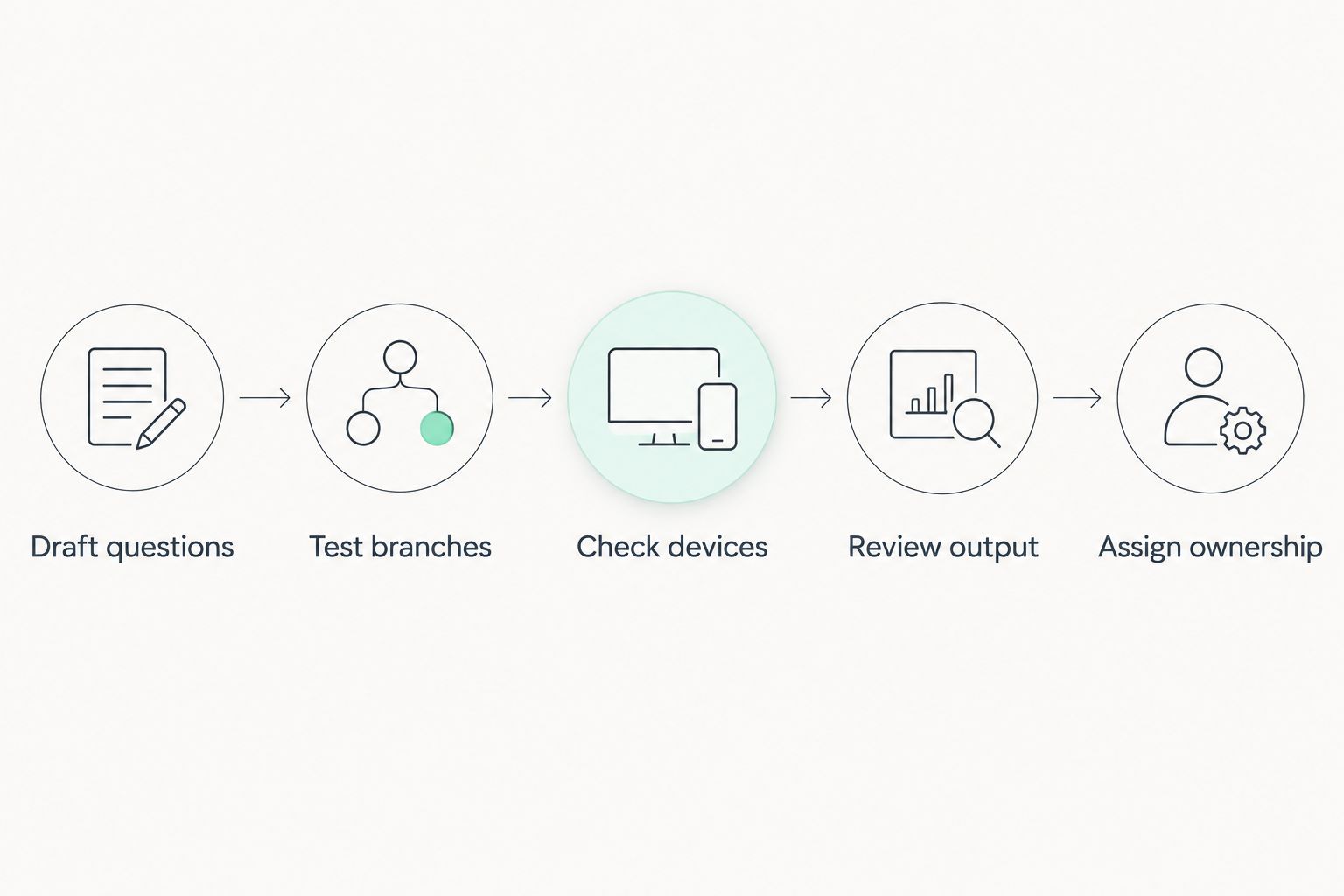
A form passes this pilot when respondents can complete it and the receiving person can act on its output. Fix the handoff before adding more fields or automations.
How the ranking works
This 2026 ranking prioritizes question design, conditional logic, response handling, respondent experience, workflow fit, and administration. Jotform takes the general-purpose slot; the remaining builders each serve a distinct editing or collection preference.
The recommendations are selection guidance, not speed-test results. Your pilot should determine whether an option meets your access rules, data-handling requirements, and maintenance process.
Which online form builder should you choose?
Choose Jotform if you need a general-purpose starting point. Choose Typeform for conversational questionnaires, Google Forms for simple spreadsheet-oriented collection, Microsoft Forms for Microsoft-centered work, or Tally for document-style authoring.
For a 2026 rollout, start with one real workflow rather than migrating every form at once. Keep your document-processing decision separate until you know whether the final output needs editing, conversion, or signing.
FAQ
What's the best online form builder software for general business use?
Jotform is the best general-purpose starting point in this comparison. Its field selection and conditional logic suit varied intake requirements; test the complete response handoff before choosing it.
Is Typeform better than Google Forms?
Typeform is the better fit for conversational questionnaires, while Google Forms suits straightforward collection connected to Google Sheets. Choose based on how respondents should answer and how your team will use the results.
Which online form builder should a Microsoft-centered team choose?
Microsoft Forms is the clearest starting point for Microsoft-centered teams. Test respondent access, branching, and the Excel output against your actual collection process.
What is Tally best for?
Tally is best for people who prefer creating forms in a document-style editor. Have the eventual form owner build and revise a pilot to check whether the editing method fits.
Can an online questionnaire replace a fillable PDF?
An online questionnaire replaces a fillable PDF only when collecting structured answers meets the recipient's requirements. Keep a document-based process when the required output is the completed document itself.
How should I compare online form builder subscriptions?
Compare subscriptions against your required fields, logic, response handling, access controls, and maintenance needs. Check the provider's current terms and included features before committing.
What should I test before publishing an online form?
Test question wording, alternative answer paths, device usability, response output, and ownership. Use fictional information and confirm that the receiving person can complete the next task.
One last thing
Start your final review with the exported answers, not the form preview. A polished questionnaire is still the wrong choice if the receiving person cannot understand the result or determine what to do next.
Ask that person to process a trial submission without your explanation. The questions they ask reveal which labels, instructions, and handoff rules still need work.


