

Best overall for individual online notarization: Proof. Best for real-estate notarization workflows: NotaryCam. Best for preparing documents before notarization: Zendocs. This 2026 guide separates the best online notary services from form-preparation and electronic-signature tools so you choose the service your document actually needs.
- Proof leads this best online notary services shortlist for individual remote notarization, subject to document eligibility.
- NotaryCam is the real-estate workflow pick; confirm acceptance with the lender, title company, and recording office.
- Zendocs handles document preparation and electronic signing; those tasks do not themselves establish notarization.
- Rocket Lawyer fits legal-template creation; DocuSign eSignature fits signature collection without a notarial act.
Why this matters
An electronic signature is not a notarization. Signing software records a signature; notarization involves a commissioned notary performing a legally defined act. A PDF editor performs neither merely by adding a signature image or stamp.
That distinction determines your next move. If a recipient asks for a notarized document, a completed form with electronic signatures alone does not satisfy that request. If the recipient asks only for a signed form, adding notarization creates an unnecessary step.
For your 2026 transaction, start with the receiving organization’s instructions. A platform’s ability to process a document does not establish that a court, lender, government office, or overseas recipient will accept it.
What makes the best online notary services
Use these criteria before comparing brands. They address the reasons a completed document gets accepted or rejected, rather than features that simply make an interface convenient.
- Correct service type: Match notarization, form creation, PDF preparation, or signature collection to the actual requirement. These are different jobs.
- Document eligibility: Confirm that the provider handles your document and that the applicable jurisdiction permits the intended remote notarial act.
- Recipient acceptance: Ask the organization receiving the document whether it accepts remote online notarization and electronic delivery.
- Identity and participant requirements: Check the identification process, signer location rules, and any witness requirements before starting.
- Document control: Understand how you receive, retain, and share the completed file. Review privacy and retention terms before uploading sensitive information.
- Workflow fit: Choose an individual signing session for an individual document, and a transaction-oriented process when several parties must coordinate.
The best choice in 2026 is the service that completes the required act—not the service with the longest feature list. Resolve eligibility and acceptance before spending time formatting the document.
Online notary and form services at a glance
The row order matches the recommendations below. Form and signature tools appear alongside notary providers because they solve adjacent tasks, not because they are interchangeable.
| Rank | Service | Best for | Standout function | Key limitation |
|---|---|---|---|---|
| 1 | Proof | Individual remote notarization | Online notarization with identity verification and a live notary session | Document eligibility and recipient acceptance still apply |
| 2 | NotaryCam | Real-estate notarization coordination | Remote notarization and real-estate closing workflows | Requires transaction-specific acceptance and participant planning |
| 3 | Zendocs | Preparing documents before notarization | Web-based conversion, editing, signing, and document management | Preparation or electronic signing does not establish notarization |
| 4 | Rocket Lawyer | Creating a legal document from a template | Guided legal-document creation | A template does not determine whether notarization is required |
| 5 | DocuSign eSignature | Collecting signatures without notarization | Electronic-signature requests and signer routing | An eSignature workflow alone does not perform a notarial act |
1. Proof: best online notary service for individual documents
Proof provides remote online notarization involving identity verification and a live notary session. It fits the reader who already has a document and needs a notarial act, rather than help creating the underlying agreement.
Best for: Individuals with an eligible document that the recipient accepts through remote online notarization. Before starting, identify the required notarial act and check the provider’s instructions for identification and signer participation.
Proof pros
- Offers an actual online notarization workflow rather than signature placement alone.
- Brings identity verification and the notary session into the same process.
- Fits a prepared document that needs notarization, without requiring a separate document-authoring workflow.
Proof cons
- Remote notarization does not override a recipient’s document-submission requirements.
- An individual notarization session is not a substitute for coordinating an entire real-estate closing.
Choose Proof when your document is ready and notarization is the remaining task. Ask the recipient about acceptance before uploading, and do not sign beforehand unless the notary’s instructions permit it. Some notarial acts require signing in the notary’s presence; the required procedure depends on the act.
Verdict: Buy for an eligible individual notarization after confirming acceptance.
2. NotaryCam: best online notary service for real-estate workflows
NotaryCam offers remote notarization and real-estate closing workflows. Its distinct use case is a transaction in which notarization must fit the requirements of other participants, not simply a standalone document.
Best for: Real-estate transactions whose lender, title company, and relevant recording office accept the proposed remote process. Confirm the transaction workflow with those parties before selecting a service independently.
NotaryCam pros
- Provides remote notarization rather than an electronic-signature-only process.
- Addresses real-estate closing workflows as well as document notarization.
- Gives transaction participants a provider to evaluate against their closing requirements.
NotaryCam cons
- Choosing the platform does not establish lender or recording-office acceptance.
- Multiple signers, witnesses, and transaction documents require preparation outside the notary session itself.
For a 2026 closing, ask who controls the document package and who selects the signing process. A borrower’s preferred platform is not automatically the platform the settlement team will use. Get agreement on the process before arranging participant schedules.
Choose NotaryCam for transaction coordination, not merely because the document concerns property. A standalone property-related affidavit and a full closing package create different operational requirements.
Verdict: Buy when the closing team approves the remote workflow.
3. Zendocs: best document-preparation tool before notarization
Zendocs offers a web-based subscription tool for converting, editing, signing, and managing PDFs and other document formats, including Word, Excel, PowerPoint, and images. Its role in this shortlist is preparation: getting the file into a usable form before sending it through the required signing or notarial process.
Zendocs is best for document preparation before notarization, not for treating an electronic signature as a notarial act. Keep those responsibilities separate when deciding which tools you need.
Zendocs pros
- Combines document conversion, editing, signing, and management in a web-based tool.
- Supports work across PDFs and other document formats rather than PDFs alone.
- Fits individuals and businesses that need online document processing before submission.
Zendocs cons
- Editing a document or adding an electronic signature does not establish notarization.
- Converting a file still requires checking the output against the original before submission.
Best for: Preparing and organizing the document that will enter a separate notarization workflow. Check names, dates, page order, and signature areas after editing or conversion. Preserve the original so you can compare the prepared version against it.
Use Zendocs for document preparation when the file needs work; choose a notary provider when the document needs a notarial act. That division prevents a polished PDF from being mistaken for a legally completed submission.
Verdict: Buy for document processing; skip as a substitute for notarization.
4. Rocket Lawyer: best form service for legal-document templates
Rocket Lawyer offers guided legal-document creation using templates. It fits the earlier stage of the process: you need to create a document before you can decide how to execute or submit it.
Best for: Readers creating a legal document from a template rather than editing an existing PDF. Choose the document type and jurisdiction carefully; a familiar title does not establish that the template fits your circumstances.
Rocket Lawyer pros
- Provides a starting structure for common legal-document tasks.
- Uses a guided creation process rather than requiring you to draft from a blank page.
- Addresses document content before you move into signatures or notarization.
Rocket Lawyer cons
- A template cannot determine every requirement of a particular transaction.
- Completing the document does not establish that its signing, witnessing, or notarization requirements are satisfied.
Choose Rocket Lawyer when the missing piece is the document itself. If you already have a form prescribed by a court, employer, lender, or agency, use that prescribed form instead of replacing it with a general template.
In 2026, keep the recipient’s instructions alongside the template while you prepare it. Check whether attachments, witness details, or a specific notarial certificate are required before collecting signatures.
Verdict: Buy for suitable template-based drafting; hold when the recipient requires its own form.
5. DocuSign eSignature: best for signatures without notarization
DocuSign eSignature supports electronic-signature requests and signer routing. It fits documents that need signatures but do not require a notarial act, or a separately arranged process for that act.
Best for: Collecting signatures from designated participants on documents that accept electronic signing. Define who signs, where each person signs, and what happens after the completed document returns.
DocuSign eSignature pros
- Organizes signature collection around designated signers.
- Supports signer routing rather than relying on informal file exchanges.
- Separates the request to sign from the task of writing or editing the document.
DocuSign eSignature cons
- An ordinary eSignature workflow is not, by itself, notarization.
- Signature collection does not resolve errors in the document’s underlying content.
Choose DocuSign eSignature when signature collection is the job. Do not add a notarial seal image or certificate yourself to make an electronically signed document appear notarized. A notary must complete the required notarial act through an authorized process.
Ask the receiving party whether electronic signatures meet its requirements. Where notarization is required, confirm how that step connects to the signing workflow instead of assuming the signature platform handles it automatically.
Verdict: Buy for accepted electronic-signature workflows; skip as a standalone notarization solution.
How these services are ranked
This 2026 ranking separates services by the task they perform: individual notarization, transaction notarization, document preparation, template creation, and signature collection. Proof leads the notarization recommendation because its use case directly matches a prepared individual document needing a remote notarial act.
The other entries occupy different decision slots. No speed, security, acceptance-rate, or customer-satisfaction ranking is implied. The criteria remain service type, eligibility, recipient acceptance, participant requirements, document control, and workflow fit.
Prepare your document before choosing a session
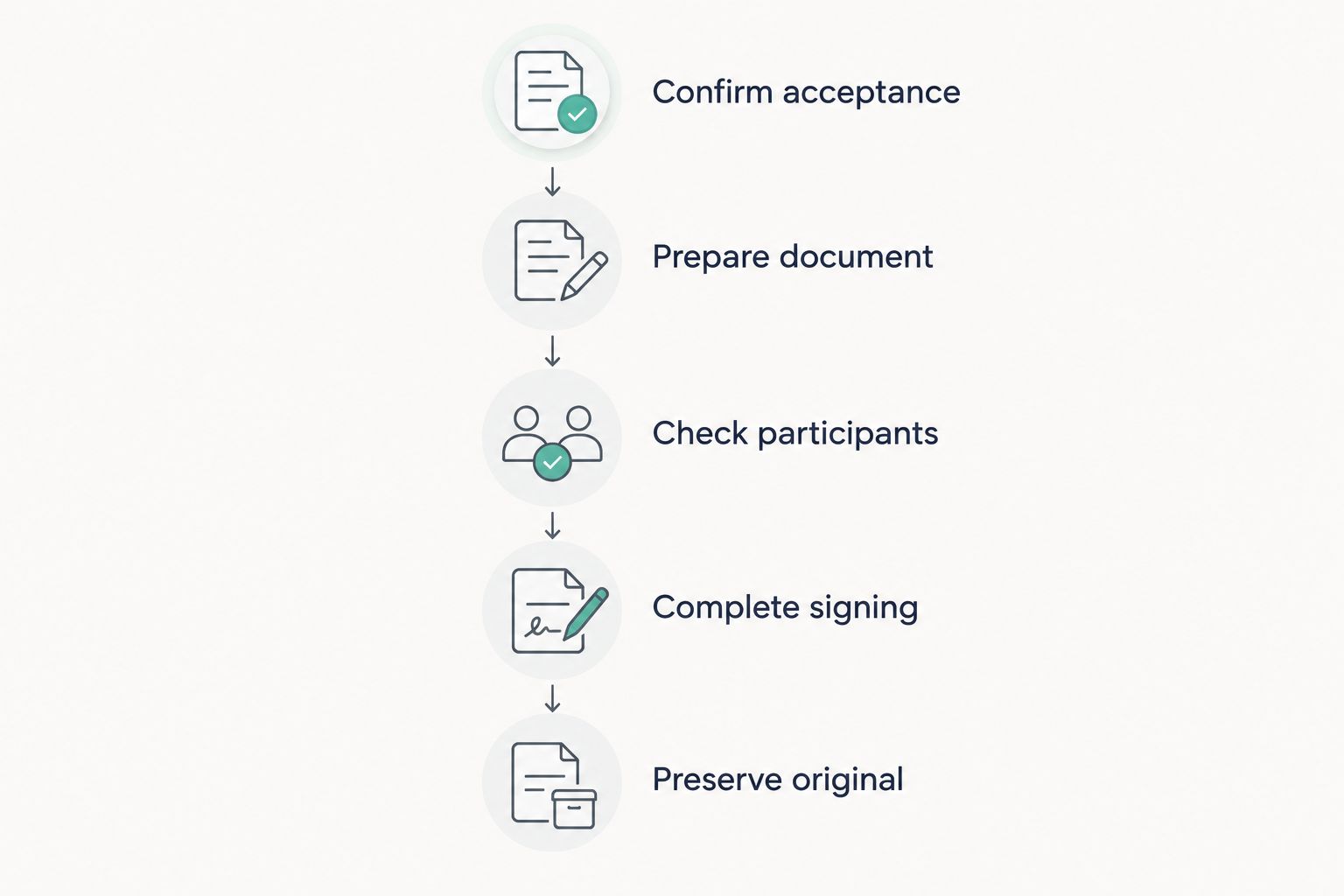
Use this sequence to avoid discovering an acceptance problem after the document is signed. The point is to resolve requirements before producing the final version.
- Confirm acceptance: Ask the recipient whether remote notarization is accepted for this document and submission method. Get the answer in writing when practical.
- Prepare document: Complete the fields you are authorized to complete. Leave signature areas for the signing process specified by the recipient or notary.
- Check participants: Confirm who must attend, what identification is accepted, and whether witnesses are required. Do not assume the platform supplies witnesses.
- Complete signing: Follow the notary’s or signature provider’s instructions. Use the correct workflow for the required act.
- Preserve original: Retain the completed output exactly as delivered. Create a separate working copy if you need annotations or further processing.
Treat the completed file as a record, not an editable draft. Editing a digitally signed PDF can affect signature validation, so do any required conversion or content correction before the final signing process whenever possible.
Keep 2 separate files: the completed original and a clearly identified working copy. Before submission, perform 3 checks: the recipient’s instructions, the document’s contents, and the completed signing or notarial record. Submit 1 final PDF when that is the recipient’s requested format; do not assume every recipient wants the same format.
Which service should you choose?
Start with Proof if you have a prepared individual document that needs accepted remote notarization. Choose NotaryCam when the requirement belongs to an approved real-estate closing workflow.
If your document is not ready, solve that problem first. Use the document-processing option for editing or conversion, Rocket Lawyer for suitable template-based creation, or DocuSign eSignature when the requirement is signature collection without notarization.
Your 2026 default should follow the required act. Do not buy a form tool to solve a notary problem, and do not arrange notarization merely because a form contains a signature line.
FAQ
What's the best online notary service for an individual document?
Proof is this guide's default for an individual document needing remote online notarization. Confirm document eligibility, identification requirements, and recipient acceptance before starting.
Is an electronic signature the same as notarization?
No, an electronic signature is not the same as notarization. Notarization involves a commissioned notary performing the required notarial act; adding a signature image does not perform that act.
Can I use Zendocs to prepare a document for notarization?
Zendocs provides web-based conversion, editing, signing, and document management for PDFs and other document formats. Use those functions for preparation, then complete any required notarial act through the appropriate notary process.
Is NotaryCam better for a real-estate closing?
NotaryCam is this guide's real-estate workflow pick because it offers remote notarization and closing workflows. The lender, title company, and relevant recording office still need to accept the proposed process.
Should I sign my document before the online notary session?
Follow the notary's instructions rather than signing beforehand by default. Some notarial acts require signing in the notary's presence, while the procedure for other acts differs.
Do legal-document templates still need notarization?
A template does not determine whether notarization is required. The document type, applicable law, and receiving organization's requirements determine the execution steps.
Will every organization accept an online notarized document?
No, acceptance must be checked with the receiving organization. Confirm the document type, remote process, and delivery format before completing the session.
Can I edit a PDF after it has been digitally signed?
Editing a digitally signed PDF can affect signature validation. Preserve the completed original and use a separate copy for annotations or further processing.
One last thing
Ask about the required notarial act, not just whether the document needs a stamp. An acknowledgment and a jurat serve different purposes; a jurat includes an oath or affirmation. The receiving party’s instructions should identify what is required rather than leaving you to guess.
If the requirement is unclear, resolve it before the appointment. A correctly formatted document with the wrong execution process still leaves you with an unfinished task.


