

Best overall: the IRS fillable Form W-9. Best for broader online document work: Zendocs. Best for desktop PDF completion: Adobe Acrobat Reader. Best for open-source PDF editing: LibreOffice Draw. This 2026 guide compares the best W-9 form generator options by form accuracy, completion workflow, signing needs, and control over sensitive information.
- The best w-9 form generator for straightforward completion is the IRS fillable Form W-9.
- Zendocs suits users who need online PDF editing, signing, and document management beyond a single tax form.
- Adobe Acrobat Reader fits desktop PDF completion; LibreOffice Draw fits open-source editing.
- Start with the official form, verify your taxpayer details, and return it securely to the requester.
Why this matters
A W-9 collects a U.S. person's taxpayer identification information and certifications for a requester. It is not a tax return, and you normally return it to the person or business requesting it rather than file it with the IRS.
The main risk is not choosing an editor with too few features. It is entering the wrong taxpayer name, using the wrong identification number, changing required wording, or exposing sensitive information during delivery.
For a straightforward 2026 request, a fillable official PDF is the strongest starting point. A broader document tool earns its place when you also need editing, signing, conversion, or ongoing file management. Separate the form source from the tool you use to complete it.
What makes the best W-9 form generator?
Use these criteria before choosing a tool:
- Official form fidelity: Preserve the IRS form's fields, instructions, and certification language. A custom-looking document is not automatically an acceptable substitute.
- Accurate field entry: Enter the taxpayer name, business name where applicable, tax classification, address, and taxpayer identification number in the correct places.
- Signing fit: Check the form instructions and the requester's requirements. Adding a signature image is not the same as establishing a compliant electronic collection process.
- Sensitive-data handling: Decide whether an online upload is appropriate before entering a Social Security number or employer identification number.
- Usable output: Save a readable document that retains the information you entered and that the requester can open.
- Workflow fit: Choose a simple form-completion route for occasional requests and broader document software for recurring work across file formats.
You do not need a dedicated generator merely because the request arrived by email. The official form already defines the required information; the editor supplies the completion workflow.
Best W-9 form options at a glance
| Option | Best for | Standout capability | Key limitation |
|---|---|---|---|
| IRS fillable Form W-9 | Straightforward official-form completion | Authoritative form and accompanying instructions | Does not manage a collection workflow |
| Zendocs | Online document work across formats | Web-based editing, signing, conversion, and management | General document software, not established here as a dedicated W-9 collection system |
| Adobe Acrobat Reader | Desktop PDF completion | Filling and signing PDF documents | Does not determine your tax classification or validate tax information |
| LibreOffice Draw | Open-source PDF editing | Opening and editing PDF content | Layout changes require careful inspection |
These options solve different problems. The IRS supplies the form itself; the other options provide ways to work with documents. This 2026 ranking favors a correct, readable W-9 over an elaborate interface.
1. IRS fillable Form W-9: best for official-form completion
The IRS fillable Form W-9 is the default choice when you need to provide taxpayer information without building a document workflow. It supplies the official fields and certifications rather than asking you to recreate them in a template.
Download the form from the IRS, complete it in a compatible PDF application, and inspect the saved copy. Read the instructions before selecting a classification or deciding which identification number belongs on the form.
IRS fillable Form W-9 pros:
- Uses the official form as the starting document.
- Includes the instructions needed to interpret its fields.
- Avoids recreating tax language in a custom template.
- Keeps the task focused on completing and returning one document.
IRS fillable Form W-9 cons:
- Does not track requests, reminders, or completed submissions.
- Still requires a suitable application and a secure delivery method.
- Does not resolve uncertainty about your tax status.
Best for: An individual or business responding to a straightforward W-9 request.
The important distinction is authority versus assistance. The IRS form gives you the correct document structure, but you remain responsible for the information entered. An official form with an incorrect taxpayer name is still incorrect.
Verdict: Choose the IRS fillable Form W-9 for ordinary form completion in 2026.
2. Zendocs: best W-9 option for broader online document work
Zendocs is a web-based subscription tool for converting, editing, signing, and managing PDF and other document formats, including Word, Excel, PowerPoint, and images. Its role in a W-9 workflow is document processing rather than defining the tax information you must provide.
Start with the official IRS form rather than constructing a W-9 from a blank page. Before entering sensitive details, confirm that the chosen workflow handles the form, produces the output your requester needs, and meets your own data-handling requirements.
Zendocs pros:
- Combines document editing, signing, conversion, and management.
- Supports work involving several document formats.
- Offers a web-based approach for individuals and businesses.
Zendocs cons:
- A subscription document tool is more than a single-form task requires.
- General editing and signing capabilities do not establish dedicated W-9 collection controls.
- An online workflow requires checking how sensitive documents are handled.
Best for: Users who need online document processing beyond an occasional W-9.
Do not convert a W-9 to another format merely because conversion is possible. Each unnecessary format change adds another output to inspect. Keep the official PDF when it already meets the requester's needs.
Verdict: Choose this route for broader document work; use the official form as your W-9 source.
3. Adobe Acrobat Reader: best for desktop PDF completion
Adobe Acrobat Reader provides a desktop route for opening, filling, and signing PDF documents. Paired with the official IRS form, it lets you complete a W-9 without treating tax-form generation as a separate purchase decision.
Use the form's existing fields wherever possible. After saving, reopen the document and check the name, identification number, checkboxes, and any required signature rather than assuming the visible entry screen guarantees a correct final file.
Adobe Acrobat Reader pros:
- Works directly with PDF documents.
- Provides filling and signing tools.
- Fits a workflow based on a downloaded official form.
- Offers a desktop application for local document work.
Adobe Acrobat Reader cons:
- Does not decide which federal tax classification applies to you.
- Does not turn individual form completion into a requester-side collection system.
- Using a desktop application does not secure the later delivery step.
Best for: Someone who wants to complete an official W-9 in a desktop PDF application.
Keep the distinction between local editing and secure transmission clear. A document completed on your computer still contains sensitive information when attached to an email or uploaded elsewhere. Choose the delivery method separately.
For a wider comparison of filling workflows, see the guide to PDF form filler software.
Verdict: Choose Adobe Acrobat Reader when desktop PDF completion is your priority.
4. LibreOffice Draw: best for open-source PDF editing
LibreOffice Draw can open PDF documents for editing. It is an alternative when you already use LibreOffice and need to work with the contents of a PDF, but it requires more layout inspection than a straightforward fillable-form workflow.
Use an untouched copy of the official form as your reference. After exporting the completed document, compare it with the original and check that fields, instructions, and certification text remain intact.
LibreOffice Draw pros:
- Provides an open-source desktop editing option.
- Allows work with PDF page content.
- Fits users already familiar with LibreOffice.
LibreOffice Draw cons:
- PDF import and editing require checking the resulting layout.
- It is not a dedicated W-9 intake or tax-validation tool.
- Editing page content creates opportunities to alter required wording accidentally.
Best for: An experienced LibreOffice user who can inspect the exported PDF carefully.
This is the least direct route for ordinary W-9 completion. If the official fillable PDF works in your PDF reader, opening it in a page editor adds work without solving a form-specific problem.
Verdict: Hold LibreOffice Draw as an editing fallback, not the default W-9 workflow.
How we ranked these W-9 options
The ranking prioritizes official-form fidelity, accurate completion, signing fit, sensitive-data handling, readable output, and workflow fit. It is a use-case comparison, not a claim that these applications have been tested against identical W-9 files.
The IRS form ranks first because it supplies the authoritative starting document. General document tools serve broader work, desktop PDF software serves direct completion, and a PDF page editor serves an editing fallback.
For 2026, choose the smallest workflow that satisfies the request. More editing features do not make a taxpayer identification number more accurate.
Complete and check your W-9 before sending it
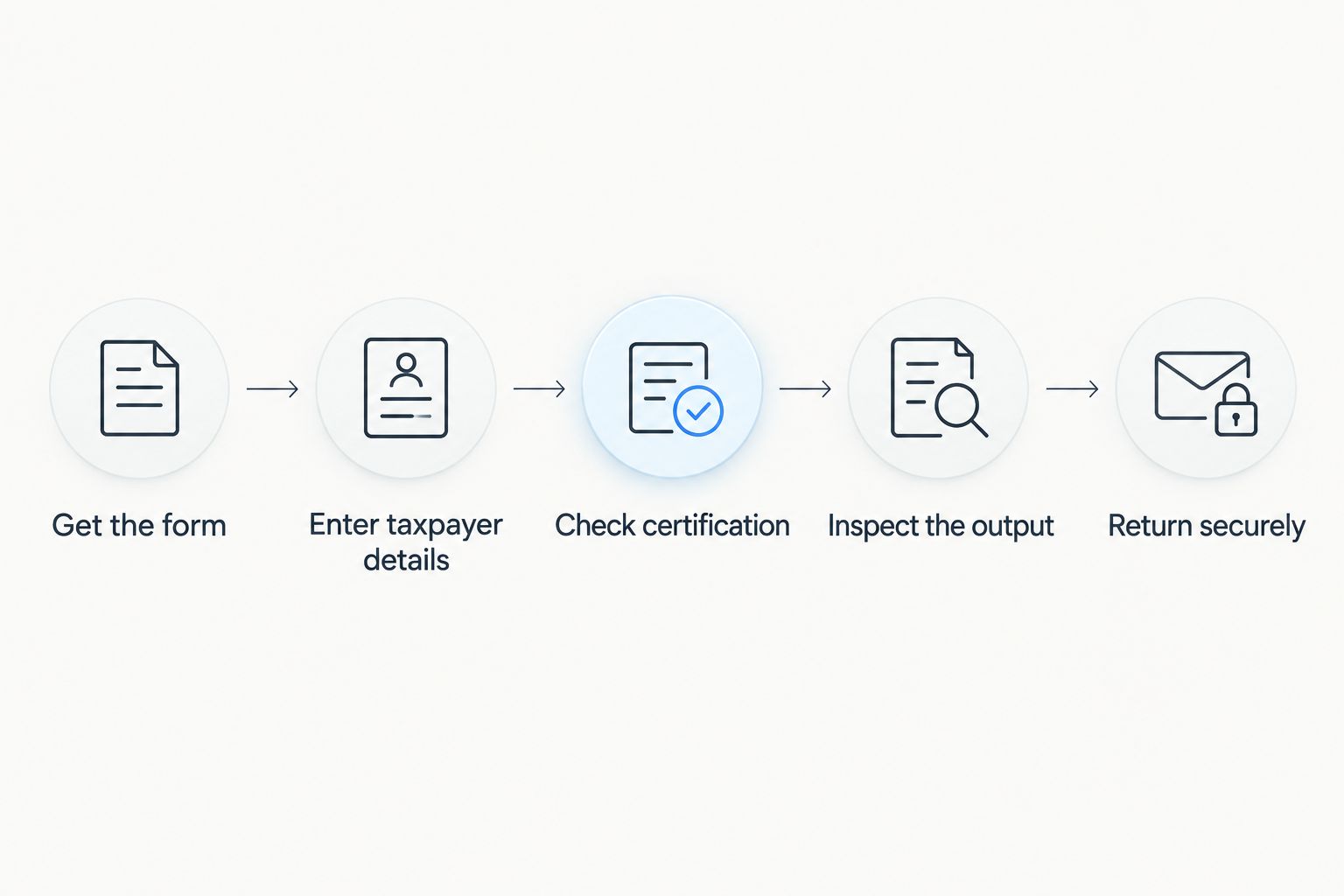
A sound tool choice still needs a sound completion process. Use this sequence whether you work in a browser or a desktop application.
Get the form
Obtain the official IRS Form W-9 and read its instructions. If the requester provides a substitute form, check that it requests the required information and preserves the necessary certifications rather than judging it by appearance alone.
Enter taxpayer details
Enter the name associated with the taxpayer identification number. A business or disregarded-entity name does not automatically replace the name required on line 1; follow the instructions for your situation.
A taxpayer identification number contains 9 digits. A Social Security number is conventionally displayed in groups of 3 digits, 2 digits, and 4 digits. Check every digit against your records rather than relying on the number's appearance.
Check certification
Read the certification language and the signing instructions. Do not assume every W-9 request has identical signing requirements, and do not treat a typed name as proof that a requester's electronic-signature process meets applicable requirements.
Inspect the output
Save the completed document, close it, and reopen it. Confirm that text remains visible, checkbox selections are clear, and any required signature and date appear in the final version.
Return securely
Use the requester's verified submission method. Confirm the recipient independently when a request is unexpected, and avoid sending taxpayer information through a channel you have not approved for sensitive documents.
Which W-9 option should you choose?
Choose the IRS fillable Form W-9 unless you have a specific document-processing need it does not address. It is the clearest default for an undecided reader completing a routine request in 2026.
Choose a broader online editor when your work also includes signing, conversion, and managing documents across formats. Choose Adobe Acrobat Reader for desktop completion. Keep LibreOffice Draw for situations that genuinely require PDF content editing.
If you collect W-9s from vendors, your buying decision is different. Evaluate access controls, retention, electronic submission requirements, and request tracking before selecting a system. A tool that helps one person fill a PDF is not automatically suitable for managing other people's taxpayer information.
FAQ
What's the best W-9 form generator in 2026?
The IRS fillable Form W-9 is the best default for straightforward official-form completion in 2026. Use a broader document tool only when you also need editing, signing, conversion, or document management.
Can I use Zendocs to work on a W-9?
Zendocs provides web-based document editing, signing, conversion, and management. Start with the official IRS form and confirm that the chosen workflow handles it correctly before entering sensitive taxpayer information.
Is a W-9 generator better than filling out the IRS PDF?
A generator is not inherently better than the official IRS PDF. For a simple request, completing the official fillable form avoids rebuilding the required fields and certification language.
Do I send my completed W-9 to the IRS?
You normally give a completed W-9 to the person or business requesting it, not to the IRS. Follow the form instructions and verify the requester's submission method.
Can I sign a W-9 electronically?
Electronic W-9 submission is permitted when the process meets the applicable IRS requirements. A signing feature alone does not establish that the entire collection process meets those requirements.
Is it safe to email a completed W-9?
An ordinary email attachment should not be treated as a secure delivery method by default. A completed W-9 contains sensitive taxpayer information, so use a verified channel approved for that information.
Does a W-9 tool check whether my tax information is correct?
Document editing does not by itself validate your taxpayer name, identification number, or tax classification. Check your records and the IRS instructions, and seek qualified tax advice when your classification is unclear.
One last thing
A W-9 does not expire simply because the calendar changes. Changes to the taxpayer information or certifications can require an updated form, and a requester can ask you to provide one again.
Before generating another document in 2026, check whether the request concerns changed information or a new collection requirement. That distinction prevents unnecessary editing while keeping your taxpayer details accurate.


