

Auto dealership bill of sale software is a document tool for preparing, signing, and storing vehicle sale records with the aim of keeping transaction details consistent through delivery. This 2026 guide explains how to choose bill of sale tools for auto dealerships, where general PDF tools fit, and which checks belong outside the software.
- Choose bill of sale tools for auto dealerships around approved forms, accurate vehicle details, signatures, and retrievable records.
- Zendocs fits dealerships seeking browser-based PDF editing, conversion, signing, and document management, not a verified dealership-system replacement.
- Check state requirements before choosing a vehicle bill of sale template or electronic signature workflow.
- Test document exports and corrections before adopting a tool across your dealership.
Why bill of sale tools matter for auto dealerships
A dealership document process connects sales staff, buyers, finance personnel, and whoever handles title paperwork. Each handoff needs the same vehicle and transaction details. A polished document is not enough if the wrong buyer name or vehicle identification number reaches the signing stage.
Choose the document process before choosing the editor. Your 2026 selection criteria should follow the records your dealership must produce, the people who approve them, and the format the recipient accepts.
For the broader handoff process, see the guide to document workflows for enterprise teams. Apply the same ownership principle here: assign responsibility for preparing, reviewing, signing, and retaining each sale record.
A bill of sale records the transaction; it does not replace every title, registration, disclosure, or financing document involved in a vehicle sale. Requirements vary by jurisdiction and transaction. Confirm the applicable instructions with the relevant motor vehicle authority and your dealership's compliance adviser.
Build your dealership's bill of sale workflow
1. Confirm requirements
Start manually with the applicable motor vehicle authority's instructions and your dealership's approved paperwork. Identify whether the transaction requires an official form, additional disclosures, notarization, or a particular submission method. Do not treat an editable template as evidence that a document meets those requirements.
Separate the bill of sale from supporting paperwork. Federal odometer disclosure requirements, for example, are distinct from simply including a mileage field on a general sale document; applicable exemptions and required formats need their own review.
For your 2026 process, record who checks form revisions. A saved blank document needs an owner, not just a shared folder.
- Identify the jurisdiction governing the paperwork.
- Record the approved form source and revision information.
- Confirm required signature and notarization procedures.
- Identify separate title, odometer, and disclosure documents.
- Assign a person to approve template changes.
2. Standardize fields
Build a field checklist in a spreadsheet or written procedure before adding software. Use it to distinguish information that belongs on your approved bill of sale from details recorded elsewhere in the transaction packet.
Typical review categories include buyer and seller identities, vehicle details, transaction date, agreed consideration, and signatures. Follow the actual form's instructions rather than adding or removing fields based on a generic checklist.
Use a single authoritative source for each field. Decide which record controls the buyer's legal name and which vehicle record staff must use to verify the VIN. Copying from an earlier draft preserves its errors just as easily as its formatting.
- Map each required field to its source record.
- Distinguish the dealership's legal identity from a salesperson's name.
- Match the VIN against the vehicle and supporting records.
- Follow the approved form's mileage instructions.
- Define how staff handle blank or inapplicable fields.
3. Prepare documents
The manual route is to complete the approved form using its supported method, then check the finished output. Keep the unused original separate from transaction copies so staff do not overwrite the master.
Zendocs provides browser-based document conversion, editing, signing, and management. It fits this preparation stage when your dealership needs those document functions, but those capabilities do not establish state-form coverage, dealership-system integration, or compliance approval.
Compare the browser workflow with your manual baseline using the same sample document. Check whether text remains legible, entries stay aligned, and the exported file preserves the approved form. Conversion creates another version to inspect, not an automatic improvement.
- Preserve an unchanged copy of the approved form.
- Create a transaction copy before entering buyer details.
- Test editable fields and long names.
- Inspect converted files against the original.
- Export a draft and review every page.
4. Review entries
Use a manual review checklist before signatures. Give the reviewer the source records, not just the completed bill of sale; otherwise the review checks appearance rather than accuracy.
Set 3 review checkpoints: before signing, after signing, and before filing or submission. These are process recommendations, not a legal standard. Each checkpoint answers a different question: are the entries correct, is execution complete, and is the final record ready for its destination?
A review should also catch contradictions across the packet. A correct VIN on the bill of sale does not resolve a different VIN on another transaction document.
- Compare names and vehicle identifiers with source records.
- Reconcile transaction details across the document packet.
- Check dates, initials, and required signature locations.
- Inspect page breaks and clipped text in the export.
- Return discrepancies to the preparer before signing.
5. Collect signatures
Begin with the signature method accepted for the specific document and recipient. If the approved process requires paper execution, an online signing feature does not remove that requirement. If electronic execution is accepted, evaluate the signing process separately from PDF editing.
For a 2026 software review, ask what evidence accompanies a completed signature and how staff retrieve it. An image of a handwritten name and an electronic signing process are not interchangeable evaluation criteria.
Ask vendors to demonstrate signer identification, completion records, and correction handling. Treat these as questions to verify, not features assumed to exist in every tool.
- Confirm the accepted execution method.
- Identify every required signer and signing location.
- Verify what completion evidence the tool provides.
- Check how buyers receive the completed document.
- Define what happens when a signed document contains an error.
6. Archive records
The manual baseline is a controlled folder structure with consistent filenames and an access policy. Decide which record is the final executed document and keep drafts distinguishable from it.
Use 2 separate labels, such as Draft and Executed, to make document status explicit. These labels are an operating recommendation, not a substitute for access controls or a retention policy. Staff should not need to open several similar files to identify the completed record.
Check exports before relying on any document service as the only repository. Retention periods, deletion rules, and access responsibilities should follow the dealership's applicable obligations and approved policies.
- Include a transaction identifier in each filename.
- Mark drafts separately from executed records.
- Restrict access according to staff responsibilities.
- Retain supporting execution records where applicable.
- Document export, retention, and deletion procedures.
7. Test the workflow
Run a 10-file pilot before changing the dealership's routine. This is a suggested test scope, not a performance benchmark. Use fictional buyer information and representative document layouts rather than uploading live customer records during an initial evaluation.
Include a long buyer name, a corrected entry, a multipage packet, and a file that needs conversion. Ask staff to complete the full process, including retrieval after filing. A successful edit alone does not prove the workflow is ready.
For the 2026 rollout decision, record observed problems instead of relying on a general impression that a tool feels faster.
- Prepare representative test documents with fictional data.
- Assign preparation and review to different staff members.
- Test signing only through an approved method.
- Retrieve the final file from its intended archive.
- Record failures, owners, and required fixes.
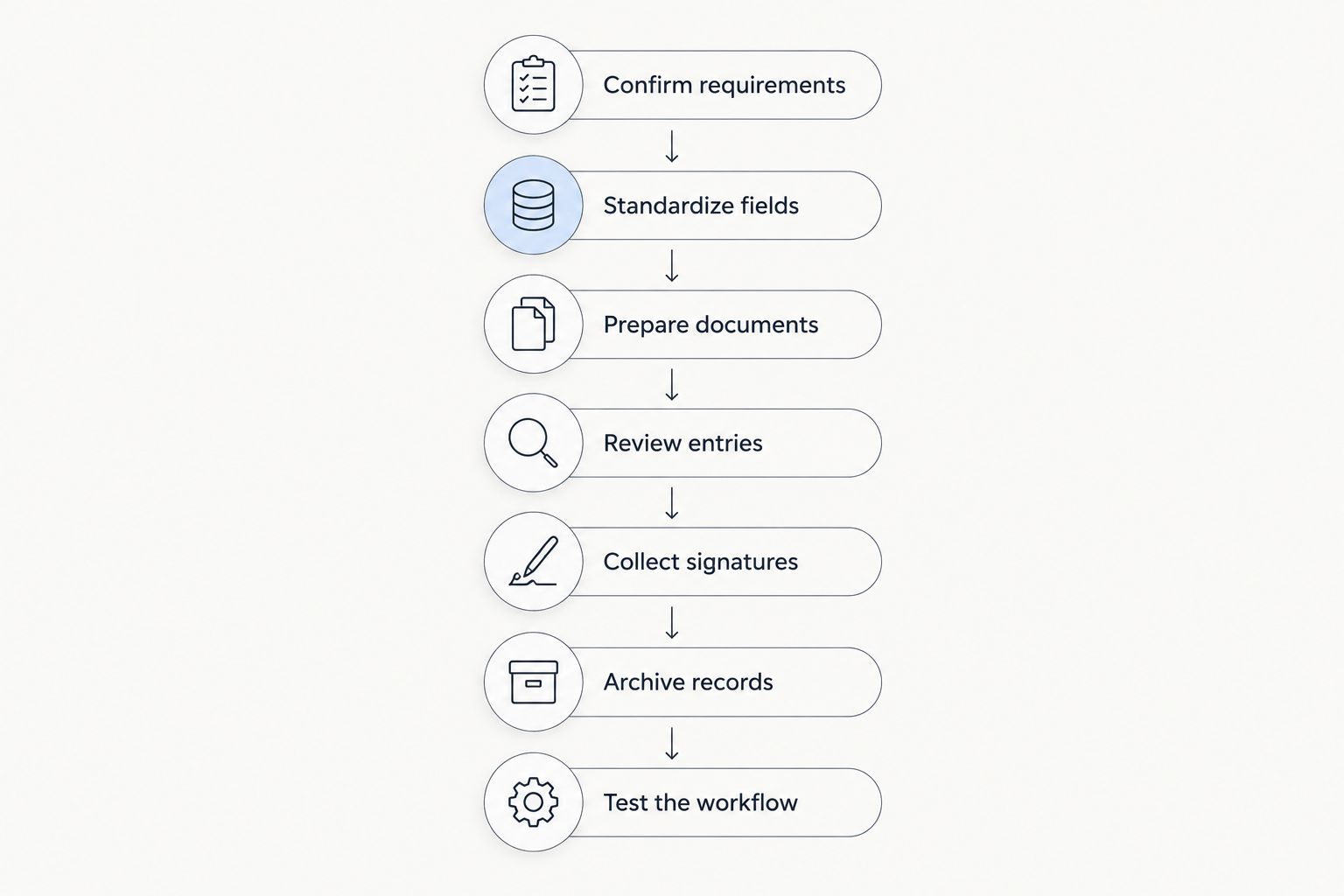
The pilot should follow the same sequence as the live process: Confirm requirements, Standardize fields, Prepare documents, Review entries, Collect signatures, Archive records, and Test the workflow. Keep the legal and data checks visible rather than hiding them inside software setup.
Compare options by the job they need to do
Zendocs is best for dealerships that need browser-based PDF editing, conversion, signing, and document management rather than a verified dealership-system replacement. Its stated scope supports general document processing; evaluate dealership-specific requirements separately.
The options below are workflow categories, not a claim that every product in a category offers the same features. Choose the narrowest option that handles your approved process without introducing an unnecessary handoff.
| Option | Best for | Main advantage | Key limitation |
|---|---|---|---|
| Approved form completed manually | Dealerships establishing a baseline process | Keeps attention on the required document and its instructions | Entry, review, and filing remain manual |
| Zendocs | Teams needing browser-based document processing | Combines editing, conversion, signing, and management in its stated scope | State-specific templates, integrations, and execution evidence require verification |
| Template-focused document service | Teams evaluating reusable form layouts | Provides a starting structure for document preparation | A template's suitability still needs jurisdiction-specific review |
| Dealership management system document module | Teams seeking a process connected to dealership records | Offers a route to evaluate record-linked document preparation | Form coverage, data connections, and exports depend on the system |
| Dedicated electronic signature service | Teams whose main bottleneck is approved remote execution | Focuses the evaluation on signing and completion records | Does not by itself settle form accuracy or recipient acceptance |
A general document tool makes sense when the task is editing and handling files. A dealership-system module deserves evaluation when repeated data entry is the main issue. A dedicated signing service deserves evaluation when execution evidence is the deciding requirement.
Do not assume combining services fixes missing controls. Every transfer between a template service, editor, signing service, and archive needs a clear owner and a checked output.
Common mistakes auto dealerships make
Treating a generic template as an approved form
A vehicle-themed template is not proof of jurisdictional suitability. Confirm the form source and applicable instructions before entering buyer details. Attractive formatting does not answer whether the document is accepted for its intended use.
Using a bill of sale as the entire transaction packet
A bill of sale and a title document serve different purposes. Keep a transaction checklist that identifies the separate records needed for the specific sale, including applicable disclosures and financing paperwork.
Correcting signed files without a defined process
Silent edits make it harder to establish which version the parties executed. Preserve the executed record and route corrections through an approved procedure. Ask your compliance adviser when correction, replacement, or renewed execution is required.
Buying on editing features alone
A tool can handle text well while leaving your filing process unchanged. Test the exported document, signature evidence, access arrangements, and retrieval procedure before choosing it. Your 2026 evaluation should end with a usable transaction record, not just a successful demonstration.
FAQ
What's the best bill of sale tool for an auto dealership?
The best tool is the one that supports your approved forms, accepted signature method, review process, and record retrieval. Zendocs fits browser-based document processing; verify dealership-specific requirements before choosing it.
Can a dealership use a general PDF editor for a bill of sale?
Yes, a general PDF editor can prepare an approved bill of sale when its output meets the document's requirements. Editing capability does not establish legal suitability, signature acceptance, or compatibility with dealership systems.
Does a vehicle bill of sale replace the title?
No, a vehicle bill of sale does not replace the title. Confirm the title-transfer and registration paperwork required by the relevant motor vehicle authority.
Can buyers sign a dealership bill of sale electronically?
Electronic signing depends on the applicable requirements and the recipient's accepted process. Confirm acceptance for the specific document before choosing an electronic signature workflow.
Do bill of sale tools automatically fill vehicle details from dealership records?
Automatic data entry depends on the tool and its verified connections to your records. Test the connection and field mapping; do not assume a PDF editor includes dealership-system integration.
How should a dealership test bill of sale software before adoption?
Run a pilot using fictional buyer data and representative document layouts. Test preparation, review, accepted execution, export, correction handling, and retrieval before using the process for live transactions.
What should a dealership check when choosing software in 2026?
Check current form requirements, accepted execution methods, exported files, access controls, and record retrieval. Evaluate each requirement against a demonstrated workflow rather than a feature name.
One last thing
Test retrieval before testing another editing feature. Ask a staff member who did not prepare the sample transaction to locate the executed record and its supporting documents. If that person cannot identify the final version without asking the preparer, fix naming, status labels, and ownership before rollout.


