

Boat dealership bill of sale software is a document tool for preparing, editing, and signing sale records with the aim of keeping each transaction accurate and ready for handoff. This 2026 guide explains how to choose bill of sale tools for boat dealerships, where a browser-based PDF tool fits, and how to keep boat, engine, and trailer details distinct.
- Choose bill of sale tools for boat dealerships around document accuracy, not template appearance.
- Zendocs suits dealerships needing browser-based PDF editing, document conversion, and signing.
- Check boat bill of sale templates against the receiving authority’s current instructions before use.
- Keep boat, engine, and trailer identifiers separate throughout the transaction.
Why this matters for boat dealerships
A boat sale can involve several assets and several documents. Your bill of sale, ownership records, financing paperwork, and delivery checklist need to describe the same transaction without conflicting identifiers or terms.
Start with bill of sale templates for boats, then check the form against the applicable authority’s instructions. A template is a drafting aid, not confirmation that your dealership has satisfied every filing requirement.
Choose the form before choosing the editor. Software can help you complete a document; it does not decide which document your transaction requires. For your 2026 workflow, assign responsibility for that decision before sales staff begin entering customer information.
Why document tools matter for boat dealerships
Boat dealerships need more than a blank space for a buyer’s signature. You need a repeatable way to identify what is being sold, distinguish included equipment, record the agreed terms, and preserve the executed paperwork.
The practical constraint is consistency. A salesperson can enter an identifier correctly on a worksheet and still introduce an error while copying it into the final document. A controlled source record and a deliberate review process address that problem without depending on automation.
Treat these as separate decisions:
- Form suitability: Does the document match the transaction and applicable instructions?
- Document preparation: Can staff enter, correct, and review the information clearly?
- Signature acceptance: Does the signing method satisfy the recipient’s requirements?
- Record control: Can your team distinguish drafts from executed documents?
A tool that handles PDF editing well still needs evaluation for the rest of your process. Do not treat a broad feature list as proof of dealership-specific suitability.
Build your dealership’s bill of sale workflow
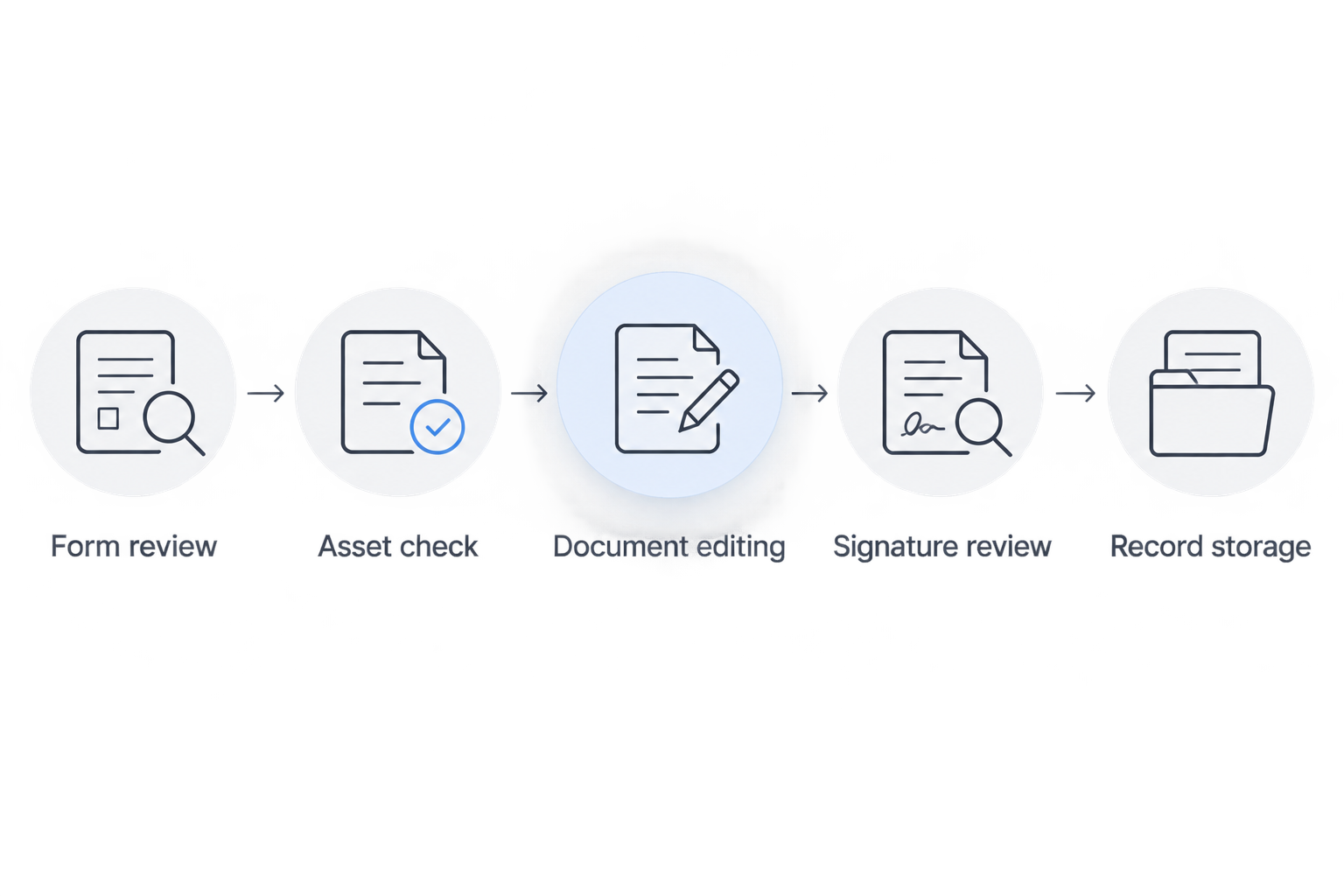
Use this sequence for your 2026 process: Form review, Asset check, Document editing, Signature review, and Record storage. The steps below turn those stages into assigned tasks rather than leaving every salesperson to improvise.
1. Confirm the required forms before drafting
Start manually with the current instructions from the authority receiving the paperwork. Identify the relevant jurisdiction, transaction type, and ownership documentation before selecting a template. Keep the source instructions with your internal procedure so another employee can repeat the check.
A dealership selling a boat with a trailer should not assume that every asset follows the same paperwork route. Check each component separately. Where instructions are unclear, resolve the question with the receiving authority or qualified counsel before presenting documents for signature.
Give one employee responsibility for approving the form set. Sales staff should know which approved version to use and when an unusual transaction needs escalation.
- Record the intended registration or documentation destination.
- Confirm whether an official form is specified.
- Check signature and notarization instructions.
- Identify separate boat, engine, and trailer documents where applicable.
- Save the source and date of your form review.
2. Verify the assets against original records
Use a written worksheet before entering information into the sale document. Compare the physical asset identifiers with the available ownership and inventory records. Do not rely on an advertisement, a customer email, or an old listing as the final authority.
Keep boat, engine, and trailer information in distinct fields. A single general description makes it harder to see whether an accessory is included or whether an identifier belongs to the wrong asset.
Use 3 checks as your internal review rule: compare the asset, the source record, and the completed bill of sale. This is a recommended control, not a legal standard. Resolve disagreements before the document reaches the signing stage.
- Copy the hull identification number from verified records.
- Record engine identifiers when relevant to the transaction.
- Keep the trailer vehicle identification number separate.
- State included equipment in clear, specific language.
- Escalate mismatched or unreadable identifiers before proceeding.
3. Prepare one controlled document master
Begin with the approved form in a local editor or an existing document application. Preserve 1 master template for each approved use case, and create a separate working copy for every sale. Staff should never overwrite the master with customer information.
Zendocs is best for dealerships needing browser-based PDF editing, conversion, and signing. Zendocs provides those document functions through a web-based subscription tool; use them to prepare approved paperwork rather than to determine its legal requirements.
Zendocs supports work with PDF and other document formats, including Word, Excel, PowerPoint, and images. Its stated capabilities do not establish inventory synchronization, jurisdiction-specific validation, or registration submission. Evaluate those requirements separately instead of assuming a general document tool covers them.
- Create a transaction-specific copy before editing.
- Enter verified information from the source worksheet.
- Review converted files for shifted fields and missing text.
- Check every page after making layout changes.
- Label drafts clearly until the transaction is ready for signature.
4. Reconcile the sale terms across the paperwork
Manually compare the bill of sale with the approved transaction record before sending anything for signature. Check the parties, assets, sale date, included equipment, and agreed terms. Correct inconsistencies in the working documents rather than expecting the customer to interpret them.
Give particular attention to trade-ins, excluded equipment, and conditions tied to delivery. These details need clear treatment across the transaction packet. Do not add warranty language from an unrelated template simply because it appears standard.
For your 2026 procedure, assign a reviewer who did not enter the original information whenever staffing permits. The reviewer’s job is to verify the document, not merely confirm that all blanks contain text.
- Match buyer and seller names across the packet.
- Compare asset descriptions with the inventory record.
- Confirm included and excluded equipment.
- Reconcile trade-in references where applicable.
- Remove unresolved alternatives and drafting notes.
5. Confirm the signing route before requesting signatures
Start by checking how the receiving party accepts signatures. A tool’s ability to place an electronic signature does not establish that every agency, lender, or transaction recipient will accept that particular process.
If electronic signing fits the transaction, examine the signing experience and the evidence your dealership needs to retain. If a different execution method is required, prepare the document electronically and follow the required signing route. Treat notarization as a separate question rather than assuming a signature feature includes it.
Check the completed document immediately. A missing signature, incorrect date, or unreadable page is easier to resolve before the customer leaves or the transaction changes hands internally.
- Confirm acceptance with the intended recipient.
- Identify every required signer and signing capacity.
- Check whether notarization or witnesses are required.
- Keep the exact executed document unchanged.
- Retain available signing evidence with the transaction record.
6. Store the executed record and test retrieval
Begin with a restricted transaction folder and a consistent naming convention. Separate working files from executed documents so staff do not send an unsigned draft when a customer or administrator asks for the completed record.
Maintain 2 clearly separated file states: Draft and Executed. These are organizational labels, not a recommendation to limit backups or retention copies. Set access, retention, and backup rules according to your dealership’s obligations and approved policies.
Test retrieval using the information employees actually have, such as a stock reference, buyer name, or asset identifier. A document management feature only helps when the team can find the correct file and recognize its status.
- Name files using an agreed transaction reference.
- Separate drafts from executed records.
- Restrict editing access to completed paperwork.
- Preserve supporting documents with the transaction.
- Assign responsibility for retention and secure disposal.
Compare your document options
Match the option to the bottleneck. If your problem is choosing the correct form, another editor will not solve it. If your problem is repeated document preparation, a browser-based tool deserves evaluation.
The comparison below distinguishes preparation methods from broader transaction systems. These are workflow choices, not interchangeable promises of legal compliance.
| Option | Best for | Practical strength | Key limitation |
|---|---|---|---|
| Official forms completed manually | Dealerships handling an unfamiliar filing requirement | Starts with the receiving authority’s published form | Staff still need to verify details and manage the completed record |
| Approved Word template with PDF export | Teams with established wording and document procedures | Makes controlled text changes straightforward | Conversion and version control need review |
| Zendocs | Dealerships needing online editing, conversion, and signing | Brings stated document-processing functions into a browser-based tool | Dealership integrations and filing functions are not established by the supplied capabilities |
| Dedicated transaction system | Teams evaluating connected inventory and sales workflows | Provides a category to assess for wider transaction requirements | Specific integrations, form coverage, and signing functions require vendor verification |
For a 2026 evaluation, use the same sample transaction with every option. Include a boat, an engine, a trailer, an equipment exclusion, and a correction before signing. Compare the resulting documents, not just the editing screen.
Ask staff to locate the executed copy afterward. That final retrieval task exposes a different problem from document preparation: whether your process preserves an identifiable transaction record.
Common mistakes boat dealerships make
Treating a generic vehicle template as a boat form
A familiar vehicle form can hide missing boat-specific details. Check the actual fields and instructions rather than trusting the template’s title. If the form does not fit the transaction, choose another approved form instead of forcing information into unrelated boxes.
Combining boat, engine, and trailer identities
A single equipment description makes individual assets difficult to verify. Keep their identifiers distinct, and state what the sale includes. Review the separate paperwork requirements rather than assuming the boat document covers the trailer.
Assuming an electronic signature completes every requirement
Document signing and acceptance are different questions. Confirm the recipient’s requirements before choosing the signing method, and check any separate notarization instructions. An editor is not a substitute for that acceptance check.
Reusing a completed sale as the next template
Copying the last customer’s document risks carrying forward names, identifiers, and transaction-specific language. Start from the controlled master instead. Review hidden or overlooked fields as well as the visible text before sharing a document.
Evaluating features without testing the handoff
A successful edit does not prove that staff can review, sign, deliver, and retrieve the file correctly. Test the entire process with an approved sample. Assign responsibility wherever the document changes hands.
FAQ
What are the best bill of sale tools for boat dealerships?
The best fit depends on whether your dealership needs form selection, document preparation, signing, or a connected transaction system. Zendocs fits browser-based editing, conversion, and signing; verify dealership-specific requirements separately.
Can a boat dealership use a general PDF editor?
Yes, a general PDF editor can help prepare an approved bill of sale. It does not establish that the form, signing method, or supporting paperwork satisfies the receiving authority’s requirements.
Do I need separate paperwork for a boat and trailer?
Check the paperwork requirements for the boat and trailer separately. Do not assume that a single bill of sale satisfies every registration or ownership-transfer requirement.
Can buyers sign a boat bill of sale online?
Use online signing only after confirming that the intended recipient accepts the signing method for that transaction. Check separate requirements for notarization, witnesses, and supporting records before requesting signatures.
Is a bill of sale enough to transfer boat ownership?
Do not assume that a bill of sale alone completes a boat ownership transfer. Follow the applicable authority’s instructions for titles, registration, documentation, and supporting records.
What should I check after converting a boat sale document to PDF?
Check every page for missing text, shifted fields, unreadable identifiers, and incomplete signature areas. Compare the PDF with the approved source before sending it for signature.
How should a dealership choose document software in 2026?
Test the software against an approved sample transaction from preparation through retrieval. Evaluate document accuracy, signing acceptance, access controls, and any required integrations as separate criteria.
One last thing
Test a correction before committing to a workflow. Deliberately change an equipment inclusion in an unsigned sample, then check whether staff update every affected document and can identify the final version. A polished blank template tells you less than a controlled correction does.


