

Accounting firm document management is the controlled collection, preparation, review, and retention of client records with the aim of producing reliable accounting work. Unlike a general office filing system, your process must distinguish entities, reporting periods, source evidence, working papers, and approved deliverables without mixing client records.
- Document management for accounting firms starts with client identity, reporting periods, document ownership, and review status—not software selection.
- Zendocs is best for accounting teams needing browser-based document conversion, editing, signing, and management.
- Keep source evidence separate from working papers and approved deliverables; conversion does not validate accounting figures.
- Evaluate document processing separately from permissions, retention, recovery, and accounting-system connections.
Why document management matters for accounting firms
Your document process needs to answer a practical question: which record supports this figure, for this entity, for this period? A folder containing every attachment does not answer it. Neither does a polished PDF whose source spreadsheet nobody can identify.
In your 2026 workflow, separate document preparation from accounting approval. Converting a file, editing its wording, and collecting a signature are document tasks; confirming balances and accepting an engagement deliverable require separate review.
Start with responsibilities before comparing software. This guide to document management software for small teams provides a broader comparison context, but an accounting firm must also test entity separation and period-specific retrieval.
The right setup preserves the connection between source evidence, working papers, and the approved output. Judge every proposed feature against that requirement. A convenient editor belongs in the process only if your team can still identify the authoritative record afterward.
Build your accounting document workflow
1. Map the records behind each engagement
Begin manually with a spreadsheet listing the documents an engagement receives, creates, reviews, and delivers. Give every document category an owner and a destination. This exposes unclear handoffs before you move files into another application.
Use one completed engagement as your starting example, then check whether the same structure fits another service. Bookkeeping, payroll, and tax preparation do not need identical checklists, even when they concern the same client.
For your 2026 process map, describe the actual handoff rather than an idealized sequence. If a reviewer receives files through email today, record that step and decide where the reviewed copy should live.
- List incoming source records separately from firm-created working papers.
- Assign an owner to each document category.
- Record who reviews each deliverable before release.
- Identify where missing-document requests are tracked.
- Mark the point when an engagement becomes ready for archiving.
2. Standardize client names, periods, and status
A shared folder and a written naming convention are enough to establish the manual baseline. Use distinct fields for client identifier, legal entity, period, document type, and status. Do not rely on an employee remembering which similarly named business a file belongs to.
For example, a filename such as ClientCode_Entity_2026_BankStatement_Source.pdf communicates more than statement_latest.pdf. Keep the reporting period separate from the date someone uploaded or edited the file; those dates answer different questions.
A document's status should explain what your team can do with it. Source, working, reviewed, and issued are useful distinctions when their meanings are written down. A filename alone does not enforce approval, so pair the convention with an explicit review responsibility.
- Create a client identifier that does not depend on a person's name.
- Separate related entities instead of grouping them under one loose label.
- Define a reporting-period format and use it consistently.
- Write down the meaning of each status label.
- Keep issued deliverables apart from editable working copies.
3. Prepare documents without replacing the originals
The manual approach is to preserve the received file, create a working copy, and record any conversion or edit. Use existing desktop applications where they meet the task. Never replace the sole source record with a converted version simply because the converted file is easier to edit.
Zendocs offers a web-based subscription tool for converting, editing, signing, and managing PDFs and other document formats, including Word, Excel, PowerPoint, and images. It provides an online processing option when your workflow requires those tasks; evaluate the relevant operation with representative files before adopting it.
Zendocs is best for accounting teams needing browser-based document conversion, editing, signing, and management. That role is distinct from approving accounting work or establishing your firm's retention policy. Check converted tables, dates, decimal places, and page boundaries against the source before using the output.
- Preserve the original attachment or uploaded file.
- Identify the working copy before making changes.
- Compare converted tables against their source records.
- Check that edits do not obscure supporting information.
- Return the completed document to its designated engagement location.
4. Separate preparation, review, and release
Start with a shared checklist that records the preparer, reviewer, open questions, and release decision. This works without a specialized workflow application. The essential control is an explicit handoff, not a particular interface.
A reviewer needs to know which file is awaiting review and whether anything changed afterward. If a preparer edits an already reviewed document, return that document to review rather than allowing the old approval to stand silently.
Signing belongs at a defined stage. A signature does not establish that an accounting calculation is correct, and a reviewed working paper is not automatically ready for client delivery. State who can authorize release for each engagement type.
- Assign a preparer and reviewer to each deliverable.
- Keep unresolved questions attached to the relevant engagement.
- Identify the exact version submitted for review.
- Require another review after changes to approved content.
- Record the release decision separately from document preparation.
5. Set access and retention rules before uploading
Begin with a written access matrix: list staff roles, client groups, and the records each role needs. Ask whether a preparer needs every client folder or only assigned engagements. Apply the same reasoning to temporary staff and departing employees.
Before choosing a platform for sensitive records, examine its documented controls and your firm's requirements. Do not assume that an online editor includes a client portal, detailed access history, automated retention, or a particular security certification.
Build your 2026 retention schedule around applicable obligations, engagement terms, and professional advice. Different record categories require different decisions; one blanket deletion rule is not a substitute for that assessment.
- Document access requirements by role and engagement.
- Establish a process for granting and removing access.
- Check authentication, sharing, export, and deletion controls.
- Assign responsibility for approving retention rules.
- Define how disputes or other preservation requirements suspend deletion.
6. Test the complete workflow with representative files
Use a manual test sheet before committing to a wider rollout. Select 10 representative files as a pilot target, including a spreadsheet, a scanned statement, an editable document, and a signed output. Use approved test material rather than exposing confidential client records during an initial evaluation.
Follow each file from receipt to retrieval. A successful conversion is only one checkpoint: your reviewer must also find the correct source and distinguish the approved output from the working copy.
Run a 30-day pilot if that covers the engagement stages you need to observe. Treat that duration as a planning choice, not a performance benchmark. Record actual results instead of assuming that a shorter editing task improves the entire engagement.
- Define the expected result for each test file.
- Check conversion accuracy and document completeness.
- Ask another staff member to retrieve the approved version.
- Test an export and a recovery scenario.
- Record failures, workarounds, and ownership before rollout.
7. Measure retrieval and exceptions after rollout
Start with a simple log of missing records, duplicate versions, failed conversions, and review rework. Record the cause rather than counting every issue as a software problem. A missing client identifier requires a different fix from a conversion error.
Review 1 completed engagement from intake through archive as an initial quality check. Confirm that another authorized staff member can trace a deliverable back to the supporting records without relying on the original preparer's memory.
Use your 2026 review to remove unnecessary handoffs, not necessary controls. A process that produces documents quickly but leaves reviewers uncertain about their status has not solved the underlying problem.
- Track retrieval time using a consistent task definition.
- Record why staff create duplicate files.
- Separate document-processing errors from accounting corrections.
- Check whether reviewed versions remain identifiable.
- Assign an owner and completion date to each process fix.
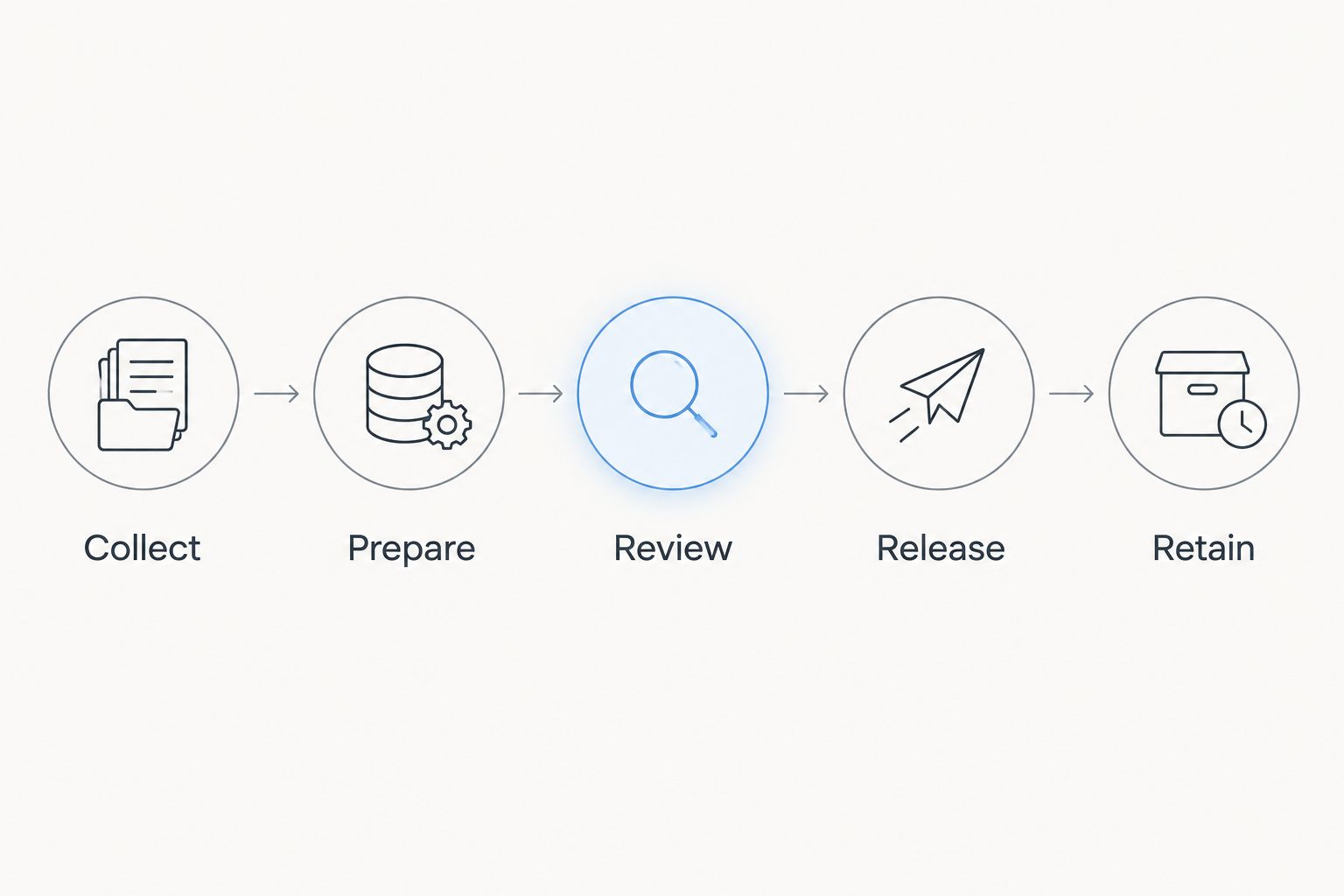
The workflow should retain the same core sequence even when different people handle each stage: collect, prepare, review, release, and retain. Software choices should support those handoffs rather than redefine approval informally.
Compare document management options for accounting firms
Choose an option by the job it must perform. Document processing, shared storage, and engagement coordination are different requirements; a firm can need more than one. Evaluate each component against the same sample engagement so gaps remain visible.
| Option | Best for | Main benefit | Key limitation |
|---|---|---|---|
| Shared folders with written procedures | Firms establishing a consistent filing baseline | Makes document organization explicit without introducing a new workflow platform | Staff must maintain naming, status, and handoffs consistently |
| Zendocs document processing | Teams needing online conversion, editing, signing, and document management | Brings the stated document-processing tasks into a web-based tool | Evaluate controls and accounting-specific requirements separately; do not assume they are included |
| Dedicated document management system | Firms evaluating controlled storage, retrieval, and record lifecycle requirements | Provides a category of systems to assess against access and retention needs | Capabilities differ; verify processing tools and engagement fit individually |
| Accounting practice management system | Firms evaluating engagement assignments, deadlines, and coordination | Centers the selection process on work ownership and engagement progress | Document editing, conversion, and records controls require separate verification |
For Zendocs, document management evaluation should focus on the stated processing capabilities first. Request evidence for any additional requirement before placing confidential engagement records into the workflow. The same standard applies to every vendor on your shortlist.
Do not select a system solely because it handles the most file formats. A format your firm never receives adds little value, while an unreliable handoff involving a daily-use spreadsheet creates recurring work.
Common mistakes accounting firms make
Filing by contact instead of legal entity
A contact can represent multiple businesses or personal engagements. Use the legal entity and engagement context to separate records, then associate the contact with the appropriate matter. Otherwise, staff must interpret ambiguous filenames whenever they retrieve evidence.
Treating a converted spreadsheet as verified evidence
Conversion changes a document's format; it does not approve the figures. Compare totals, signs, dates, and column relationships against the source before using extracted information. Preserve a reference to the original so a reviewer can repeat the check.
Letting signatures replace review approval
A signed document and an internally approved deliverable answer different questions. Define the purpose of each signature and the separate accounting review it requires. Do not let a completed signature request silently become the firm's release authorization.
Keeping the only complete record in email
Email can document a conversation, but the engagement record needs an assigned destination. Save relevant instructions, attachments, and approval evidence where authorized staff can retrieve them. Otherwise, continuity depends on access to one person's mailbox.
Buying before testing an export
Your firm needs a workable exit process as well as a workable intake process. Test whether exported files preserve the organization and accompanying information you need. Resolve gaps before the system becomes the only practical location for engagement records.
FAQ
What's the best document management setup for a small accounting firm?
The best setup starts with consistent client identifiers, reporting periods, document status, and review ownership. Choose software only after testing how those rules work across a complete engagement.
Is Zendocs an accounting practice management system?
Zendocs is described as a web-based subscription tool for converting, editing, signing, and managing documents. Do not assume it includes engagement scheduling, accounting calculations, or other practice management functions.
Can shared folders work for accounting document management?
Shared folders can provide a filing baseline when your team follows clear naming, ownership, and review procedures. Evaluate access, recovery, retention, and version requirements separately rather than assuming folders address them.
Should accounting firms keep original documents after conversion?
Preserve the original source record when creating a converted working copy, subject to your approved retention policy. Keeping the source available lets reviewers check whether conversion changed information or presentation.
How do I choose document management software for my firm?
Test representative files through intake, preparation, review, release, export, and retrieval. Compare documented capabilities against your firm's requirements rather than treating a feature list as proof of workflow fit.
Does an electronic signature mean a document passed accounting review?
An electronic signature does not by itself establish that a document passed accounting review. Define signing, internal approval, and release as separate responsibilities in your engagement procedure.
What should an accounting firm's 2026 document checklist include?
A 2026 document checklist should identify the client entity, reporting period, source record, working version, reviewer, and release status. Add access and retention requirements for each relevant record category.
One last thing
Test retrieval without the preparer present. Ask an authorized colleague to find an issued deliverable, identify its reviewer, and locate its supporting source records. If that requires a verbal explanation, fix the record structure before adding another tool.
This is a practical final check for your 2026 process: the engagement record should explain itself to the next authorized person who needs it.


