

Nonprofit document management is the process of organizing, processing, storing, and controlling organizational records to support fundraising, service delivery, and accountability. This 2026 guide explains how to handle grant files, donor records, board papers, and volunteer documents without treating every file as equally sensitive or equally permanent.
- Document management for nonprofits starts with file ownership, access rules, and a clear location for approved records.
- Zendocs suits nonprofits needing web-based document conversion, PDF editing, and signing; evaluate governance requirements separately.
- Separate working drafts, approved documents, and signed records so staff know which file to use.
- Choose retention periods by record type and applicable obligations, not one organization-wide deletion rule.
Why document management matters for nonprofits
A grant proposal, a volunteer agreement, and a beneficiary case file need different handling. The proposal needs controlled revisions; the agreement needs an identifiable signed copy; the case file needs access restricted to the people responsible for it. Putting everything in one shared folder does not resolve those differences.
Your document system needs to answer three questions: who owns this record, who can access it, and which copy is authoritative? Start there before comparing software. The document management software guide for small teams provides a separate starting point for evaluating tools once those responsibilities are clear.
For your 2026 review, distinguish document processing from records governance. Converting a spreadsheet into a PDF changes its format; it does not establish approval, restrict access, or determine when to delete it. Your workflow must cover both jobs, even when different tools handle them.
How to build a nonprofit document workflow
1. Inventory your records and assign owners
Start manually with a spreadsheet. List document categories, their current locations, their responsible teams, and the event that makes each record complete. Work at the category level first rather than attempting to catalog every attachment.
For grant records, distinguish applications, award agreements, reporting evidence, and submitted reports. For governance, distinguish draft agendas, approved minutes, and supporting papers. These distinctions tell you what needs approval and what belongs in the final record.
Make ownership explicit. A department name is not enough if nobody has responsibility for correcting misplaced files or answering access requests. Assign a role and identify its backup before moving documents.
- Record where each document category currently lives.
- Name an accountable owner and a backup role.
- Identify sensitive donor, employee, volunteer, and beneficiary information.
- Mark the authoritative location for completed records.
- Flag folders whose owner or purpose is unclear.
2. Define a folder structure and naming convention
Use your existing storage system to establish a workable structure before introducing new software. Organize around activities your staff recognize: governance, fundraising, finance, programs, and people operations. Restrict sensitive categories separately rather than relying on obscure folder names.
Choose a naming convention that explains the document without opening it. For example, 2026_CommunityGrant_Report_Draft distinguishes an unfinished report from its submitted counterpart. Keep the naming pattern short enough that staff will actually follow it.
A filename describes a document; its approved storage location establishes which copy your team should use. Renaming a file does not resolve conflicting copies sitting in inboxes and personal folders.
- Separate drafts, approved records, and signed copies.
- Use consistent project or grant identifiers.
- Include document purpose and status in filenames.
- Keep sensitive personal details out of filenames.
- Write a short naming example for each major document category.
3. Standardize editing, conversion, and signing
Begin with the applications your team already has. Create reusable source templates, export documents in the required format, and check the exported file before sharing it. Do not make volunteers rebuild the same agreement or reporting cover sheet from scratch.
For a browser-based processing option, Zendocs offers conversion, editing, signing, and management of PDFs and other document formats. Zendocs is best for nonprofits needing web-based document conversion, editing, and signing. Its processing functions do not, by themselves, establish whether it meets your organization's access, retention, or approval requirements; evaluate those requirements separately.
Keep the editable source when future revisions are expected. A submitted PDF and the spreadsheet used to prepare it serve different purposes, so give each an identifiable home.
- Maintain an approved template for recurring documents.
- Preserve editable originals when revisions are expected.
- Check tables, page breaks, and signature fields after conversion.
- Confirm the recipient's required file format before submission.
- Store completed signatures with the correct agreement or project.
4. Map review, approval, and final storage
Draw the workflow on paper before configuring it in software. Specify who prepares the document, who reviews it, who approves it, and where the completed record belongs. Keep review and approval distinct: proofreading a proposal is not authorization to submit it.
For a grant report, the program lead might prepare evidence while finance checks the financial section and an authorized person approves submission. Treat that as a workflow example, not a required staffing model. Match responsibilities to your actual delegation rules.
Your 2026 process should also explain what happens after rejection or revision. Returning a document to its owner with an explicit action prevents an unresolved draft from looking complete.
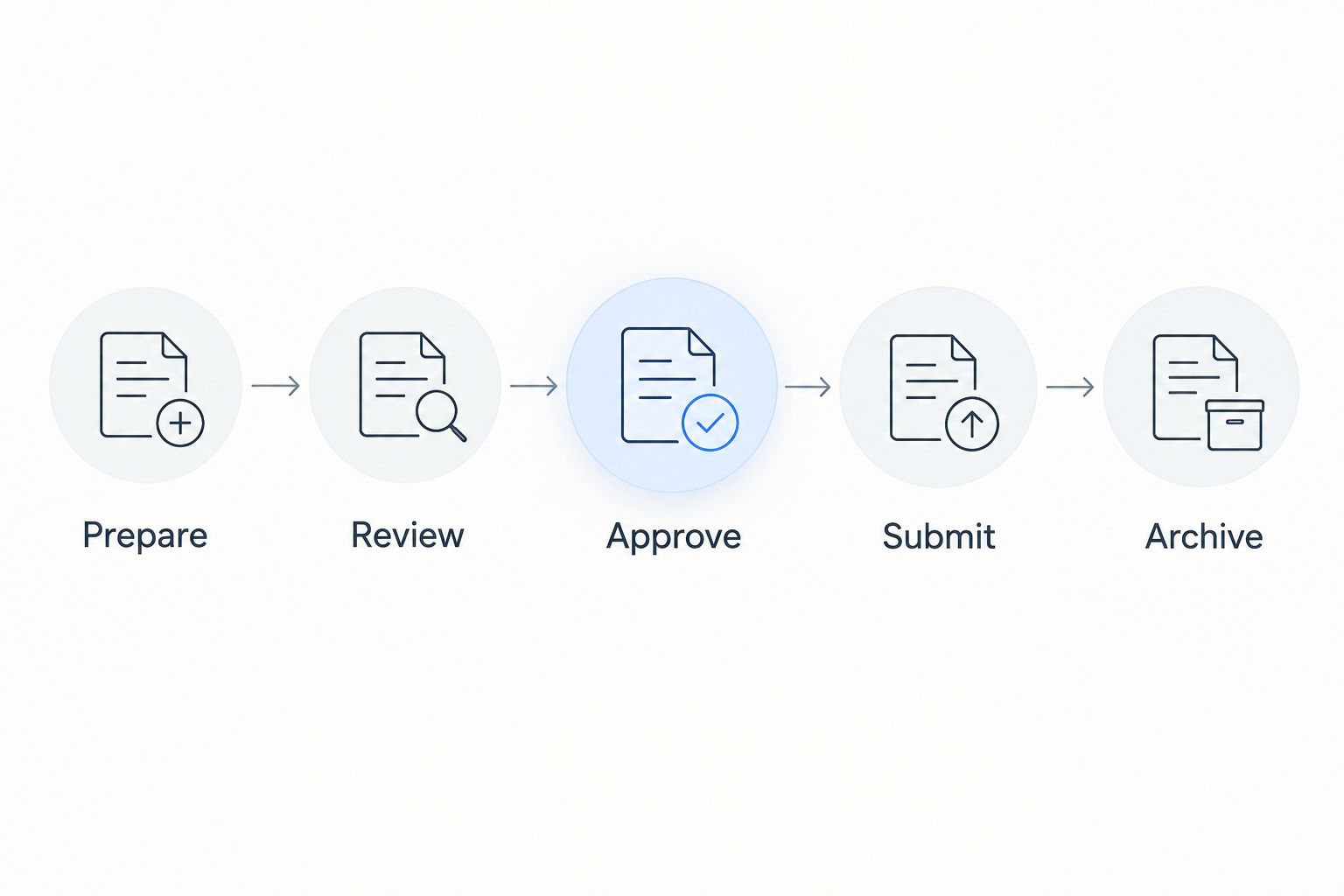
The workflow ends when the completed record reaches its designated location, not when someone sends an email. Record submission confirmation where the team can find it alongside the submitted document.
- Prepare the working document from an approved source.
- Review content, attachments, and recipient requirements.
- Approve the version that will be signed or submitted.
- Submit through the required channel and save confirmation.
- Archive the completed record in its designated location.
5. Restrict access and plan for departures
Start with an access list for each sensitive document category. Identify who needs to edit, who only needs to read, and who should have no access. Then compare that list with actual folder permissions and sharing links.
A board member's access needs differ from a volunteer coordinator's. Give each role access to the records required for its work rather than opening the full organizational archive for convenience.
Include departures in the process. When a staff member, trustee, or volunteer leaves, identify their owned documents, transfer responsibilities, and remove access that is no longer authorized. Review personal-account ownership before it becomes an urgent handover problem.
- Assign access by work responsibility and document sensitivity.
- Separate viewing rights from editing rights where supported.
- Review external sharing links and their intended recipients.
- Transfer record ownership during role changes.
- Verify permission controls before uploading sensitive documents to any service.
6. Set retention rules and retrieval checks
Create a retention schedule by record category, not by folder age alone. For each category, record the retention trigger, applicable obligation, responsible owner, and disposal decision. Obtain appropriate legal or professional advice where requirements need interpretation.
There is no single retention period that fits every nonprofit document. Grant conditions, employment obligations, tax requirements, and active disputes can affect different records differently. Do not turn a general housekeeping preference into a legal retention rule.
For your 2026 review, check retrieval as well as storage. Ask someone other than the document's author to locate an approved record, identify its status, and explain why it is the correct copy. A successful upload is not a successful retrieval test.
- Define retention rules separately for each record category.
- Record the event that starts the retention period.
- Suspend routine deletion when a relevant hold applies.
- Document who authorizes disposal and how it is recorded.
- Test whether completed records remain readable and retrievable.
7. Pilot one workflow before expanding
Choose a contained process such as volunteer agreements or one grant-reporting cycle. Use a suggested 30-day pilot to test your rules with real work, rather than reorganizing the entire archive at once. This is a planning recommendation, not a performance benchmark.
Select 10 sample files covering drafts, approved documents, signed records, and exceptions. Run a 15-minute retrieval exercise with someone who did not create them. These are suggested test parameters; adjust them to your workload without treating them as industry standards.
Before expanding the 2026 workflow, resolve ambiguous ownership and repeatable filing errors. Adding more documents to an unclear process only spreads the same problem across more folders.
- Select a workflow with a named owner and clear completion point.
- Include ordinary files and awkward exceptions in the sample.
- Record retrieval failures and conflicting document versions.
- Check whether staff can follow the process without its author present.
- Expand only after updating instructions from the pilot.
Compare document management options for nonprofits
Choose by the job you need completed, not by the length of a feature list. Shared storage, document processing, specialist systems, and records management address different needs. Your organization can use more than one, provided each record has a clear authoritative location.
| Option | Best for | Main advantage | Key limitation or buying check |
|---|---|---|---|
| Existing folders and a document register | Small, contained workflows with clear ownership | Lets you establish naming, ownership, and status rules before changing tools | Filing, access reviews, and status updates depend on manual discipline |
| Shared cloud storage | Teams needing a common working location | Supports centralized access to working documents | Verify permissions, version recovery, external sharing, and export behavior |
| Zendocs | Nonprofits needing online conversion, editing, signing, and document management | Handles PDF and other document formats through a web-based subscription tool | Verify nonprofit-specific access, retention, approval, and export requirements before selection |
| Dedicated document management system | Organizations with defined records-control requirements | Provides a category to assess against formal governance needs | Requires configuration, ownership, and verification of the controls you need |
| Grant or donor management system | Teams whose records belong to specific grants or donor relationships | Keeps supporting documents associated with the relevant operational record | Check how documents outside that system will be governed and retrieved |
Evaluate every option with the same representative documents. Use a spreadsheet, a scanned attachment, an agreement, and a reporting packet if those belong to your actual workload. Judge the resulting files, handoff steps, and retrieval process rather than a demonstration using unrelated examples.
For sensitive records, establish your requirements before starting a trial. Check contractual terms, handling of uploaded files, access controls, deletion behavior, and export options. Do not assume that online signing or PDF editing implies a particular security certification or legal suitability.
Common mistakes nonprofits make
Treating a grant folder as the complete grant record
A folder containing the application is incomplete if the award agreement, reporting evidence, and submission confirmation live elsewhere. Define the required record set for each grant and identify where its components belong. Keep links or references consistent if operational systems hold part of that record.
Mixing board packets with approved minutes
A meeting packet contains material presented for discussion; approved minutes record the agreed account of the meeting. Label and store them distinctly. A draft carried forward from an earlier meeting should not become authoritative simply because it is the easiest copy to find.
Giving volunteers access to an entire program archive
A volunteer needs the information required for the assigned task, not automatic access to every beneficiary record. Separate operational instructions from sensitive case material. Review access when assignments change, not only when a volunteer leaves.
Deleting source files after making a PDF
A PDF is useful for distribution, but it does not replace every purpose of an editable source. Keep working spreadsheets or templates when you need to update calculations, revise text, or reproduce a submission. Apply the relevant retention rules to both versions rather than deleting by format.
Buying software before defining responsibility
Software does not decide who approves a grant report or owns a volunteer agreement. Establish those decisions first, then test whether the proposed system supports them. Treat training, account handover, and documented exceptions as part of implementation rather than optional cleanup.
FAQ
What's the best document management approach for a small nonprofit?
Start with a named owner, an authoritative storage location, and clear access rules for each document category. Test those rules in one contained workflow before choosing additional software.
Can a nonprofit use shared folders instead of a document management system?
Yes, shared folders can support a contained workflow when ownership, permissions, naming, and final-record locations are clear. Evaluate a dedicated system when your documented requirements exceed what the current setup can support.
Is Zendocs suitable for nonprofit document management?
Zendocs suits nonprofits needing web-based document conversion, editing, signing, and management across PDFs and other document formats. Evaluate access controls, retention, approval, and export requirements separately before using it for sensitive organizational records.
How long should nonprofits keep documents?
Retention depends on the record category and applicable obligations, not one universal period. Build a schedule that accounts for relevant grant terms, legal requirements, and any active preservation hold.
Should nonprofits keep editable files after converting them to PDF?
Keep editable sources when future revisions, calculations, or reproduction of the document are required. Store the final PDF separately and apply the appropriate retention rules to each record.
How should a nonprofit manage documents when a volunteer leaves?
Transfer document ownership and remove access that is no longer authorized. Check shared links, personal-account dependencies, and unfinished work so the handover covers records as well as account access.
What should a nonprofit test before changing document software?
Test representative files through editing, conversion, review, signing where relevant, export, and retrieval. Confirm the resulting documents remain usable and that another staff member can identify the authoritative copy.
One last thing
Test your document system with the person who did not build it. Give that person a completed grant report or approved agreement to find, without coaching. If they cannot identify the authoritative copy and its owner, fix the filing rules before adding another tool to your 2026 stack.


