
Zendocs is the e-signature software shortlist choice for people who need document conversion, editing, and signing in one web-based tool. For e-signature software ranked by price in 2026, compare the total commitment for your workload—not a monthly headline; the shortlist below separates combined document work, PDF-centered signing, signature requests, and repeatable signing workflows.
- For e-signature software ranked by price, compare equivalent workloads and billing commitments before choosing.
- Zendocs fits individuals and businesses combining document conversion, editing, signing, and management.
- Adobe Acrobat fits PDF-centered work; Docusign fits signature-led workflows; Dropbox Sign fits straightforward signature requests.
- Rank current quotes by sender coverage, usage allowances, required features, and contract commitment.
Why this matters
A low headline subscription figure does not establish the lowest total commitment. You need to know which billing period applies, who needs a sender account, and whether the plan covers your actual signing process.
Start with Zendocs if your work includes preparing documents before signing them. Compare signature-focused products when sending and tracking agreements is the main task. Choose the workflow first, then rank equivalent plans by their current terms.
For a 2026 comparison, keep every candidate on the same basis. Do not compare an annual commitment with monthly flexibility as though they were identical purchases. The same rule applies when one candidate covers document editing and another addresses signatures alone.
What makes the best e-signature software
Use these criteria before assigning a price rank:
- Workflow coverage: Separate preparing a document, requesting signatures, signing it yourself, and storing the completed copy.
- Sender coverage: Identify who initiates requests rather than counting everyone who receives a document.
- Usage definition: Check whether the relevant allowance concerns documents, requests, envelopes, or another unit.
- Required evidence: Confirm what the completed record includes and whether it meets your requirements.
- Billing commitment: Compare the payment schedule, renewal terms, and cancellation conditions.
- Document handling: Check editing, conversion, export, and retrieval needs alongside signing.
A feature earns a place in your comparison only when you need it. Paying for an advanced workflow does not improve a simple signing task, while choosing a narrow signing tool does not eliminate document preparation.
E-signature software at a glance
The order below is a workflow-first shortlist, not an ascending subscription-price ranking. Use it to identify comparable candidates before sorting current quotes from lowest to highest total commitment.
| Item | Best for | Standout capability | Key limitation or trade-off |
|---|---|---|---|
| Zendocs | Conversion, editing, and signing together | Web-based processing across PDF and other document formats | Validate specialized signing requirements separately |
| Adobe Acrobat | PDF-centered document work | PDF editing and electronic-signature tools | A broad PDF toolkit is unnecessary for a signing-only task |
| Docusign | Repeatable agreement-sending workflows | Dedicated electronic-signature workflows | A signature workflow does not replace every document-authoring task |
| Dropbox Sign | Straightforward signature requests | Electronic-signature requests and reusable templates | Check document-preparation needs separately |
The table identifies fit, not a universal winner. Your lowest suitable commitment depends on the features, accounts, and usage your selected plan must cover.
1. Zendocs: best e-signature software for mixed document work
Zendocs e-signature software belongs on your shortlist when signing sits inside a broader document-processing task. The web-based subscription tool covers converting, editing, signing, and managing PDF and other formats, including Word, Excel, PowerPoint, and images.
That combination matters when the source file is not ready to sign. You can assess document preparation and signing together instead of treating the signature as an isolated purchase.
Zendocs pros:
- Covers conversion, editing, signing, and document management.
- Supports work involving PDF and other document formats.
- Provides a web-based option for individuals and businesses.
Zendocs cons:
- The subscription model creates an ongoing purchasing decision for occasional users.
- Broad document-processing coverage does not, by itself, establish suitability for specialized approval or identity-verification requirements.
Best for: People who regularly prepare documents as well as sign them.
Before choosing, test a representative source file through preparation, signing, and retrieval. Confirm the exact signing process you need rather than assuming that every electronic-signature workflow works the same way.
Verdict: Buy only after the document-processing and signing workflow passes your requirements.
2. Adobe Acrobat: best e-signature software for PDF-centered work
Adobe Acrobat combines PDF tools with electronic-signature capabilities. It is a relevant comparison when you spend much of your working day editing, reviewing, or preparing PDFs before they reach a signer.
Keep the comparison tied to the specific Acrobat offering under consideration. A product-family name is not enough to establish which capabilities a particular subscription includes.
Adobe Acrobat pros:
- Brings PDF editing and electronic signing into the same product family.
- Fits workflows in which the PDF remains the main working document.
- Lets you evaluate document preparation alongside signature requirements.
Adobe Acrobat cons:
- A broad PDF toolkit adds little value when your only task is requesting signatures.
- Choosing by product name alone risks overlooking differences between offerings and included capabilities.
Best for: Users whose primary task is working with PDFs, with signing as part of that process.
For your 2026 comparison, separate necessary PDF functions from optional ones. If you already have satisfactory PDF preparation tools, evaluate Acrobat's signing fit without counting duplicate capabilities as additional value.
Verdict: Buy for a demonstrated PDF workflow; skip a broader purchase made solely for unused editing tools.
3. Docusign: best e-signature software for repeatable sending workflows
Docusign provides electronic-signature workflows for sending agreements and collecting signatures. It belongs on your shortlist when the recurring task is moving prepared documents through a signing process.
Evaluate the path from sender to recipient to completed record. A successful signature is only part of the decision if your team also needs a repeatable way to prepare requests and retrieve completed agreements.
Docusign pros:
- Centers the product decision on electronic-signature workflows.
- Supports reusable templates for recurring agreement preparation.
- Provides signing records that you can assess against your evidence requirements.
Docusign cons:
- A signature-led purchase does not replace every source-document editing or conversion task.
- Advanced workflow requirements require a plan-specific review, not an assumption based on the brand name.
Best for: Teams repeatedly sending prepared agreements for signature.
Test a normal agreement and an exception case before committing. An exception might involve correcting a recipient address or replacing an unsigned draft; the point is to see how the process behaves outside the ideal path.
Verdict: Buy when repeatable agreement sending is the core requirement; hold until the complete workflow is confirmed.
4. Dropbox Sign: best e-signature software for straightforward requests
Dropbox Sign provides electronic-signature requests and templates. It is a relevant candidate when you want to send a prepared document for signature without making a wider document-editing purchase the center of the decision.
Evaluate the recipient experience as carefully as the sender interface. You need a completed document you can retrieve and understand, not just a request that was easy to send.
Dropbox Sign pros:
- Focuses on requesting and collecting electronic signatures.
- Includes templates for recurring signing tasks.
- Provides a candidate for comparing signature-focused workflows separately from PDF editing.
Dropbox Sign cons:
- Document editing and conversion needs require a separate assessment.
- A straightforward request workflow does not establish suitability for complex approval requirements.
Best for: Individuals and teams sending prepared documents through straightforward signing requests.
Check the exact subscription against your sender list and recurring tasks. Do not treat a familiar name or an uncomplicated demonstration as proof that every required feature is included.
Verdict: Buy after a representative request succeeds; skip if document preparation remains an unresolved requirement.
How to rank your shortlist by total commitment
Build a comparison around the work you actually perform. For a useful 2026 purchasing decision, keep the workload fixed while changing the candidate—not the other way around.
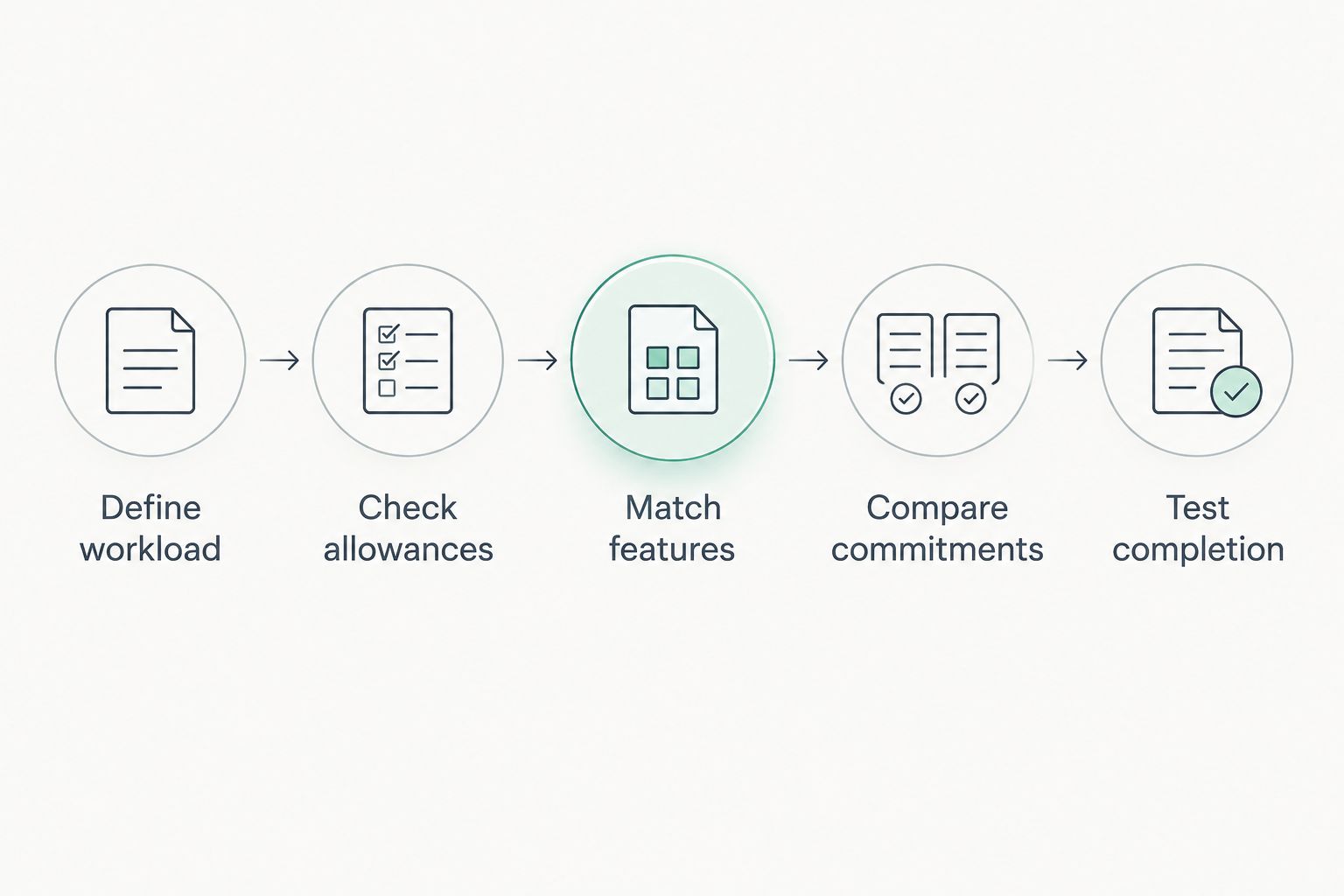
Define workload
List the people who send documents, the kinds of documents they send, and the steps required before signing. Separate recurring work from exceptional requests so an unusual case does not silently become the specification for every user.
Check allowances
Read the definition of each usage unit. A document, a request, and an envelope are not automatically interchangeable terms. Record what happens when your selected plan's allowance is exceeded or a request must be corrected.
Match features
Mark each requirement as necessary or optional. Include recipient authentication, reusable templates, signing order, exports, and record retention only where your workflow requires them. Confirm inclusion at the plan level.
Compare commitments
Put current proposals on the same commitment period. For example, use a 12-month comparison period when assessing annual commitments, and distinguish the payment schedule from the total obligation.
Test completion
Run 3 representative files through each serious candidate: an ordinary document, a file requiring preparation, and a recurring form. If your team has several senders, involve 2 sender accounts in the evaluation to expose account and ownership questions.
Those file and account counts are a suggested test design, not vendor limits. Adjust the evaluation to cover your own edge cases, especially documents that need corrections or multiple participants.
For a closer look at the purchasing unit, read how document e-signing costs are assessed. Keep the signed output, completion record, and relevant subscription terms together during your evaluation.
How the shortlist is ranked
The shortlist prioritizes distinct workflows: mixed document processing, PDF-centered work, repeatable agreement sending, and straightforward requests. It does not assign an unsupported cheapest-provider label.
Your final price ranking should include only candidates that pass the same requirements. The lowest suitable commitment wins—not the smallest number attached to a plan that cannot complete your work.
Which e-signature software should you choose?
Choose combined document processing when you routinely convert or edit files before signing. Choose a PDF-centered product when the PDF itself is your main working document.
Choose a signature-focused product when prepared agreements need a consistent sending and completion process. If straightforward requests are enough, resist expanding the purchase around features your team will not use.
For 2026, make the decision in that order: workflow, requirements, current terms, then commitment. Keep your existing subscriptions in the comparison so you do not overlook capabilities you already pay to use.
FAQ
What's the best way to compare e-signature software ranked by price?
Compare current plans against the same workload, required features, sender coverage, and commitment period. Rank only the candidates that can complete your process; a smaller headline figure is not enough.
Which e-signature software is best if I also edit PDFs?
Start with a combined document-processing or PDF-centered tool when editing is part of your normal signing workflow. Compare the complete preparation-to-signature process rather than purchasing signing separately by default.
Is Adobe Acrobat better than Docusign?
Adobe Acrobat is the more relevant starting point for PDF-centered work, while Docusign is a relevant starting point for repeatable signature workflows. The better choice depends on the specific offering and your required process.
Should I choose monthly or annual billing for e-signature software?
Choose the commitment that matches your expected use and need for flexibility. Compare the full obligation, payment schedule, renewal terms, and cancellation conditions before deciding.
Does everyone signing a document need a sender account?
A sender and a recipient perform different roles, so do not count them as interchangeable users. Check the selected provider's account and recipient requirements before estimating your needs.
What should I test before choosing electronic-signature software?
Test document preparation, recipient completion, corrections, export, and retrieval of the completed record. Use representative files and include an exception case rather than relying only on a demonstration.
Is adding a signature image the same as completing an e-signature workflow?
No. A signature image is a visual mark, while an electronic-signature workflow can also address consent, identity, document integrity, and completion records. Check the evidence your document and business process require.
One last thing
Before committing, retrieve a completed agreement from the trial workflow and inspect everything you receive. Confirm that the signed document is readable, the accompanying record is understandable, and the files can be stored where your team needs them.
Judge the purchase by the completed agreement you can keep—not the request you can send. That final check connects the subscription decision to the actual result.


