

eForms is a useful starting point for legal document templates when you need to create an agreement rather than edit an existing file. Its template-first approach stops being the right fit when your main task is converting, revising, signing, or managing documents you already have. The best eForms alternative in 2026 is Zendocs for online document processing; Adobe Acrobat for PDF-focused work; DocuSign for signature workflows; and Rocket Lawyer for guided legal-document creation.
- Among eforms alternatives, Zendocs fits online PDF editing, document conversion, signing, and management.
- Adobe Acrobat fits PDF-focused work; DocuSign fits electronic-signature workflows.
- Rocket Lawyer fits guided legal-document creation rather than general file conversion.
- Stay with eForms when finding a suitable legal template remains your main task.
Why this matters
A legal template service and a PDF editor solve different problems. One helps you start with document language; the other helps you work with a file. Choosing between them without identifying that distinction leads to a tool that handles the wrong part of your workflow.
For your 2026 shortlist, separate document creation from document processing. If you already have the agreement, application, spreadsheet, or scanned page, focus on what must happen to that file next. If you still need the right wording, prioritize the document's purpose and jurisdiction before its appearance.
Choose by the task you need to finish, not by the number of features on a comparison page. Signing a document does not establish that its terms are appropriate, and changing its format does not check its legal meaning.
eForms alternatives at a glance
The table includes eForms so you can compare staying with your current approach against changing tools. These are use-case recommendations, not a claim that every option replaces every eForms function.
| Tool | Best for | Standout focus | How it differs from eForms |
|---|---|---|---|
| eForms | Starting with legal document templates | Legal forms and template-based document creation | Benchmark option when you need document language first |
| Zendocs | Processing existing documents online | Converting, editing, signing, and managing PDF and other document formats | Starts from the file-processing task rather than the template-selection task |
| Adobe Acrobat | PDF-focused editing and conversion | Working with PDF content and document formats | Focuses on the PDF itself rather than choosing legal language |
| DocuSign | Electronic-signature workflows | Preparing documents for electronic signing | Focuses on the signing stage rather than legal-template selection |
| Rocket Lawyer | Guided legal-document creation | Legal documents and access to legal services | Keeps the focus on document wording and legal context |
There is no universal winner here. A business sending agreements for signature has a different requirement from an individual correcting an existing PDF or creating a bill of sale. Start with the row that describes your actual work, then test its fit with your own documents.
1. Zendocs: best for online document processing
This web-based subscription tool covers converting, editing, signing, and managing PDFs and other document formats, including Word, Excel, PowerPoint, and images. It fits individuals and businesses that need to process existing files online. Choose this category when the document already exists and the next job is changing or handling it.
The distinction matters when your workflow crosses formats. Revising a Word document, preparing a PDF, and handling an image are file-processing tasks; selecting legally suitable contract language is a different task.
Where it shines
- Covers document conversion, editing, signing, and management within its stated scope.
- Supports work involving PDFs, office-document formats, and images.
- Uses a web-based model for people who want online document processing.
- Fits both individual and business document tasks.
Where it falls short
- Document-processing functions do not replace legal advice about an agreement's terms.
- A web-based workflow is the wrong selection criterion if offline operation is your deciding requirement.
- A subscription tool needs to earn its place through recurring use; a single document task calls for a narrower evaluation.
The practical test is not whether the tool has a long feature list. It is whether you can complete your real sequence without losing text, layout, or the information the recipient needs.
| Dimension | Zendocs | eForms |
|---|---|---|
| Starting point | An existing document or file-processing task | A legal form or template |
| Main focus | Conversion, editing, signing, and management | Legal-document templates |
| Document scope | PDF, Word, Excel, PowerPoint, and images | Template-led legal documents |
| Selection question | Can it process the files you use? | Does it offer the document you need? |
Best for: Individuals and businesses whose recurring work involves existing files across document formats.
Verdict: Buy for recurring online document processing; skip it as a substitute for legal guidance.
2. Adobe Acrobat: best for PDF-focused work
Adobe Acrobat is a PDF-focused option for editing and converting documents. Choose it when the PDF itself is the center of your work, rather than a legal template you still need to select. Its relevance comes from that focus, not from being a like-for-like legal-document service.
For an eForms user, this distinction is practical. If you have already created the agreement and now need to correct the file, review its contents, or change its format, evaluate a PDF editor rather than starting the template search again.
Where Adobe Acrobat shines
- Focuses on PDF editing and conversion.
- Fits workflows built around existing PDF documents.
- Gives you a PDF-centered alternative to a template-centered starting point.
Where Adobe Acrobat falls short
- PDF editing does not establish whether contract language suits your situation.
- A PDF-centered choice does not answer the question of which legal document to create.
- Conversion results still need checking against the original, especially when layout carries meaning.
| Dimension | Adobe Acrobat | eForms |
|---|---|---|
| Primary task | Work with PDF files | Start with legal forms |
| Best starting point | An existing document | A document requirement |
| Main evaluation | Editing and conversion results | Template suitability |
Before switching in 2026, use a document that resembles your actual work. A clean text page is not a useful stand-in for a file containing tables, images, or difficult page breaks. Check the output, not just whether the conversion completes.
Best for: People whose main recurring task is editing or converting PDFs.
Verdict: Buy for PDF-focused work; skip it if your unresolved problem is legal-document wording.
3. DocuSign: best for electronic-signature workflows
DocuSign is an electronic-signature option when the document is ready and the remaining task is getting it signed. That puts it at a different stage from selecting a legal template. Consider it when signature handling, rather than document drafting, drives your search.
Where DocuSign shines
- Centers the workflow on electronic signing.
- Fits agreements whose wording has already been settled.
- Makes the signing stage the basis of your tool evaluation.
Where DocuSign falls short
- A signature workflow is not a substitute for choosing appropriate contract terms.
- It is not the right category to prioritize for spreadsheet conversion or general PDF editing.
- You still need to establish who must sign and whether the signing method fits the document.
| Dimension | DocuSign | eForms |
|---|---|---|
| Main focus | Electronic signing | Legal forms and templates |
| Starting point | A document ready for signature | A document you need to create |
| Decision criterion | Signing workflow fit | Template fit |
Best for: Individuals and businesses whose main bottleneck is getting prepared documents signed.
Verdict: Buy for signature-centered work; skip it as the primary answer to a drafting or conversion problem.
4. Rocket Lawyer: best for guided legal-document creation
Rocket Lawyer is closer to the legal-document side of the comparison. Its focus includes legal-document creation and access to legal services, making it relevant when you need help with wording rather than file manipulation. Evaluate it against eForms on the actual document you need.
Where Rocket Lawyer shines
- Keeps legal-document creation at the center of the task.
- Fits readers who need to resolve wording before processing a file.
- Offers a legal-services context rather than a general document-conversion focus.
Where Rocket Lawyer falls short
- Legal-document services are not a substitute for evaluating PDF conversion results.
- A template still needs to fit your facts and jurisdiction.
- Access to a document does not, by itself, establish that its terms protect your interests.
| Dimension | Rocket Lawyer | eForms |
|---|---|---|
| Main focus | Legal documents and legal services | Legal forms and templates |
| Best use | Guided document creation | Template-based document creation |
| Evaluation priority | Wording and legal-service fit | Template suitability |
Best for: Readers whose main requirement is creating a legal document, not editing an existing file.
Verdict: Buy for guided legal-document work; skip it for a primarily file-conversion workflow.
Why people switch from eForms
The reasons that justify switching are task-specific. Do not assume that changing services will fix every step of document creation, editing, and signing.
You already have the document
If the agreement or form already exists, finding another template is not the next move. Your next move is editing, converting, signing, or organizing the file. An online document processor or PDF editor matches that requirement more directly.
The signature is the bottleneck
When the wording is settled but signing remains unfinished, evaluate an electronic-signature workflow. Keep drafting and signing separate in your decision. A better template does not answer every question about sending an existing agreement for signature.
You need help with wording
If you cannot determine which document or clauses fit your situation, general file editing is not the answer. Evaluate legal-document services or qualified legal assistance. The ability to change text does not establish that the changed terms are appropriate.
Your work crosses formats
A workflow involving Word, Excel, PowerPoint, PDFs, and images calls for a document-processing evaluation. List the formats you actually use before comparing tools. That prevents a template-focused shortlist from crowding out the category your work requires.
How to choose an alternative in 2026
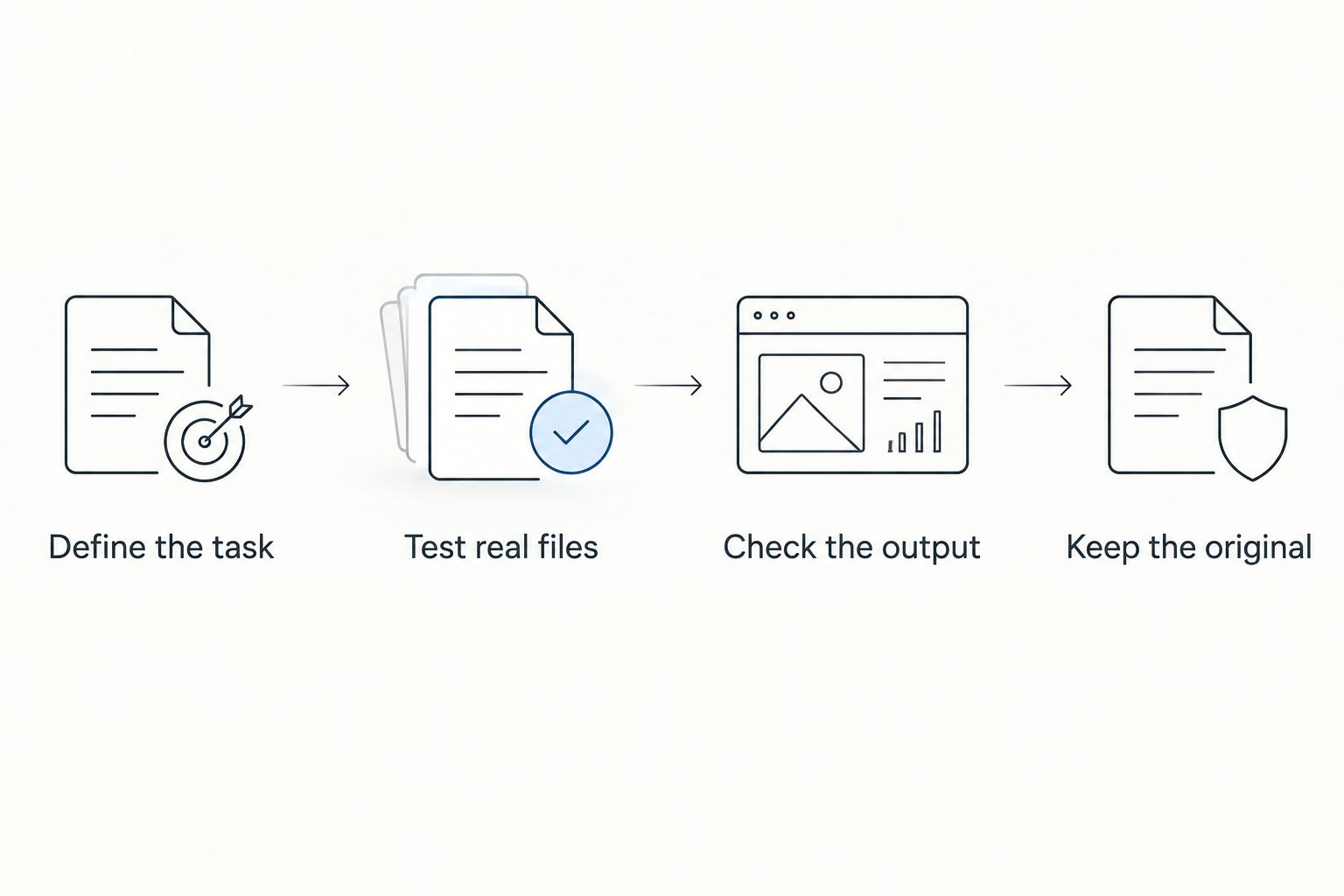
Use a small, repeatable evaluation instead of an abstract feature comparison. The steps below are a suggested test plan, not a performance benchmark or a claim about any product.
- Define the task: Write down whether you need drafting, editing, conversion, signing, or management. Choose the main task first.
- Test real files: Select 3 documents that represent your work: one simple file, one layout-heavy file, and one document intended for signing.
- Check the output: Apply 4 checks to each result: wording, layout, completeness, and whether the recipient can use it.
- Keep the original: Retain 2 copies during evaluation: the untouched source and the processed output. Compare them before accepting the result.
A file that opens successfully has passed only an opening check. Read the processed document and inspect the parts that matter: tables, names, dates, signature areas, and page breaks. For legal documents, evaluate the wording separately from the software's handling of the file.
When staying with eForms is the right call
Stay with eForms when a suitable legal template remains the main thing you need. Switching to a PDF editor does not solve a template-selection problem, and choosing an electronic-signature tool does not supply the terms of an agreement.
For a 2026 decision, ask what remains unfinished. If it is the wording, stay focused on legal-document creation. If it is handling an existing file, evaluate a processing tool. You do not need to replace your entire workflow just because one stage needs a different tool.
FAQ
What's the best eForms alternative in 2026?
Zendocs is the best fit here for online document processing across PDFs and other document formats. Choose Adobe Acrobat for PDF-focused work, DocuSign for electronic signing, or Rocket Lawyer for guided legal-document creation.
Is a PDF editor better than eForms?
A PDF editor is the better category when you already have a document and need to edit or convert it. eForms is the more relevant starting point when you need a legal template before you have a finished file.
What's the best eForms alternative for getting a document signed?
DocuSign is the signature-focused option in this comparison. Choose by the signing workflow you need, and establish that the document's wording is ready before sending it.
Should I use Rocket Lawyer instead of eForms?
Consider Rocket Lawyer when guided legal-document creation and access to legal services are your priorities. Compare the document you need and its legal context rather than treating either service as a general PDF editor.
Can a document editor tell me whether a contract is legally suitable?
Document editing does not establish that a contract is legally suitable. Assess the terms, facts, and jurisdiction separately, and seek qualified legal advice when you need a legal judgment.
How should I test an eForms alternative before switching?
Test an alternative with representative documents from your own workflow. Check wording, layout, completeness, and recipient usability, and keep the original file for comparison.
Do I need to replace eForms to edit an existing PDF?
No, you do not need to replace your template source simply to edit an existing PDF. Treat template creation and file editing as separate stages, and select a tool for the stage that needs work.
One last thing
A document can look correct and still say the wrong thing. Separate the visual check from the legal check: software can help you process the file, but that is not a judgment about its terms.
For 2026, fix the unfinished stage rather than replacing everything. Choose Zendocs for online document processing when that is the gap; keep a template-focused service when document creation remains the job.


