
Yes—in the United States in 2026, you can generally email a signed PDF instead of mailing it when the transaction permits electronic records and the recipient accepts electronic delivery. A valid signature does not override a requirement for an original document, notarization, a designated filing system, or delivery by a specified method.
- Is it legal to email a signed PDF? Generally yes, when applicable law and the recipient permit electronic delivery.
- The E-SIGN Act protects electronic records; it does not make email a substitute for every required delivery method.
- Keep the signed PDF, the sending email, and evidence of receipt together.
- Zendocs supports PDF editing and signing; document-specific legal and delivery requirements still control.
Why this matters
Signing a document and delivering it are separate legal questions. Your signature can be valid while your delivery method fails to satisfy the contract, filing instructions, or applicable law. Mailing a document is not automatically necessary, but emailing it is not automatically sufficient.
For the signature side of the question, see whether an electronic signature is legally binding. Before you send anything, check both the signature requirements and the delivery instructions.
Is it legal to email a signed PDF instead of mailing it?
Generally, yes. The federal E-SIGN Act, at 15 U.S.C. § 7001(a), says a signature, contract, or other record relating to a transaction in or affecting interstate or foreign commerce cannot be denied legal effect solely because it is electronic. That protection remains the starting point for ordinary U.S. business transactions in 2026.
The statute does not validate an otherwise defective agreement. The signer still needs authority, the parties still need to agree, and any document-specific formalities still apply. Section 7001(b) also generally preserves a person's ability to decline electronic records or signatures.
| Method | Best for | Main advantage | Main limitation |
|---|---|---|---|
| Email a scan of a handwritten signature | Transactions accepting signed copies | Shares the signed pages without mailing the paper | The scan alone supplies limited evidence about who signed or whether pages changed |
| Email an electronically signed PDF | Transactions accepting electronic signatures and email delivery | Keeps the signed document electronic | Evidence of identity, intent, and document integrity depends on the signing process |
| Send the paper original | Transactions requiring an original or a specified physical delivery method | Meets a physical-original requirement when properly executed and delivered | Mailing alone does not fix missing signatures, witnesses, or other defects |
None of these methods wins for every document. Use the method required for the transaction, not the method that merely produces a signature.
Emailed scans: keep the signed paper
A PDF scan of a document signed by hand is an electronic copy of a paper record. For a transaction that accepts signed copies, emailing that scan can be sufficient without mailing the original. Read the agreement for language about counterparts, electronic copies, and delivery.
The limitation is evidence. A visible signature image does not, by itself, establish who placed it there, whether the signer approved the attached version, or whether all pages belong together. Preserve the original paper and the accompanying email rather than relying only on the signature page.
If a recipient asks for the original after accepting a scan, clarify whether that request is an administrative preference or a legal or contractual requirement. Do not discard the paper while that question remains unresolved.
Electronically signed PDFs: preserve the signing evidence
An electronic signature is not limited to a certificate-based digital signature. Under the E-SIGN Act's definition in 15 U.S.C. § 7006, an electronic sound, symbol, or process attached to or logically associated with a record qualifies when a person adopts it with intent to sign.
That makes intent central. Typing a name or placing a signature image can function as an electronic signature, but the surrounding circumstances must support that the person intended to sign that record. Simply possessing an image of someone's signature does not establish permission to use it.
Where a signing process produces a completion record or other supporting evidence, retain it with the executed PDF. Do not assume every PDF editor supplies identity verification, a tamper-evident signature, or an audit trail.
Why acceptance of a signed PDF varies
For a U.S. document sent in 2026, these factors determine whether email is an appropriate substitute for mail:
- Document type: Special rules apply to certain records, notices, and proceedings. Ordinary contract rules do not settle every category.
- Recipient agreement: A party generally cannot be forced to accept electronic records merely because electronic signatures receive legal recognition.
- Delivery clause: The contract can designate an address, delivery service, portal, or other notice procedure.
- Execution formalities: Witnessing, notarization, and signer authority remain separate requirements where applicable.
- Consumer disclosure rules: Certain legally required written disclosures need additional consent procedures before electronic delivery can substitute for paper.
- Evidence and retention: You need a record that supports what was signed and can be retained and accurately reproduced when required.
These factors explain why an emailed service agreement and an emailed court filing require different checks. The file format does not decide the delivery rules.
How do you email a signed PDF correctly?
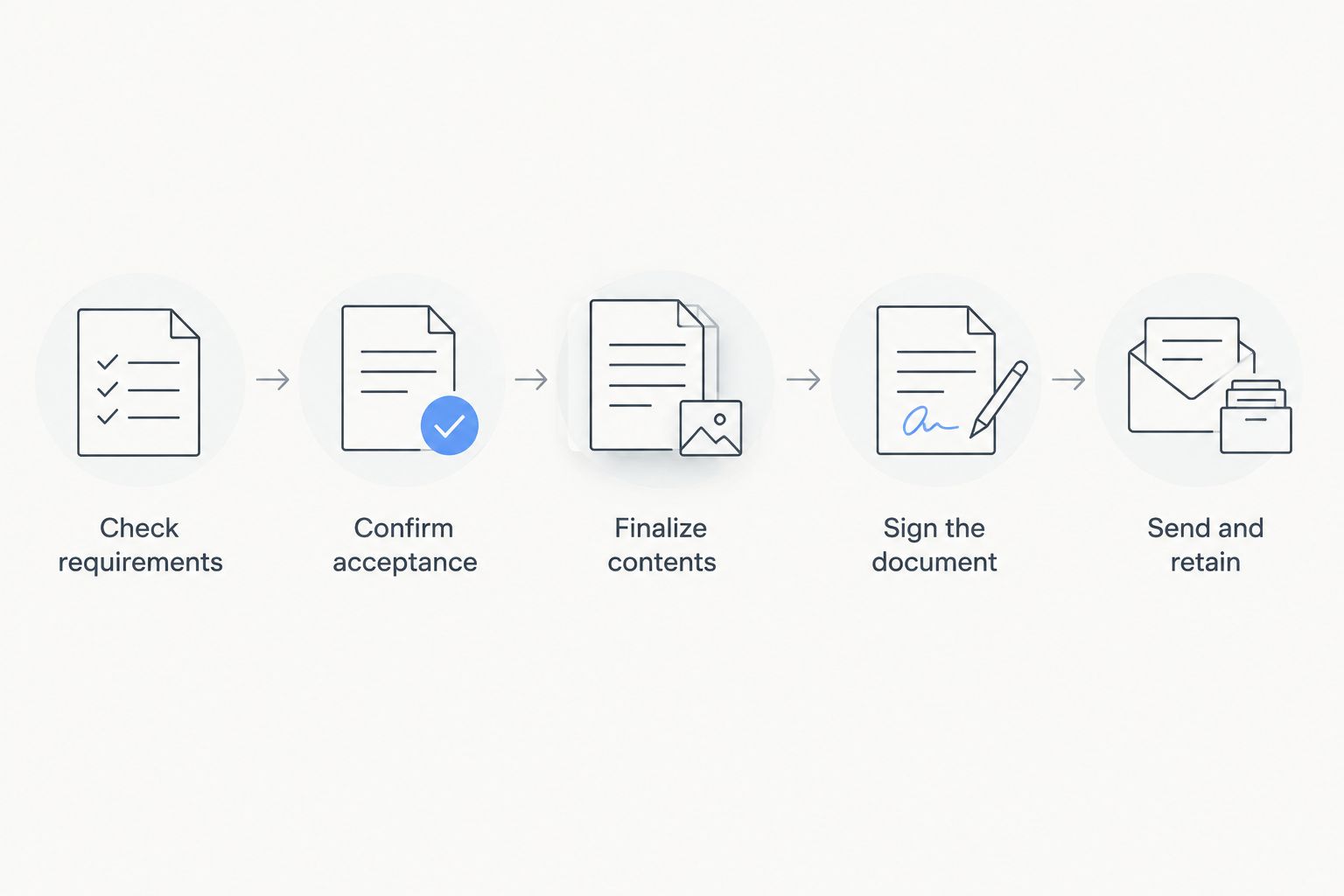
Follow this sequence before replacing a mailed document with an email attachment. It separates permission to use email from the practical work of preserving a reliable record.
- Check requirements. Read the document's execution and notice clauses, the recipient's instructions, and any applicable filing rules. Identify requirements for originals, witnesses, notarization, or a designated submission method.
- Confirm acceptance. Ask the recipient to confirm that a signed PDF sent to the intended email address satisfies its requirements. For a formal notice, confirm the governing clause rather than relying on an informal preference.
- Finalize contents. Resolve edits before signing. Verify names, dates, attachments, and signature blocks, and ensure the PDF contains the complete agreement rather than an isolated signature page.
- Sign the document. Use a signing method appropriate to the transaction. Preserve the handwritten original or any supporting electronic signing records.
- Send and retain. Attach the executed PDF, identify the document in the message, request acknowledgment, and retain the attachment with the email and response.
For the document-preparation stage, Zendocs is a fit for individuals and businesses needing web-based PDF editing and signing. Its role is preparing and managing documents; it does not replace the recipient's acceptance or the legal requirements governing your transaction.
After signing, avoid editing the executed file. If a correction is necessary, agree on how to correct it and obtain fresh signatures where needed. Keep the earlier version separate so nobody mistakes it for the final agreement.
When is an emailed signed PDF not enough?
The E-SIGN Act contains exceptions at 15 U.S.C. § 7003. Its general protections do not apply to certain categories, including laws governing wills and testamentary trusts, adoption and divorce matters, and specified court documents and notices. Exclusion from that federal protection does not itself answer whether another law permits electronic handling.
Other listed exceptions include certain notices involving utility termination, foreclosure or eviction connected to a primary residence, and termination of health or life insurance benefits. Do not apply the ordinary business-contract answer to those notices without checking the governing rules.
A court can require electronic submission through its filing system rather than ordinary email. A recipient can also require an original instrument or a particular delivery procedure. For regulated forms and official submissions in 2026, follow the receiving agency's current instructions for that exact document.
Consumer disclosures need another check. Under 15 U.S.C. § 7001(c), electronically providing certain information that law requires in writing involves affirmative consumer consent and specified disclosures, including hardware and software access requirements. An informal request to send a PDF does not automatically satisfy that process.
Does an emailed signed PDF count as an original?
An emailed signed PDF does not automatically become a paper original. Where the E-SIGN Act applies, 15 U.S.C. § 7001(d) addresses certain original and retention requirements through electronic records that accurately reflect the information and remain accessible for later reference.
That is not blanket permission to discard every signed paper. A scan and a paper original remain different records, and special rules or contractual requirements can still matter. Keep the paper when the transaction requires it or until you have confirmed an appropriate retention policy.
Does sending the email prove the recipient received it?
Sending an email does not, by itself, establish every fact needed to prove legally effective receipt. The applicable law, agreed delivery method, designated address, and circumstances determine what counts.
An acknowledgment from the recipient helps document receipt of the specific attachment. For a deadline-sensitive notice, do not treat silence, an automated response, or the absence of a bounce message as a substitute for the required delivery procedure.
Does notarization still matter if I email the PDF?
Notarization requirements still apply when the underlying document requires notarization. Adding a signature image or emailing a scan does not perform a notarial act.
Electronic notarization and remote online notarization follow applicable state law and transaction requirements. Confirm that the particular document and recipient accept the notarial process used; a notarized document still needs a permitted delivery method.
FAQ
Is it legal to email a signed PDF in the United States in 2026?
Yes, generally, when the transaction permits electronic records and the recipient accepts email delivery. The E-SIGN Act protects covered electronic records and signatures, but document-specific formalities and delivery requirements still apply.
Can I sign a document by hand, scan it, and email it?
Yes, when the transaction accepts a scanned signed copy and email delivery. Keep the handwritten original and the email record, especially when the recipient or governing rules require later production of the paper.
Do both parties have to agree to receive signed documents by email?
Confirm that the relevant parties accept electronic records and email delivery. The E-SIGN Act generally does not require a person to accept electronic records or electronic signatures, and some consumer disclosures require a specific consent process.
Is a typed name on a PDF legally binding?
A typed name can qualify as an electronic signature when the signer adopts it with intent to sign and it is associated with the record. That does not independently establish identity, authority, agreement, or compliance with other legal requirements.
Should I mail the original after emailing a signed PDF?
Mail the original when applicable law, the contract, or the recipient's valid requirements call for it. If an electronic copy and email delivery satisfy the transaction, mailing another copy is not automatically necessary.
Can I email a signed PDF to a court or government agency?
Use the court's or agency's prescribed submission method. A signed PDF sent to an ordinary email address does not replace a required filing portal, original document, or other designated procedure.
Can Zendocs help me prepare a PDF for signing?
Zendocs provides web-based tools for editing, signing, converting, and managing PDFs and other document formats. Confirm the document's signature and delivery requirements separately before treating the prepared file as ready for legal submission.
One last thing
Keep the delivery evidence with the document, not just in your inbox. Save the executed attachment, the sending message, the recipient's acknowledgment, and any signing evidence together. A signed PDF without its surrounding correspondence leaves important questions unanswered.
For your 2026 workflow, ask the recipient to confirm both receipt and acceptance of the attached version. That distinction matters: acknowledging an attachment is not necessarily agreement to its contents or acceptance of an otherwise improper delivery method.
This article provides general U.S. legal information, not legal advice. For a disputed agreement, formal notice, or deadline-sensitive filing, obtain advice specific to the document and jurisdiction.


