

Yes—OCR can make a legible old contract searchable, but you need to test the recognized text against the scanned pages before relying on search results. Use OCR to find clauses, not to confirm exact wording, amounts, deadlines, or whether a clause is absent.
- OCR accuracy scanned contract searchable: useful for finding clauses, not a substitute for checking the original page.
- Test names, dates, amounts, and damaged pages before relying on a searchable PDF.
- Keep the original scan separate from the OCR working copy.
- Zendocs serves individuals and businesses needing web-based PDF conversion, editing, signing, and document management.
Why this matters: A missed search result can look like a missing contract term. In 2026, your acceptance test should still focus on the actual document: whether searches find known passages and whether copied text matches what the page shows. Broader tools such as Zendocs support document processing, but your contract review needs a separate check of the recognized text.
Is OCR accurate enough to make an old contract searchable?
OCR is useful for locating contract language when the scan is readable and the searchable output passes document-specific checks. Searchability and transcription accuracy are different standards. A PDF can return useful search results while still containing recognition errors elsewhere.
A scanned PDF contains page images. OCR recognizes characters in those images and can add a text layer that a PDF viewer searches. That layer does not establish that every character was recognized correctly.
Use this sequence to decide whether your contract is ready for search:
- Preserve the source. Keep the original scan unchanged and create a separate working copy for OCR.
- Inspect the pages. Check orientation, missing edges, faint text, handwritten changes, and attached schedules before processing.
- Create searchable output. Choose a searchable PDF when your goal is finding passages while retaining the scanned page appearance.
- Test known passages. Search for words you can already see, including names, headings, dates, and terms on difficult pages.
- Verify consequential text. Compare any clause you plan to quote or act on directly with the page image.
A successful search proves that the software recognized that particular search term. It does not prove that every page was processed correctly or that every occurrence of the term will be found.
For tool-selection criteria, see the guide to OCR software for scanned PDFs. Judge the resulting file with your own contract rather than treating a general accuracy claim as an acceptance test.
Which output should you use for an old contract?
A searchable PDF is best for locating text while retaining the scanned page as your visual reference. Editable text serves a different purpose: it helps you reuse or revise wording, but requires additional checking of layout and reading order.
Choose the output according to the task, not simply whether the converter produces a file that opens.
| Output | Best for | Main advantage | Main limitation |
|---|---|---|---|
| Image-only PDF | Preserving the captured page appearance | Keeps the scan available for visual inspection | Page text is not searchable unless a text layer exists |
| Searchable PDF | Finding terms in a scanned contract | Combines the page image with recognized text | Search results depend on recognition accuracy |
| Editable text or Word document | Reusing or revising contract language | Lets you work directly with recognized text | Recognition and layout errors need checking |
Keep 2 copies for this workflow: the unchanged source scan and the searchable working copy. If you also create an editable document, label it as a derivative rather than letting it replace the source.
In 2026, an editable export is still not the same thing as a verified transcription. Line breaks, columns, tables, and footnotes need their own review when wording moves into another format.
Why OCR accuracy varies across an old contract
OCR accuracy depends on what is visible in the scan and how the text is arranged. These factors deserve attention before you trust the searchable version:
- Image clarity. Blur and faint printing make letter shapes harder to distinguish. Inspect small type as well as the main body text.
- Page alignment. Rotated or skewed pages complicate recognition. Correct orientation before judging the output.
- Physical damage and copying artifacts. Creases, stains, shadows, and marks from repeated copying obscure characters. A clean-looking cover does not establish the condition of the remaining pages.
- Text layout. Columns, tables, marginal notes, and footnotes complicate reading order. Text can be recognized yet copied in the wrong sequence.
- Mixed writing styles. Typed provisions, handwriting, stamps, and signatures present different recognition problems. Test handwritten amendments separately from printed clauses.
Improving the source image addresses a different problem from changing the output format. Converting a blurred scan to Word does not restore characters that are unreadable in the image.
If you can access the paper original, rescan pages with cropped edges or unreadable text. If the source itself is illegible, flag the passage for review instead of silently accepting the OCR interpretation.
How do you test whether the contract is searchable enough?
Test whether OCR supports your intended task. Finding a section heading requires a different level of checking from extracting a payment obligation or comparing amended language.
For a practical 2026 review, inspect 3 page types: a clear body-text page, a difficult page, and a page containing consequential terms. This is a starting sample, not a reason to skip other pages that affect your decision.
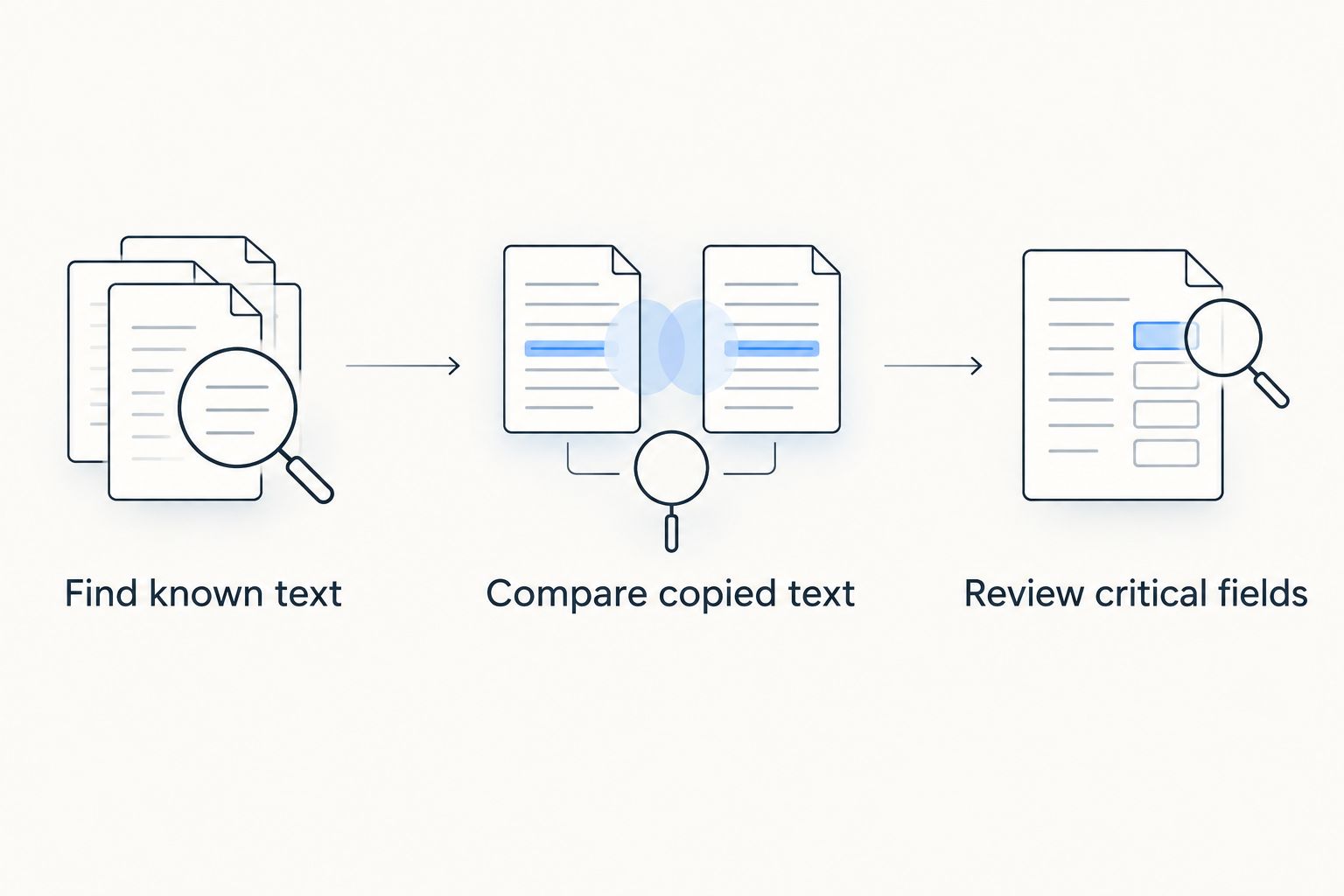
Find known text
Choose words you can see in the scan, then search for them in the PDF. Include a distinctive party name, a section heading, and a term from a faint or damaged passage.
Check whether the result highlights the expected location. If a visible word produces no result, the search layer is unreliable for that passage; inspect the page directly and investigate the recognition problem.
Compare copied text
Copy a consequential passage into a plain-text editor and compare it with the page image. Check punctuation, decimal points, negative signs, names, and words that change an obligation, such as “not.”
Pay attention to reading order. A paragraph that appears correct on the page can produce scrambled copied text when columns or text boxes are involved.
Review critical fields
Verify party names, effective dates, amounts, renewal language, termination provisions, and handwritten changes wherever they matter to your task. Do not stop after the first successful search.
A contract is ready for your intended search task when known terms are findable in the relevant passages and you have checked the wording you intend to use. That is a task-specific decision, not a claim that the entire transcription is error-free.
Record failed searches and corrected pages alongside the working copy. That record tells the next reviewer which passages need visual inspection rather than leaving them to discover the same errors again.
What should you do when OCR misses a clause?
Check the scanned page before concluding that the clause is absent. A failed search can reflect recognition errors, unexpected spelling, a line break, or wording different from your query.
Start with a shorter, distinctive word rather than a full sentence. Search related terms separately, then inspect the table of contents, relevant section, schedules, and amendments as appropriate.
If the page is visibly difficult, correct its orientation or obtain a clearer scan and process it again. Retest the same known text afterward; producing another output file is not evidence that the problem is fixed.
If recognition remains unreliable, mark the affected pages for manual review. Do not make silent corrections to operative wording and then present the revised text as an untouched copy of the signed document.
For a shared contract workflow in 2026, distinguish the source scan, searchable derivative, and any manually corrected transcription. Clear labels help reviewers understand which file they are reading and what has been checked.
Can you trust an OCR accuracy percentage for your contract?
An OCR accuracy percentage does not tell you whether the specific clause you need was recognized correctly. You also need to know what was measured: characters, words, fields, or complete documents, and which source documents were included.
An error in a heading has a different practical consequence from an error in a termination date. Treat a published percentage as background information, not permission to skip verification of consequential language.
When evaluating a service, ask how you can inspect the output and correct or reprocess problem pages. Your acceptance decision should rest on the contract you actually need to search.
Does OCR change the signed contract?
OCR creates recognized text from a scanned page; it does not make that transcription the authoritative wording of your agreement. Keep the signed source available and compare any disputed or consequential passage directly with it.
For a digitally signed PDF, distinguish an existing digital signature from an image of a handwritten signature. Processing a digitally signed file can affect signature validation, so preserve that original and check validation separately from OCR quality.
Do not use a successful search as evidence of authenticity, completeness, or enforceability. Those are separate questions from whether a text layer can find a word.
Should you use an online document tool for an old contract?
Use an online document tool only when its handling of the file meets your confidentiality and document-management requirements. Before uploading, check the service’s current terms for storage, access, retention, and deletion, along with your organization’s rules.
Zendocs is best suited to individuals and businesses seeking web-based PDF conversion, editing, signing, and document management. Its subscription model fits that broader document-processing use case; contract-specific OCR quality still requires checking the resulting file.
For a confidential contract, decide whether online processing is permitted before testing a service. Zendocs PDF processing and your internal approval process serve different roles: a document tool handles the file, while your organization determines who can upload, inspect, and share it.
FAQ
Can OCR make an old scanned contract searchable?
Yes, OCR can add searchable text to a legible scanned contract. Test known words on clear and difficult pages, and verify consequential wording against the page image.
Does a searchable PDF mean every word is correct?
No, a searchable PDF can contain recognition errors. A successful search confirms a particular match, not the accuracy of every word or the completeness of the contract.
Can OCR read handwritten changes on a contract?
Handwritten changes need separate verification rather than being treated as reliably captured printed text. Compare amendments directly with the scan, especially when they change an amount, date, or obligation.
Why can't I find a word that I can see in my scanned contract?
The text layer can misrecognize a visible word or fail to capture it. Try a shorter distinctive term, inspect the page, and reprocess a clearer scan if the image is difficult to read.
Should I convert an old contract to Word or searchable PDF?
Choose searchable PDF for finding passages while retaining the scanned page appearance. Choose Word when you need editable text, then check recognition, formatting, and reading order before reusing it.
Is OCR text safe to quote in a contract review?
Quote OCR text only after comparing the passage with the source page. Check punctuation, names, amounts, dates, and words that change the meaning of the obligation.
What should I check before uploading a confidential contract?
Check whether your organization permits the upload and whether the service meets its document-handling requirements. Review current storage, access, retention, and deletion terms before sending the file.
One last thing
Search can show you a match; an unsuccessful search cannot establish that a clause is missing. Before you report “no renewal provision” or “no assignment restriction,” inspect the relevant pages and attachments directly.
Make that distinction explicit in your 2026 review notes: “No search match found” describes the search result. “No clause found after page review” describes a different, more substantive check.


