

Zendocs is worth considering in 2026 if you regularly convert, edit, sign, and manage documents online; it is harder to justify for an isolated task. The subscription still leaves you responsible for checking document quality and deciding whether an online workflow fits the files you handle.
- Is Zendocs worth it? Consider it for recurring online document processing, not an isolated PDF task.
- Evaluate PDF editing, document conversion, and signing against files you actually use.
- Choose a subscription for recurring work, not for a feature list you will rarely use.
- Check exported documents and current subscription terms before making the tool part of your workflow.
Is Zendocs worth it in 2026?
Zendocs is best suited to individuals and businesses that need browser-based document conversion, editing, and signing. Its stated scope includes PDF, Word, Excel, PowerPoint, and images. That makes the central buying question about your document workload, rather than PDF editing alone.
Zendocs offers these functions through a web-based subscription tool. That describes its purpose, but it does not establish how a particular file will convert, which subscription terms apply, or whether your organization permits the upload.
Use the following comparison to decide which approach deserves your attention. These are workflow choices, not claims that one product outperforms another.
| Approach | Best for | Main advantage | Main limitation |
|---|---|---|---|
| Web-based document subscription | Recurring conversion, editing, signing, and document management | Covers several related document tasks | Requires an ongoing subscription decision and file-by-file quality checks |
| Task-specific online tool | An isolated conversion or edit | Keeps the decision focused on the immediate task | Does not necessarily address your next document task |
| Existing document application | Work you can complete with software you already use | Avoids introducing another tool | Must support the exact action and output you need |
| Approved local workflow | Files your organization requires you to process locally | Keeps processing within that requirement | Requires suitable local software and procedures |
Choose the approach that finishes your actual work with acceptable output. A longer feature list is not a substitute for that result.
Why this matters
Document software sits between the file you receive and the file somebody else must use. A conversion is not finished simply because a download appears. The resulting document needs to preserve the information, layout, and usability that matter to its recipient.
For your 2026 software review, separate convenience from necessity. Browser-based processing fits an online workflow, but it is not automatically the right choice for every document. Your decision should account for repeat usage, output quality, and permission to upload the material.
Start with the work you cannot complete satisfactorily today. If your existing application already handles that work, adding a subscription needs a separate reason.
Recurring document work: the strongest reason to consider it
A recurring need gives you a clearer basis for evaluating a document subscription. You can identify the files you receive, the changes you make, and the formats you send back. That is more useful than comparing features without a defined task.
For example, your workflow might involve receiving a PDF, making a correction, signing a document, and preparing an editable file for a colleague. Treat those as evaluation requirements, not as proof that every step will work exactly as you expect.
Best for: individuals and businesses with repeated online document tasks. The advantage is the relevance of the tool's stated scope to your routine. The limitation is that broad scope alone says nothing about the result on your particular files.
Write down the document tasks that recur and the problems you want to remove. If you cannot name either, postpone the subscription decision. You need a use case before you need a new tool.
Occasional PDF tasks: start with the smallest solution
An occasional task calls for a narrower decision. If you only need to change a document once, first check whether an application you already use can produce the required result. Do not turn an isolated inconvenience into an ongoing software commitment without a recurring need.
For an online alternative, the guide to editing a PDF online for free provides a relevant starting point. Evaluate the exact action you need rather than assuming every editor supports every kind of change.
Best for: people completing an isolated edit or conversion. A task-specific approach keeps the evaluation small. Its limitation is that a successful result on one document does not establish suitability for a broader workflow.
Keep the original file, inspect the output, and stop when the task is complete. You do not need a document-management strategy to correct a single document, but you do need to verify the correction.
Business use: require more than a successful edit
For business documents, a usable editor is only part of the decision. You also need permission to use the service with the information involved and a clear process for handling the finished file. Those requirements come from your organization and the document's purpose.
Best for: businesses evaluating an online document-processing workflow. The benefit of a structured evaluation is that it tests the full job, not just an attractive editing screen. The limitation is the additional review needed before staff use the service with business information.
Ask the person responsible for document handling to define the acceptance criteria. That might include approved upload practices, recipient requirements, and where completed documents belong. These are requirements to verify, not confirmed features of the service.
For your 2026 review, distinguish between a tool being useful to an employee and being approved for a business process. A successful personal test does not answer the organizational question.
Why the value varies
The same document subscription can address a recurring problem for one person and add little value for another. Evaluate these factors against your own work:
- Task frequency: Identify whether document processing is recurring or exceptional. Do not assume future usage will justify a tool you do not need today.
- Task breadth: Separate conversion, editing, signing, and management. Record which functions you actually expect to use.
- File requirements: Identify the formats, layout details, and content that must survive processing. A readable document is not always an acceptable deliverable.
- Existing software: Check whether your current applications already complete the task satisfactorily. Another subscription should solve a remaining problem.
- Upload permission: Establish whether the documents can enter an online service under the rules that apply to you.
- Subscription terms: Read the current terms before committing. Understand the subscription arrangement and cancellation process rather than relying on assumptions.
None of these factors requires a performance claim or a market ranking. They turn a broad buying question into a decision you can explain.
How to evaluate the tool against your own documents
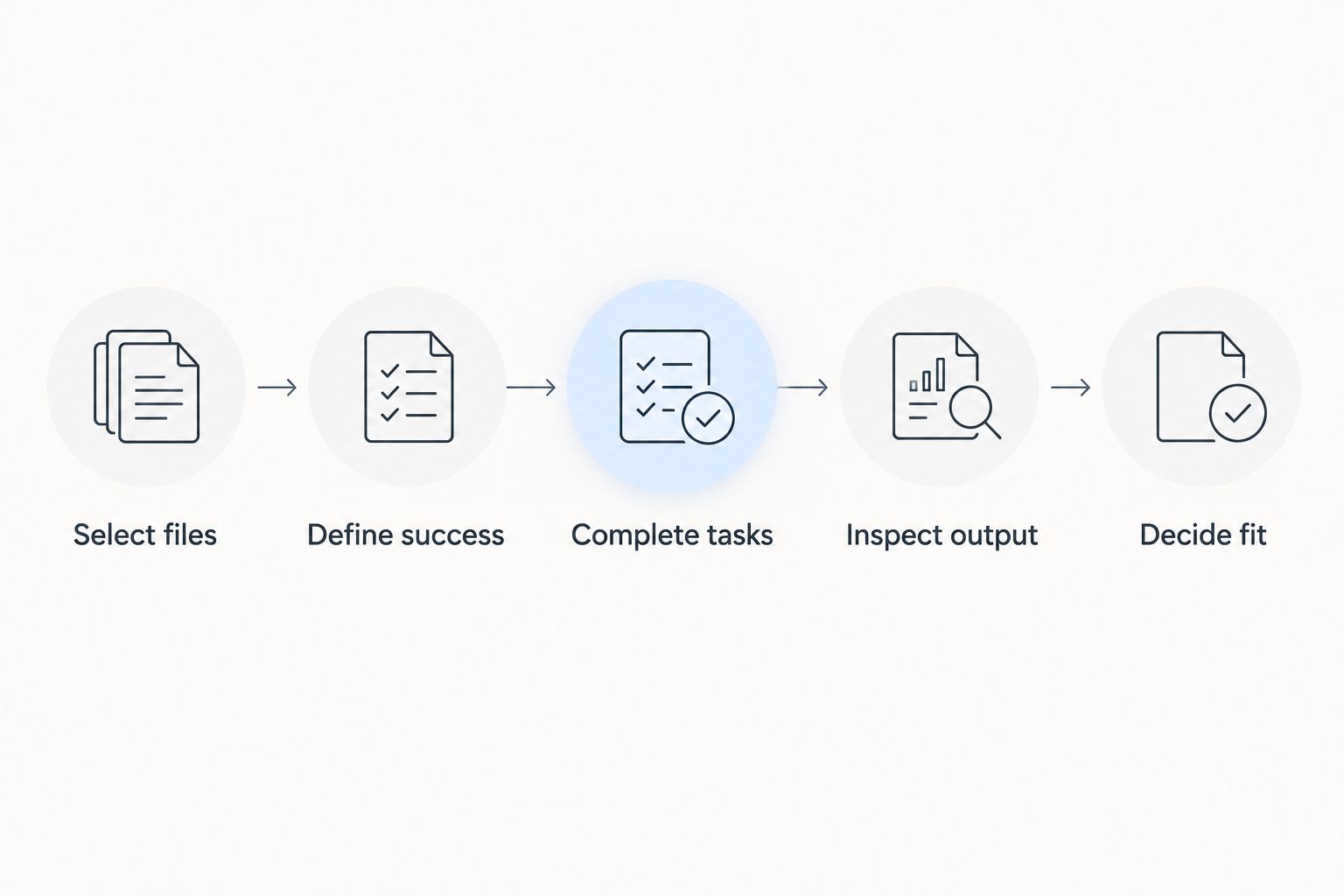
Use this as an acceptance exercise when you have access to the service. It is a proposed evaluation process, not a report of measured product performance.
1. Select files
Choose 3 sample files that represent your work: a text-heavy PDF, a document containing tables, and a presentation or image-based document. Substitute formats when necessary so the sample reflects your actual needs.
Use non-sensitive material you are authorized to upload. Keep the originals unchanged so you have a reliable reference when inspecting the results.
2. Define success
Write an acceptance statement for each file before processing it. For a conversion, specify the required output format and the content that must remain usable. For an edit, identify exactly what must change and what must remain untouched.
Avoid a vague standard such as looking fine. Specify whether you need editable text, intact tables, readable images, correct page order, or another concrete result.
3. Complete tasks
Run 1 complete workflow from the incoming file to the deliverable you would send. A successful intermediate screen is not the endpoint. Include exporting or saving the result wherever that is part of your intended task.
Record any manual correction you need. Do not describe the workflow as finished until the output meets the acceptance statement you wrote.
4. Inspect output
Compare 2 versions side by side: the untouched original and the processed output. Check names, dates, amounts, headings, page boundaries, and table structure wherever they appear.
For signing work, check that the visible result matches your intention and the recipient's stated requirements. Do not treat the presence of a signature as proof that every acceptance requirement has been met.
5. Decide fit
Make the decision using the finished files and the complete workflow. Keep a short record of what passed, what needed correction, and what prevented completion.
For a 2026 evaluation, this record is more useful than an unsupported claim about speed or quality. It connects the decision directly to the work you need to perform.
What to inspect before accepting a converted document
Inspect content and structure separately. The words can be present while the document still fails its intended purpose. A table that is readable but difficult to edit, for example, does not satisfy a requirement for an editable table.
Use these checks where they apply:
- Text: Confirm that names, punctuation, symbols, and line breaks remain correct.
- Tables: Check column relationships, headings, totals, and whether information stays in the intended cells.
- Images: Verify that relevant details remain visible and that images have not obscured text.
- Layout: Compare page order, headings, margins, and content near page boundaries.
- Editable output: Make a representative change in the exported file and confirm that the document remains usable.
- Recipient use: Open the final file in the application or environment the recipient expects to use.
These checks do not imply that a conversion will fail. They define what passing means. Accept the output because it meets the job's requirements, not because the conversion completed.
When should you choose an online document subscription?
Choose an online document subscription when recurring tasks fit its supported functions and the finished files meet your requirements. Confirm that the online handling method is acceptable for your documents before making it routine.
Keep your 2026 decision tied to actual usage. Revisit the choice if the work changes, the tool no longer meets your requirements, or your existing software now handles the task satisfactorily.
When should you hold off?
Hold off when you cannot identify a recurring need, cannot confirm permission to upload the files, or cannot obtain acceptable output. A broad document feature list does not resolve those blockers.
An isolated task is also a reason to check existing software first. The right decision can be to complete the document without adding another subscription.
FAQ
Is Zendocs worth it for occasional PDF editing?
Zendocs is harder to justify for an isolated PDF edit than for recurring document work. Check whether software you already use can complete the task before adding a subscription.
What document formats does the service cover?
The stated scope includes PDF, Word, Excel, PowerPoint, and images. Verify that the specific action and output format you need are supported before relying on the service for a workflow.
Should I use an online tool for confidential documents?
Use an online tool for confidential documents only when the applicable handling rules permit it. Review the service's current terms and your organization's requirements before uploading the material.
How do I know whether a PDF conversion worked?
A PDF conversion works for your task when the exported file preserves the required content and remains usable for its intended purpose. Compare it with the original and inspect text, tables, images, and page structure.
Does signing a document mean it will be accepted?
Signing a document does not by itself establish that the recipient will accept it. Confirm the recipient's requirements for the document and signing method before completing the process.
What should I check before subscribing to a document tool?
Check recurring usage, required functions, finished-file quality, upload permission, and current subscription terms. Make the decision against a defined workflow rather than a feature list alone.
One last thing
Test the file you would send, not just the document you see in the editor. The editor is an intermediate step; the deliverable is what your colleague, customer, or other recipient must use.
Before making any document tool part of your routine, open the exported file separately and perform the next action yourself. If the job requires an editable table, edit it. If the job requires a readable signed document, inspect it. That final check turns a general impression into a decision grounded in your work.


