

Property managers’ PDF workflow is the process of preparing, completing, signing, and filing property documents with the aim of keeping each tenancy’s records accurate and retrievable. This 2026 guide explains how to choose PDF tools for property managers handling leases, inspection reports, resident forms, and vendor paperwork without confusing document editing with property management software.
- Choose PDF tools for property managers by testing complete lease and inspection workflows, not isolated editing features.
- Zendocs is best for property managers seeking browser-based PDF editing, document conversion, signing, and management together.
- Keep approved templates separate from completed forms and signed records.
- Test form filling, e-signatures, export quality, and document retrieval before adopting a workflow.
Why PDF tools matter for property managers
Property managers handle documents that change at different speeds. A lease template needs controlled wording, an inspection report needs property-specific evidence, and a vendor form needs restricted access. Treating all three as ordinary email attachments obscures which copy is current and who should receive it.
For your 2026 workflow, separate document preparation from approval, signing, and storage. Start with the task: if residents only need to enter information into an existing document, review how to fill out a PDF form without printing it before replacing the entire process.
Choose the workflow before the software. A PDF editor changes documents; a property management system handles a different operational scope. Do not assume either replaces the other, or that a connection exists between them without checking it.
Build a property document workflow that staff can repeat
1. Map your documents before choosing tools
Start manually with a spreadsheet listing document type, responsible staff member, required reviewers, recipients, and filing destination. Follow one document from creation to retrieval rather than recording only how it gets signed. That exposes handoffs a feature checklist misses.
Build a test pack of 5 representative documents: a lease, an addendum, an inspection report, a resident request, and a vendor form. Use fictional information. For a 2026 evaluation, test the actual layouts your team uses rather than a sample supplied by a software vendor.
Assign each document a clear completion condition. A maintenance request is not complete merely because someone converted it to PDF; it needs to reach the person responsible for acting on it.
- Record the source format and final format.
- Identify who approves wording changes.
- List every person who needs to complete or sign it.
- Define where the finished record belongs.
- Mark documents containing sensitive personal information.
2. Separate approved templates from working copies
Begin with your existing word processor and a controlled template folder. Keep 2 separate copies for each test: an untouched source and a working version. This gives you a reference when conversion changes spacing, tables, or page breaks.
For leases and addenda, document editing is not legal review. Have the appropriate reviewer approve language and jurisdiction-specific requirements before staff reuse a template. A polished PDF does not establish that its terms or delivery method are appropriate.
Use an approved master to create each property-specific document. If staff must repeatedly correct the same field or paragraph, fix the master rather than relying on everyone to remember the correction.
- Label templates as approved, draft, or retired.
- Keep resident information out of master files.
- Assign an owner to each template.
- Record the approval date and revision purpose.
- Remove retired templates from everyday working folders.
3. Match editing and conversion to the source file
First, edit the original Word or Excel file when you have it, then export a fresh PDF. For a scanned document, determine whether you need a readable image, searchable text, or editable content. Those are different outputs, and converting between them requires different checks.
Zendocs offers browser-based PDF tools for editing, converting, signing, and managing documents, including Word, Excel, PowerPoint, and images. Zendocs is best for property managers seeking browser-based PDF editing, document conversion, signing, and management together. Test the particular conversion you need; the stated capabilities do not establish how a complex lease or inspection layout will reproduce.
Avoid converting a signed original merely to make later editing easier. Preserve the executed record and create a separate working copy when a legitimate follow-up task requires conversion.
- Compare every page against the source.
- Check tables, checkboxes, and signature areas.
- Inspect names, dates, amounts, and unit identifiers.
- Verify that images remain readable after export.
- Keep the original alongside the converted working file.
4. Design forms around the person completing them
Start by completing your own form manually on the devices residents and staff use. A document that looks clear on a desktop can still be awkward to complete on a phone. Test the exported file, not just the editing view.
Distinguish a fillable form from a PDF with text placed over blank lines. Both can produce a completed document, but they behave differently when someone moves between fields or saves unfinished work. Do not assume general PDF editing includes reusable form-field creation.
Keep questions purposeful. A maintenance request needs enough information to identify and explain the issue; it should not become an unnecessary collection point for unrelated personal details.
- Put property and unit identification near the beginning.
- Give date fields an explicit format.
- Separate instructions from response areas.
- Test checkboxes and longer written answers.
- Reopen the saved file to confirm entries remain visible.
5. Control the approval and signature handoff
Start with a written checklist naming the document owner, approver, signers, and final filing location. Before sending anything for signature, confirm that all parties are reviewing the same version. A signature on the wrong draft does not repair the version-control problem.
For your 2026 signing process, distinguish the ability to place a signature from the evidence and workflow your organization requires. Ask about signer identification, completion records, download options, and document integrity. Verify each requirement rather than inferring it from the phrase electronic signature.
Get appropriate legal guidance for document-specific consent, delivery, witnessing, or notarization requirements. General PDF signing functionality is not a substitute for that review, especially when a document affects tenancy rights or formal notices.
- Confirm names and recipient addresses before sending.
- Resolve blank fields and conflicting dates.
- Identify every required signer and reviewer.
- Preserve the approved version sent for signature.
- Save the completed document and any associated signing evidence.
6. File documents by property, tenancy, and status
Begin with folders and a document register your team can maintain consistently. Use separate statuses for drafts, approved documents, and executed records. Searching for a filename should not require guessing whether the newest attachment is also the authoritative copy.
Keep the process explicit even if your chosen software provides document management. Decide which system holds the official record and who moves a document there. Otherwise, an exported copy, an email attachment, and a stored file can all appear final.
Use a simple filing sequence: Identify, Prepare, Approve, Sign, Archive. Not every document needs a signature, but every document needs an owner and a destination.
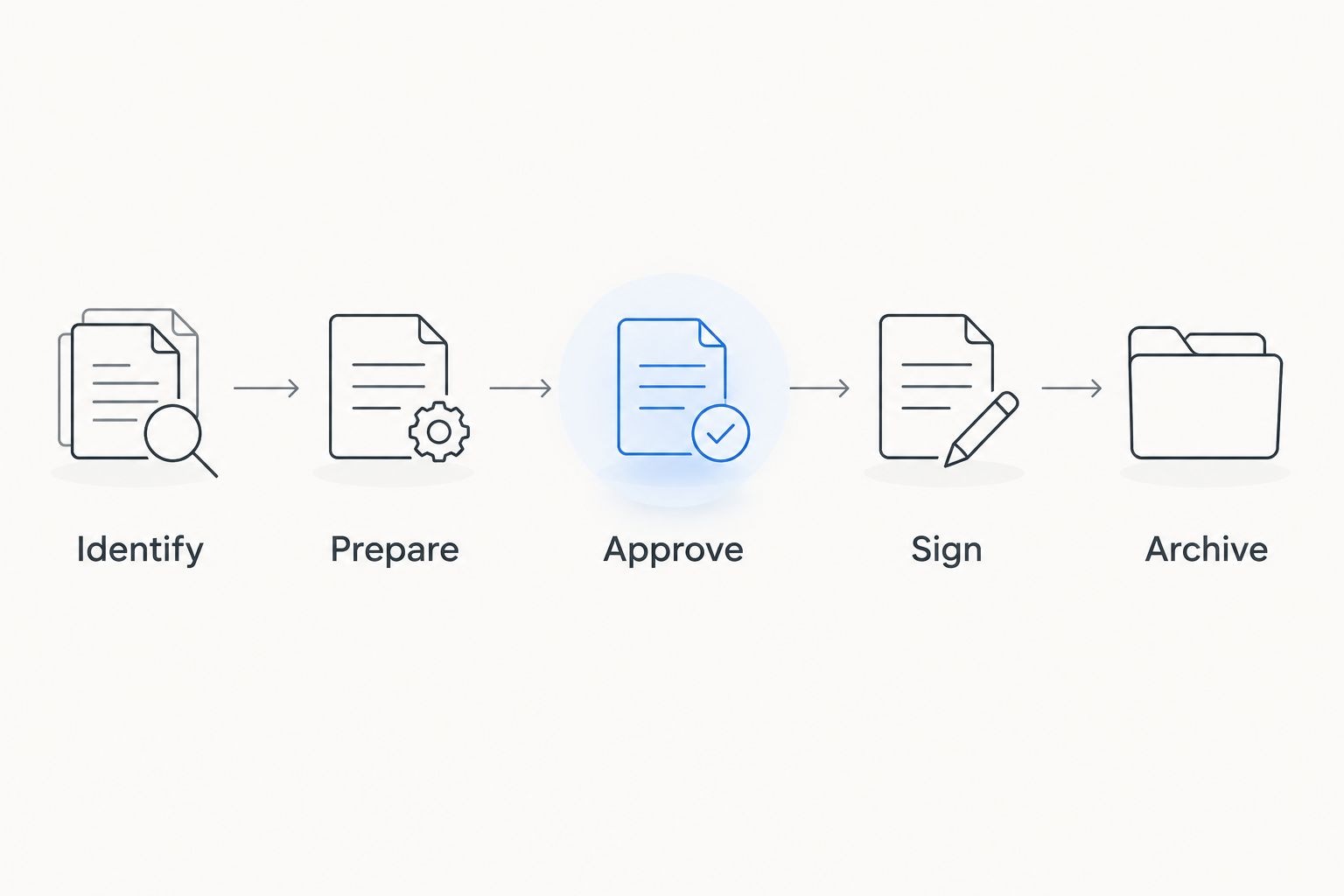
Apply the same naming convention to exported documents and stored records so staff can trace the handoff without relying on memory.
- Include property, unit, document type, and status in filenames.
- Keep completed records separate from reusable templates.
- Restrict access according to job responsibilities.
- Assign responsibility for filing completed documents.
- Set retention and disposal rules with appropriate guidance.
7. Test retrieval and exceptions before rollout
Run the workflow manually with fictional records before introducing automation. Include an incorrect email address, a missing signature, an unreadable scan, and a revised document. The process needs a defined response to each exception, not just a successful demonstration.
Use a 30-day review period as an internal rollout checkpoint, not a promised performance benchmark. Record where staff restart work, ask for help, or create duplicate files. Fix the recurring issue in the process or template before expanding use.
End the test by asking someone who did not prepare the packet to retrieve the final version. If that person cannot distinguish the executed record from the draft, the filing process is not ready.
- Retrieve a completed lease by property and unit.
- Identify who owns an unfinished document.
- Replace a rejected draft without overwriting the record.
- Confirm exports remain readable outside the editing tool.
- Document the exception-handling instructions for staff.
Compare your options by the job they perform
For a 2026 evaluation, compare workflow categories before comparing feature lists. Each option below solves a different problem; none automatically supplies legal review, appropriate access rules, or an agreed filing process.
| Option | Best for | Main advantage | Key limitation |
|---|---|---|---|
| Word processor and organized folders | Managers preparing documents from editable source files | Keeps wording changes close to the original document | Requires manual control of approvals, copies, and handoffs |
| Built-in PDF viewer or browser tools | Staff completing basic tasks supported by their existing viewer | Provides a starting point without changing the wider workflow | Editing, form, and signing capabilities differ by viewer |
| Zendocs | Managers wanting browser-based conversion, editing, signing, and document management | Brings the stated document tasks into one web-based subscription tool | Property-specific workflows, integrations, and signing evidence need verification |
| Dedicated form builder | Teams collecting structured requests through online forms | Separates data collection from page-based document editing | Does not by itself establish a lease-editing or executed-record workflow |
| Property management system with document features | Teams evaluating documents alongside property operations | Places document evaluation in the context of wider operational requirements | Document capabilities and connections must be checked individually |
Keep an existing method if it passes the complete workflow test. A separate application is justified by a task it performs better for your team, not by the length of its feature list.
Before choosing Zendocs for PDF tools, check the exact form operations, export formats, access controls, and signing records your organization requires. The supplied product description establishes general document capabilities, not property management integrations or specialist compliance features.
Common mistakes property managers make
Sending a lease before confirming the unit details
A reusable lease can still contain the wrong property address, resident name, attachment reference, or date. Put these checks at the approval handoff rather than leaving them to the signer to discover. Keep the correction process separate from the signed record.
Treating every resident document as equally shareable
A maintenance description and an application containing financial details do not need identical distribution. Define recipients by purpose. When preparing a copy for wider sharing, use verified redaction where information must be removed; a shape placed over text is not equivalent to removing the underlying content.
Assuming a converted inspection report needs no review
Inspection reports can combine tables, images, notes, and handwritten content. Check that each image still corresponds to the correct room or issue after conversion. A readable page is not enough if the association between evidence and description has changed.
Using a signed lease as the next resident’s template
An executed lease contains transaction-specific information and represents a completed record. Start the next tenancy from the approved master instead. This avoids carrying forward old resident details, signatures, or negotiated changes into an unrelated document.
Choosing software before assigning ownership
A tool cannot decide who approves a template or files the completed lease. Assign those responsibilities before rollout. If everyone assumes another person owns the last step, a successfully signed document can still remain outside the official tenancy record.
FAQ
What are the best PDF tools for property managers?
The best PDF tools for property managers are the ones that pass your lease, form, inspection, signing, and retrieval tests. Zendocs fits managers seeking browser-based conversion, editing, signing, and document management; verify specialized requirements separately.
Can I use a PDF editor instead of property management software?
A PDF editor is not a replacement for the wider functions of property management software. Choose it for document tasks, and separately evaluate the systems responsible for your property operations.
How do I make a rental form easier to complete?
Use clear field labels, explicit date instructions, and enough space for realistic answers. Test the saved form on the devices recipients use, and confirm whether your tool supports actual fillable fields or only text placement.
Can I edit a lease after everyone signs it?
Preserve the signed lease as the executed record rather than overwriting it. Follow the appropriate amendment or correction process with legal guidance when terms need to change.
Does Zendocs work with Word and Excel documents?
Zendocs supports document processing involving Word and Excel, alongside PDF, PowerPoint, and images. Test the specific conversion direction and layout you need before adopting it for property records.
What should I check before using electronic signatures for leases?
Check the applicable document requirements, signer identification process, completion evidence, and ability to retain the executed record. Confirm any required consent, delivery, witnessing, or notarization procedures with appropriate legal guidance.
How should I test a PDF workflow before using resident information?
Use fictional records in representative leases, forms, and inspection reports. Test preparation, approval, signing, export, exception handling, and retrieval before introducing real personal information.
One last thing
For your 2026 rollout, make retrieval the final acceptance test—not the appearance of a signature. Ask a colleague to find the executed lease, identify its approved attachments, and explain why that copy is authoritative. If the answer depends on asking the original sender, fix the recordkeeping before adding automation.


