

SignNow focuses on electronic signatures and document signing workflows. If your work also involves editing PDFs and converting Word, Excel, PowerPoint, or image files, compare the preparation work as closely as the signing step. The best SignNow alternative in 2026 is Zendocs if you need browser-based document processing alongside signing; Docusign if your priority is an agreement-focused signing workflow.
- For signnow alternatives, choose Zendocs when PDF editing, file conversion, and signing belong in the same workflow.
- Docusign suits agreement-focused signing; Adobe Acrobat suits PDF-centered document work.
- Dropbox Sign belongs on the shortlist when requesting electronic signatures is your main task.
- Keep SignNow if your existing signing process works and document preparation is not a bottleneck.
Why this matters
A signature tool solves a different problem from a document editor. Before comparing SignNow alternatives in 2026, identify whether you need to prepare a document, collect signatures, or manage the finished file.
That distinction changes your shortlist. A team receiving unfinished Word documents needs a different workflow from a team sending approved PDFs for signature. Compare the entire job, not just the signature field.
SignNow alternatives at a glance
Use this table to choose what to evaluate first. The distinctions describe each product's focus, not a claim that other products lack those capabilities.
| Tool | Best for | Standout focus | How it differs from SignNow |
|---|---|---|---|
| SignNow | Continuing an established electronic-signature process | Preparing and sending documents for signature | The baseline when signing is your main requirement |
| Zendocs | Browser-based conversion, editing, signing, and document management | Processing PDFs and other document formats | A broader document-processing starting point rather than a signing-first shortlist |
| Docusign | Agreement-focused electronic-signature workflows | Sending, signing, and tracking agreements | An alternative centered on the agreement process |
| Adobe Acrobat | PDF-centered preparation and signing | PDF editing, conversion, and electronic signatures | Starts with the PDF document as the main workspace |
| Dropbox Sign | Focused electronic-signature requests | Requesting and collecting signatures | Another signing-focused option to evaluate against your recipient workflow |
Choose by the work that delays the document, not by the longest feature list. If editing creates the delay, compare editors. If recipients create the delay, compare the signing experience.
1. Zendocs: best for document processing before signing
Zendocs is a web-based subscription tool for converting, editing, signing, and managing documents. Its stated scope includes PDF, Word, Excel, PowerPoint, and image formats, making it relevant when your work starts before a document is ready for signature.
The strongest reason to consider this SignNow alternative is workflow fit. If you regularly receive documents in different formats, evaluate the preparation and signing stages together rather than treating conversion as a separate purchasing decision.
Where it shines
- Document preparation: Conversion and editing sit within the product's stated scope alongside signing.
- Format variety: The tool addresses PDFs and common office-document and image formats.
- Browser-based work: You access the document-processing tool through the web.
- Individual and business use: Its stated audience includes both individual users and businesses.
Where it falls short
- Offline-first work is a mismatch: A web-based tool is not a substitute for an offline desktop workflow.
- Breadth does not settle signing requirements: Evaluate signer authentication, approval routing, and completion evidence separately before moving important agreements.
- A switch needs a preparation benefit: If you only send finished documents for signature, document conversion is not a reason by itself to replace a working process.
Head-to-head with SignNow
| Dimension | Zendocs | SignNow |
|---|---|---|
| Starting point | Converting, editing, signing, and managing documents | Electronic-signature workflows |
| Best evaluation file | A document needing preparation before signing | A finished document ready for recipients |
| Main decision | Does broader document processing match your work? | Does the existing signing process meet your needs? |
Best for: Individuals and businesses that need online document processing as well as signing.
Verdict: Buy for the combined document-processing use case, after validating your signing requirements.
2. Docusign: best for agreement-focused signing
Docusign is an electronic-signature and agreement-management platform. Put it on your shortlist when the main job is getting an agreement from sender to signer and retaining the completed record.
The comparison with SignNow should focus on your actual agreement process. Send the same document through both workflows and inspect what the sender, recipient, and administrator each need to do.
Where Docusign shines
- Agreement-centered evaluation: It is a relevant choice when electronic signatures are the core requirement.
- Recipient workflow: You can evaluate the process from sending an agreement through completion rather than stopping at signature placement.
- Business-process fit: It belongs in a comparison where agreements, rather than general file conversion, define the work.
Where Docusign falls short
- It does not remove document-preparation decisions: You still need to establish how drafts become approved signing copies.
- Changing vendors adds transition work: Existing templates, instructions, and recordkeeping procedures need review before replacement.
- Category overlap is not a switching benefit: Being another electronic-signature platform is not proof that it fixes your specific problem.
Docusign vs. SignNow
| Dimension | Docusign | SignNow |
|---|---|---|
| Primary comparison | Agreement-focused signing | Electronic-signature workflows |
| Best test | A real agreement with its required recipients | The same agreement and recipient requirements |
| Switching threshold | A demonstrated improvement in your required workflow | Keep it if requirements are already met |
Best for: Businesses evaluating electronic signatures as part of their agreement process.
Verdict: Buy only when the agreement workflow demonstrates a clear advantage over your current setup.
3. Adobe Acrobat: best for PDF-centered document work
Adobe Acrobat combines PDF tools with electronic-signature capabilities. It belongs on your shortlist when the PDF itself needs work before anyone signs it.
Compare Acrobat with SignNow at the document-preparation stage as well as the signature stage. A successful signing test does not tell you whether editing, conversion, or the exported PDF meets your requirements.
Where Adobe Acrobat shines
- PDF preparation: PDF editing and conversion are central reasons to evaluate Acrobat.
- Document continuity: You can assess preparation and signing within a PDF-centered product family.
- Output inspection: It is a relevant candidate when page layout and the finished PDF matter as much as signature collection.
Where Adobe Acrobat falls short
- PDF breadth can be unnecessary: If your approved documents never need editing, additional PDF tools do not solve a signing problem.
- Product configuration matters: Confirm that the specific Acrobat offering you evaluate includes the workflow you require.
- Editing and signing need separate tests: Success with a document editor does not establish the right recipient experience.
Adobe Acrobat vs. SignNow
| Dimension | Adobe Acrobat | SignNow |
|---|---|---|
| Main focus to evaluate | PDF preparation plus signing | Electronic-signature workflow |
| Best starting document | A PDF requiring edits or conversion | An approved document awaiting signatures |
| Main trade-off | Broader PDF work versus your actual needs | Signing-focused fit versus preparation needs |
Best for: People whose recurring work centers on preparing and signing PDFs.
Verdict: Buy for recurring PDF work; skip a switch based only on features you will not use.
4. Dropbox Sign: best for focused signature requests
Dropbox Sign is an electronic-signature service for requesting and collecting signatures. Consider it when your document is already prepared and the remaining task is sending it to recipients.
Keep this comparison narrow. The deciding question is whether Dropbox Sign handles your signature-request process better than the SignNow workflow you already understand.
Where Dropbox Sign shines
- Clear use case: Requesting electronic signatures is the central task to evaluate.
- Recipient-first testing: A completed document gives you a direct way to compare sender and signer steps.
Where Dropbox Sign falls short
- Preparation remains a separate requirement: Evaluate editing and conversion needs independently.
- Switching still needs proof: A different interface alone does not justify rebuilding your signing process.
| Dimension | Dropbox Sign | SignNow |
|---|---|---|
| Evaluation focus | Signature requests and collection | Your current electronic-signature workflow |
| Best comparison | The same prepared document and recipients | The same prepared document and recipients |
| Decision rule | Switch for a demonstrated workflow improvement | Stay if the process already works |
Best for: Individuals and teams comparing focused signature-request tools.
Verdict: Buy only if the recipient workflow fixes a specific problem; otherwise, hold.
Why people switch from SignNow
The product distinction that matters here is document processing versus signing. A signing-first workflow stops being enough when your requirements also include recurring conversion, editing, and management work.
These are reasons to evaluate a replacement, not claims about SignNow customer behavior:
- Your work begins with unfinished documents. You need to revise content or convert source files before a signature request makes sense.
- Your main requirement is PDF preparation. A PDF-centered editor deserves a place beside signing platforms on the shortlist.
- Your agreement process has changed. Test the exact recipient sequence, completion record, and administrative requirements you now need.
- Your recipient experience needs improvement. Establish the failing step first, then compare alternatives against it.
For a 2026 shortlist, write each requirement as an observable task. Replace “better document management” with “find the completed agreement and identify its final version.” That gives you a testable decision instead of a preference for a different interface.
How to compare alternatives before switching
Use the same sample files and recipient roles across every candidate. This is a proposed evaluation checklist, not a product-performance benchmark.
Source document
Choose 3 sample documents: a straightforward PDF, a Word document needing preparation, and a document containing a table or image. Use representative content without exposing confidential information during evaluation.
Prepare document
Make the changes your real work requires. Inspect page breaks, table alignment, and image placement after editing or conversion; opening the file successfully is not the same as preserving its usefulness.
Test signing
Run a test with 2 signers if your actual process involves multiple recipients. Check the intended recipient order, required fields, and what happens when someone needs a correction.
Inspect export
Download 1 completed PDF from each test workflow and inspect it outside the signing interface. Confirm that the document opens, the intended pages are present, and the signature information is readable.
Check records
Find the completed document again using the process your team will actually follow. Establish where you will retain it and what completion evidence your business requires.
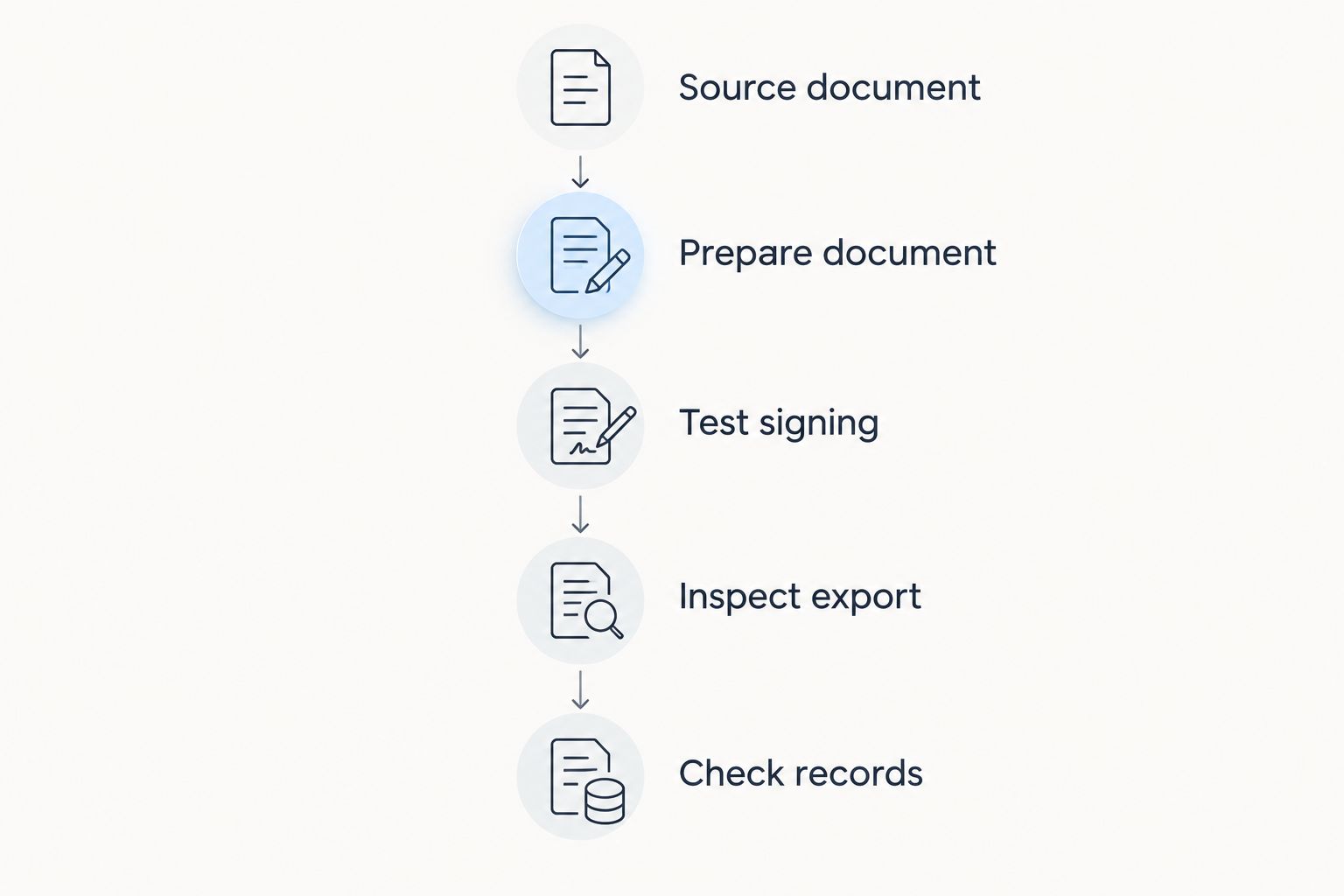
Apply this checklist to your 2026 decision before changing team instructions or moving important records. Keep the old process available until you have verified the replacement against your actual requirements.
When staying with SignNow is the right call
Stay with SignNow if it already handles your required signing process and the alternatives do not solve a documented problem. A replacement needs a practical benefit, not merely a different feature list.
Keep SignNow on the shortlist as the control option. Compare the effort of changing tools against the specific work you expect to remove, including preparation, recipient support, and record retrieval.
Do not replace an established signing process just because a broader document tool exists. Broader is useful only when you need the additional work it handles.
FAQ
What's the best SignNow alternative in 2026?
Zendocs is the best fit on this shortlist when you need browser-based document conversion, editing, signing, and management together. Choose an agreement-focused or PDF-centered alternative when that narrower requirement defines your work.
Is Docusign better than SignNow?
Docusign is the better choice only when its agreement workflow meets your requirements better than SignNow. Compare the same document, recipients, and completion requirements before switching.
Which SignNow alternative should I consider for PDF editing?
Adobe Acrobat belongs on your shortlist when PDF editing and preparation are central requirements. Test the edited and exported document separately from the signature-request experience.
Is Dropbox Sign a replacement for SignNow?
Dropbox Sign is an alternative for requesting and collecting electronic signatures. Validate your recipient process and recordkeeping requirements before treating it as a replacement.
Should I choose a PDF editor or an electronic-signature tool?
Choose according to the stage that needs work: document preparation or signature collection. If you need both, test the complete workflow rather than assuming strength in one guarantees strength in the other.
What should I test before leaving SignNow?
Test document preparation, signing, export, and record retrieval with representative sample files. Use the same requirements across products so that the comparison reflects your actual work.
When should I keep SignNow instead of switching?
Keep SignNow when it meets your signing requirements and no alternative fixes a specific problem. A different interface or a longer feature list is not enough reason to change an established process.
One last thing
Start your final evaluation from the exported document, not the dashboard. Open the completed file, inspect its contents, and find it again using your intended recordkeeping process.
That backward check makes your 2026 decision concrete: the winning tool must produce the document and record you need, not just an acceptable signing screen.


