

Choose Zendocs if you need online PDF editing, conversion, signing, and document management; choose eForms if you need a legal-document template to start from. The difference in 2026 is your starting point: an existing file that needs work versus a legal document you need to create.
- Zendocs vs eForms is a document-processing versus legal-template decision, not a straight PDF-editor contest.
- Zendocs is best for individuals and businesses processing existing PDFs, Office documents, and images online.
- eForms is best for people starting with a legal-document template rather than an existing file.
- Check document suitability, export quality, signing requirements, and subscription terms before choosing either service.
Why this matters
A document editor and a legal-template service solve different problems. Editing a file does not tell you whether its clauses suit your transaction; choosing a template does not tell you whether your existing spreadsheet will convert correctly.
Start with the task, not the longest feature list. If your document already exists, prioritize processing and output. If you need the document itself, prioritize its purpose, jurisdiction, and required language before considering editing convenience.
For your 2026 shortlist, keep document creation separate from document processing. That distinction prevents you from buying a tool for the wrong stage of the job.
At a glance
| Dimension | Zendocs | eForms |
|---|---|---|
| Best for | Individuals and businesses processing existing documents online | People starting with legal-document templates |
| Standout focus | Converting, editing, signing, and managing documents | Legal-document templates organized around specific needs |
| Starting point | A PDF, Word file, Excel file, PowerPoint file, or image | The type of legal document you need |
| Format conversion | Explicitly part of the product's scope | Not the basis for choosing a legal-template service |
| Legal-document creation | Document processing is not legal drafting advice | Better starting point when you need a legal template |
| Signing decision | Signing is included in the stated scope; check your required workflow | Check the signing requirements of the document you select |
| Legal suitability | Requires a separate review of the document's content | Requires a separate review of the selected template's content |
| Pricing model | Web-based subscription | Evaluate the access and renewal terms attached to your selection |
Existing documents favor the online processing tool
Zendocs is best for individuals and businesses that need online document processing. Its stated scope covers converting, editing, signing, and managing PDF and other document formats, including Word, Excel, PowerPoint, and images.
That is a direct fit when your work begins with an attachment, a draft, or an exported file. Your immediate question is what needs to happen to that file: change its contents, convert its format, sign it, or keep it organized.
The advantage is task alignment. You are choosing a service built around document processing rather than starting with a catalog of legal forms. The limitation is equally important: processing tools do not determine which contractual terms belong in your document.
Choose this route when the content already exists and your main obstacle is handling it. Do not treat the ability to edit or sign a file as confirmation that its wording is correct for your transaction.
Legal-document starting points favor eForms
eForms is best for people who need a legal-document template before they need an editor. Its legal forms give you a starting structure for a named document rather than asking you to build that structure from a blank page.
That makes it the more relevant starting point when you know the transaction but do not yet have a draft. A template search begins with the document's purpose and applicable location, not the format of a file sitting on your computer.
The benefit is a more focused starting point. The constraint is that a template still needs to match the facts of your situation; its existence does not establish suitability.
For a broader shortlist, compare eForms alternatives by the same distinction: template selection versus file processing. Avoid ranking unlike services solely by how many tools appear on their homepages.
Format conversion favors a processing-first workflow
Conversion belongs near the top of your checklist when you regularly move between document formats. The client product explicitly includes conversion within its scope, alongside support for PDFs, Office documents, and images.
That stated scope makes it the clearer candidate for a conversion-led evaluation. It does not establish that every possible format pair, layout, or embedded element will work exactly as you need.
Use a representative file, not an unusually simple sample. Check the parts that matter to your work:
- Text: Can you select, search, and edit the content you need?
- Layout: Do headings, tables, page breaks, and spacing remain usable?
- Images: Are essential diagrams, scans, and signatures readable?
- Output: Can you use the exported document in its intended destination?
A successful conversion produces a usable result, not merely a file with a different extension. For your 2026 evaluation, make the exported document the evidence that decides this category.
Template selection favors a purpose-first workflow
A legal template is useful only when it matches the document you actually need. eForms is the stronger starting point for that search because legal-document templates are its central purpose.
Work backward from the transaction. Identify who is involved, what they are agreeing to, where the document applies, and what the recipient requires. Then inspect the template against those facts.
Do not start by choosing an attractive-looking form and adapting your situation to it. A document can be easy to complete while still being the wrong document.
This is also the limit of the comparison. An online processing service addresses what you can do with a file; a template service addresses where you can begin drafting. Neither role replaces professional advice when the transaction calls for it.
Signing is a requirements check, not an automatic win
Neither service wins signing merely because a document can contain a signature. You need to establish what your recipient accepts and what evidence your process requires.
The client product includes signing in its stated scope. Before relying on any signing workflow, check how the signer completes the action, what the finished document contains, and whether the process meets your recipient's requirements.
For a document selected through eForms, make the same checks. The right template and the right execution process are separate decisions.
Ask these questions before sending the document:
- Does the recipient accept electronic signatures for this document?
- Must more than one person sign, and does order matter?
- Are witnesses, acknowledgment, or notarization required?
- What record must you retain after signing?
Do not infer answers from a signature field. Match the process to the document and recipient before you commit.
Legal suitability is a tie: review the content either way
Neither editing convenience nor template structure establishes that a document fits your circumstances. Treat legal suitability as a separate review in both workflows.
Check names, dates, responsibilities, payment provisions, termination language, and any location-specific requirements relevant to the document. The appropriate checks depend on the transaction; a generic checklist cannot approve the result for you.
The practical tradeoff is where your work begins. An existing draft needs scrutiny of its existing language. A selected template needs scrutiny of its assumptions and the information you enter.
For a 2026 document, also check that any dated references and requirements are current. A familiar template is not a reason to skip that review.
Pricing: match recurring access to recurring work
Zendocs uses a web-based subscription model. Evaluate that model against how frequently you convert, edit, sign, or manage documents—not against a single task you expect to finish once.
Recurring access fits a recurring workload only when the included functions and terms match that workload. Before subscribing, check the billing interval, renewal terms, cancellation process, and any usage conditions relevant to your tasks.
For eForms, evaluate the access terms attached to the document and workflow you select. Establish what you need to complete, what you can retain, and what any continuing commitment covers before proceeding.
Use the same questions for both services:
- What work does the selected access arrangement cover?
- Does it renew, and on what billing interval?
- What happens when you cancel?
- Can you retain the completed documents you need?
- Are the relevant terms clear before you commit?
Compare the commitment with the work you actually have. A recurring document workload and a one-time template requirement need different purchasing decisions, even when both happen in a browser.
Test the complete workflow before choosing
Use 3 representative files: a text-heavy document, a table-heavy document, and an image-heavy document. These are suggested evaluation samples, not a claim about either service's performance.
For a template-led task, substitute the document you genuinely need for a generic sample. The goal is to evaluate your real work, not collect successful demonstrations of unrelated features.
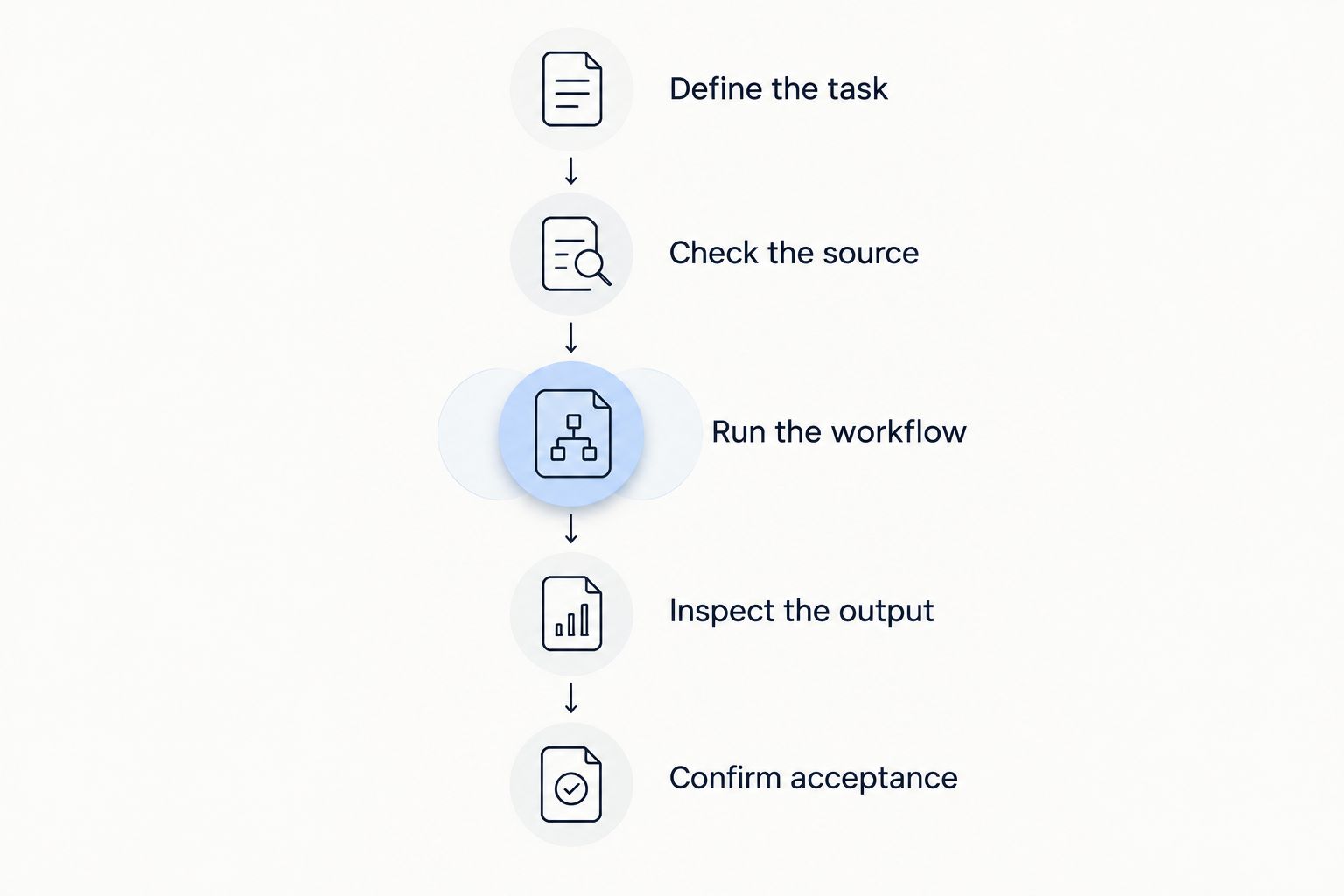
Follow this sequence:
- Define the task. State whether you need a new document, an edit, a conversion, or a signature.
- Check the source. Confirm that the starting file or template contains the right material.
- Run the workflow. Complete the steps you expect to repeat in normal use.
- Inspect the output. Review the result outside the editing interface.
- Confirm acceptance. Check that the intended recipient can use it as required.
Inspect 2 outputs when relevant: the editable working version and the final version you intend to send. A readable preview is not enough if the saved document has broken tables, missing content, or an unsuitable format.
Complete 1 end-to-end workflow before making your 2026 choice. Include opening the final file and checking the recipient's requirements; stopping at the editor leaves the most consequential step untested.
Final verdict: choose by your starting point
Choose Zendocs if you already have files to process
Best for: individuals and businesses with recurring online document-processing tasks. Choose it when conversion, editing, signing, and document management are the work you need to accomplish.
Its fit is strongest when your content already exists across PDFs, Office documents, and images. Keep legal review separate, and validate the exact file operations your workload requires.
Choose eForms if you need a legal-template starting point
Best for: people creating a legal document from a template. Choose it when finding an appropriate document structure comes before editing or converting a file.
Its fit is strongest when you can name the document you need but do not yet have a draft. Review the selected template's suitability and execution requirements rather than treating completion as approval.
Decision scorecard
| Dimension | Winner |
|---|---|
| Existing-file processing | Zendocs |
| Legal-template starting point | eForms |
| Conversion-led evaluation | Processing-first workflow |
| Purpose-led template selection | eForms |
| Signing | Tie: match the recipient's requirements |
| Legal suitability | Tie: review the content separately |
| Subscription decision | Match the commitment to the workload |
| Final output | Decide with your completed workflow |
FAQ
Is Zendocs better than eForms for editing PDFs?
Zendocs is the clearer fit for an online PDF-editing requirement because editing is part of its stated product scope. eForms is the more relevant starting point when you need a legal-document template.
Which should I choose if I need a legal document?
Choose eForms as the starting point when you need a legal-document template. Check that the selected document matches your transaction and applicable requirements before completing it.
Do I need a template service if I already have the document?
Not necessarily; an existing document often calls for processing rather than template selection. Identify whether you need changes to the file, changes to its legal content, or both.
Does an electronic signature make my document suitable?
No, a signature does not establish that the document's content fits your transaction. Check content, recipient requirements, and the required execution process separately.
How should I compare subscription costs?
Compare the commitment with your expected workload and the functions it covers. Check billing intervals, renewal, cancellation, and document-retention terms before proceeding.
What should I test before choosing a document tool?
Test a complete workflow using a representative document. Inspect the exported file and confirm that the intended recipient can use it as required.
One last thing
Review the exported file, not just the editor preview. Open it in the application or viewer your recipient uses and inspect the parts that carry meaning: names, tables, clauses, signature areas, and page breaks.
That final check tests the deliverable you are actually sending. A convenient editing session does not compensate for an unusable document.


