

Choose Zendocs if you need to convert, edit, sign, and manage documents online; choose SignNow if your main job is sending prepared documents to other people for signature. The deciding difference in 2026 is document preparation versus signature coordination—not simply whether either tool supports signing.
- Zendocs vs SignNow: choose document processing for mixed-format work and SignNow for signature-request workflows.
- SignNow suits teams that need signing invitations, recipient coordination, and reusable signature requests.
- Compare PDF editing and e-signature workflows separately before choosing a subscription.
- Test document quality, recipient experience, and completed-file records before committing.
Why this matters
A PDF editor and an e-signature platform solve different bottlenecks. Preparing an editable document is not the same task as collecting approval from someone outside your business.
If your work starts with Word files, spreadsheets, presentations, images, and PDFs, document preparation belongs near the top of your shortlist. If your files already arrive ready to sign, recipient coordination deserves more weight than conversion breadth.
Buy for the task that creates the work, not the last button you click. A signing feature does not prove that a tool handles your editing requirements, and an editing feature does not establish how well it coordinates external signers.
At a glance
| Dimension | Zendocs | SignNow |
|---|---|---|
| Best for | Individuals and businesses processing documents online | Individuals and teams collecting electronic signatures |
| Standout feature | Converting, editing, signing, and managing documents in a web-based tool | Sending documents through an electronic-signature workflow |
| Document preparation | Stronger fit when editing and format conversion drive the purchase | Stronger fit when the document is already prepared |
| Recipient coordination | Evaluate the signing process against your recipient requirements | Signing invitations, recipient roles, and completion tracking |
| Repeated requests | Best evaluated across recurring document-processing tasks | Reusable templates for recurring signature requests |
| Browser access | Web-based document processing | Browser-based electronic signing |
| Legal and evidence fit | Assess the document, signing method, and retained records | Assess the document, signing method, and retained records |
| Pricing model | Subscription for online document processing | Subscription plans organized around users and features |
The table compares buying fit rather than claiming that either product wins every feature test. Your decision should follow the sequence of work: prepare the file, involve the right people, and retain the completed result.
Zendocs is the better fit for mixed-format document work
Best for: an individual or business whose documents need work before they are ready to sign. The document-processing platform covers converting, editing, signing, and managing PDFs and other formats, including Word, Excel, PowerPoint, and images.
That scope matters when your starting point changes from task to task. A spreadsheet, presentation, and existing PDF create different preparation requirements, even when each eventually becomes a document you share.
The advantage is the match between the product's stated purpose and a varied document workload. The limitation is that broad format coverage does not establish the quality of every conversion or the depth of every editing function.
For your 2026 evaluation, begin with actual files rather than a feature checklist. Look for misplaced text, altered tables, missing images, and an output that remains usable for its next task.
A signature-focused product becomes the more direct choice when preparation is already handled elsewhere. Do not replace a working document-production process merely to duplicate it inside another subscription.
Document processing wins when preparation is the bottleneck
Best for: someone who repeatedly receives files that need conversion or correction. Here, the strongest reason to choose a broader document tool is the work required before anyone signs.
Use 3 test documents: a text-heavy file, a spreadsheet with tables, and a presentation or image-based document. These are evaluation samples, not a claim about supported limits or processing performance.
For each sample, define what a successful result looks like before uploading it. That stops a visually acceptable first page from hiding problems later in the file.
- Text accuracy: Check names, punctuation, paragraph order, and special characters.
- Layout quality: Inspect tables, page breaks, images, and headings.
- Output usability: Confirm that the result works for the next person who receives it.
SignNow is the less direct starting point when conversion and substantive editing are your main requirements. Its signature workflow is easier to evaluate when you begin with a finished document rather than asking it to replace a separate preparation process.
For a closer look at one common preparation step, read the guide to converting a Word document to PDF without installing Word.
SignNow is the better fit for coordinating external signers
Best for: a business sending prepared agreements to customers, vendors, or colleagues. SignNow centers its product on electronic-signature workflows, including sending invitations and tracking completion.
That focus changes what you should test. Instead of asking only whether you can place a signature on a PDF, ask how the document moves between the sender and its recipients.
Use a sample request involving 2 recipients. Check that each person receives the intended fields, understands the required action, and can complete the request without instructions from the sender.
The practical advantage is signature coordination. The tradeoff is that a signing-centered purchase does not automatically solve your wider requirements for editing spreadsheets, converting presentations, or preparing image-based documents.
In your 2026 comparison, judge the recipient experience separately from the sender's dashboard. A process that looks clear to an administrator still needs to make sense to someone opening a signing invitation for the first time.
Choose SignNow when collecting signatures is the recurring job, rather than an occasional finishing step.
SignNow has the clearer fit for repeated signature requests
Best for: a team sending the same kind of agreement repeatedly. SignNow's reusable templates support recurring signature-request workflows without treating every request as an entirely new document setup.
The value comes from repetition. If you regularly send the same agreement structure, evaluate how the template handles changing names, dates, recipient roles, and fields.
Do not stop at creating a template successfully. Send it, complete it, and inspect the final document to check that the reusable setup produces the result you intended.
- Confirm which content stays fixed and which content changes.
- Check that fields belong to the correct recipient.
- Confirm that the completed copy contains the intended information.
- Review how you identify and retrieve the finished request.
The limitation is scope: a reusable signing template is not the same thing as a general-purpose document template or a format-conversion workflow. If your recurring work changes the document substantially before signing, preparation still deserves its own evaluation.
Both offer browser-based work, but test the whole handoff
Best for: anyone who wants online document processing or signing without making desktop software the center of the workflow. Both products support browser-based work within their respective areas of focus.
Browser access is a tie, not a reason to ignore the rest of the process. You still need to check uploads, editing or field placement, recipient actions, and the final downloaded file.
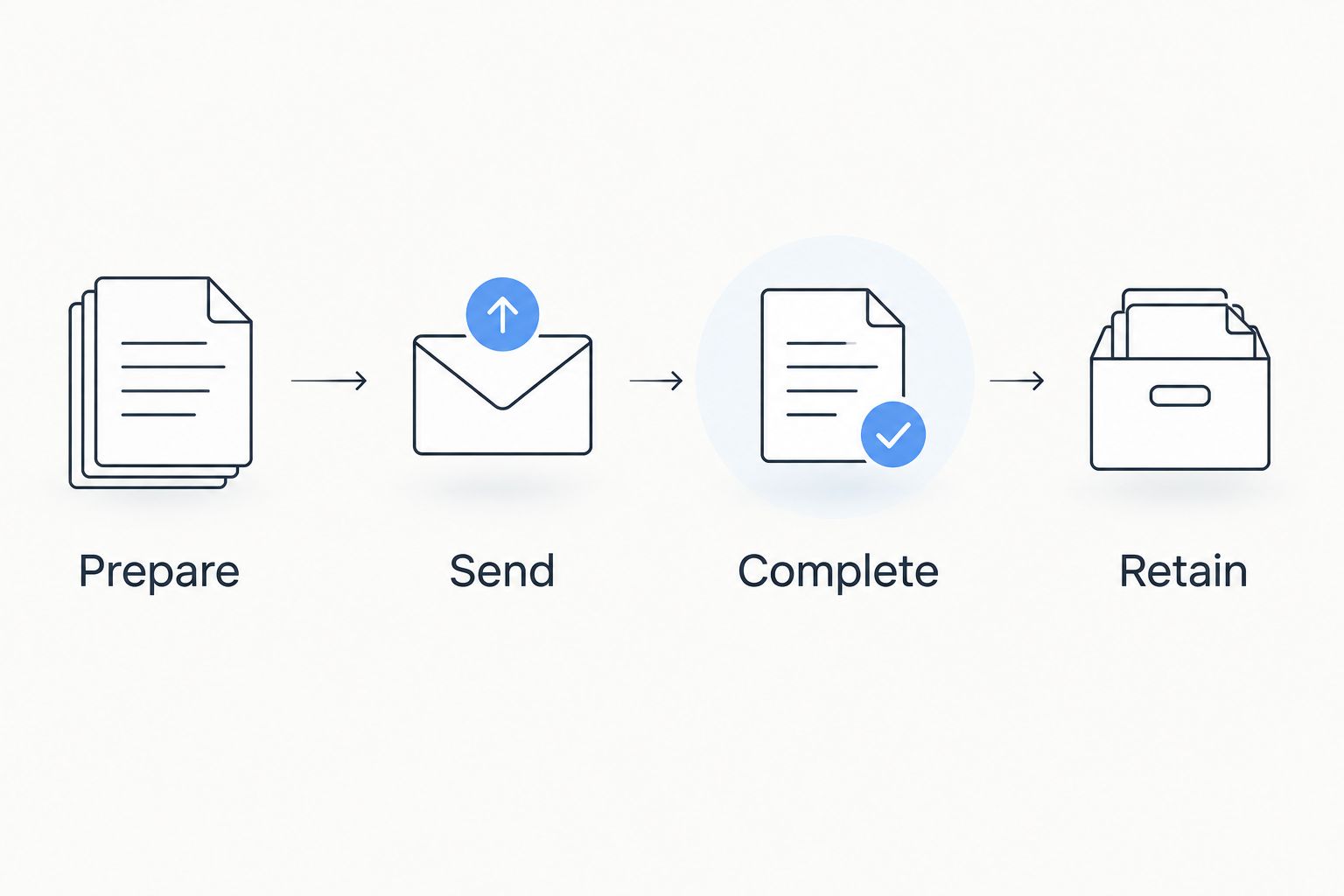
Use this sequence for your 2026 browser test:
- Prepare: Start with the source file you actually receive.
- Send: Share or initiate the signing process appropriate to the task.
- Complete: Carry out the recipient's required actions.
- Retain: Save the finished document and any necessary records.
Test on the devices and browsers your participants actually use. A desktop-only evaluation does not answer whether the same task is practical for a recipient opening the request on a phone.
The shared limitation is that online access alone says nothing about your file's final quality or your organization's approval requirements. Treat browser availability as an entry requirement, not the deciding advantage.
Neither product wins legal suitability by default
Best for: a buyer who needs a defensible signing process, not merely a visible signature. Legal suitability depends on the document, the applicable rules, the parties' actions, and the evidence retained.
An image of a signature and a documented electronic-signature process are not interchangeable concepts. Before selecting either product, decide what records your organization needs to show who acted and what document they completed.
For your 2026 review, ask these questions:
- Does this document type permit the intended electronic-signature method?
- How will you establish the signer's identity and authority?
- What completion records must you retain?
- Can your team retrieve the document and associated records later?
- Does your organization require a particular approval or security review?
There is no automatic winner on legal fit. A product's category does not establish compliance for every document or jurisdiction.
Do not substitute a software comparison for advice on a document with special execution requirements. Establish those requirements first, then assess whether the proposed signing process meets them.
Compare subscription models around the work you perform
Both options use subscriptions, but the useful comparison is what your subscription needs to cover. The document-processing platform addresses converting, editing, signing, and managing files; SignNow organizes its offering around electronic-signature users and features.
A subscription is predictable only when the included scope matches your work. Check billing terms, cancellation conditions, usage allowances, and access to the functions you expect to use before making a commitment.
For a document-heavy individual, evaluate whether the subscription covers the preparation tasks that recur throughout the month. For a signing team, evaluate who must send requests, who administers the account, and which workflow functions those people require.
Use these buying questions rather than comparing headline plan labels:
- Which tasks are included in the subscription you are considering?
- Which people need accounts, and what can each person do?
- What usage conditions apply to your intended workflow?
- Can you export the documents and records your business needs?
- What happens to your process if your requirements change?
The pricing-model verdict is a tie until you define the workload. Predictable billing and a suitable product are separate requirements; neither compensates for the other.
Final verdict: choose preparation breadth or signing focus
Choose Zendocs if you manage varied document tasks
Named profile: the hands-on document preparer. You receive different file formats, need to edit or convert them, and want online document processing that also includes signing and management.
Your strongest reason to choose this option is its stated breadth across document tasks. Your decision should still depend on successful tests with the files you use, not an assumption that every format or conversion behaves identically.
Choose SignNow if you own signature collection
Named profile: the agreement sender. You already have a document-preparation process and need a signing-focused tool for sending requests, coordinating recipients, and repeating established signing workflows.
Your strongest reason to choose SignNow is its focus on moving prepared documents through electronic signing. Keep a separate preparation tool if your editing and conversion needs extend beyond the signing workflow.
| Dimension | Winner |
|---|---|
| Mixed-format document work | Zendocs |
| Preparation-heavy workflow | Document-processing approach |
| External signer coordination | SignNow |
| Repeated signature requests | SignNow |
| Browser-based access | Tie |
| Legal suitability | No default winner |
| Subscription fit | Workload-dependent tie |
FAQ
Is Zendocs or SignNow better for PDF editing?
Zendocs is the better starting point when PDF editing and broader document processing drive the purchase. Test your actual files to assess editing depth and output quality rather than treating format coverage as proof of every capability.
Which tool is better for sending documents to clients for signature?
SignNow is the better fit when your main task is sending prepared documents to clients for electronic signature. Evaluate recipient roles, invitation handling, and the completed document during your selection process.
Do I need an e-signature tool if I already have a PDF editor?
You need a signing-focused tool when your existing editor does not meet your signature-collection requirements. Placing your own signature on a document is a different task from coordinating requests with external recipients.
Can I use either option in a browser?
Both support browser-based work within their respective document-processing and electronic-signature workflows. Test the full task on the devices your senders and recipients use.
How should I compare the subscription models?
Compare the included tasks, account requirements, usage conditions, and billing terms against your actual workload. A document-processing subscription and a signing-focused subscription should be assessed against the different work each needs to perform.
Does an electronic-signature platform make every document legally valid?
No electronic-signature platform establishes legal validity for every document automatically. Document-specific rules, signer authority, intent, and retained evidence still matter.
What should I test before choosing in 2026?
Test preparation quality, the recipient experience, and the final retained document. Use representative files and complete a real end-to-end sample rather than evaluating only the initial upload screen.
One last thing
Inspect 1 completed PDF before you commit. Reopen it outside the service, check every page, and confirm that the document and any required signing records remain understandable to someone who did not participate in the workflow.
The finished file is the deliverable; the interface is only the route to it.


