

Choose Zendocs if you already have documents to convert, edit, sign, and manage online; choose TemplateRoller if your first task is finding a form or template. This 2026 comparison separates document processing from template discovery so you can choose around the work you actually need to finish.
- Zendocs vs TemplateRoller is primarily a choice between online document processing and finding forms or templates.
- Choose Zendocs for PDF editing, document conversion, signing, and document management.
- Choose TemplateRoller when locating a suitable form is the main task.
- For official paperwork, verify the issuing authority’s current version before completing or signing it.
Why this matters
A document library and a document-processing tool solve different starting problems. Finding the right form does not finish the paperwork; having an editor does not tell you which form you need.
Zendocs is a web-based subscription tool for converting, editing, signing, and managing PDFs and other document formats. TemplateRoller is a forms-and-templates resource. Start with the bottleneck: finding the document or working on its contents.
That distinction matters more than a long feature checklist. If your document already exists, browsing templates adds another step. If you do not know which document to use, opening an editor starts you in the wrong place.
At a glance
| Dimension | Zendocs | TemplateRoller |
|---|---|---|
| Best for | People processing existing documents online | People looking for forms and templates |
| Starting point | A file you need to work on | A document you need to find |
| Standout feature | Conversion, editing, signing, and management in a web-based tool | A library centered on forms and templates |
| Format needs | PDF, Word, Excel, PowerPoint, and images | Choose according to the individual template’s format |
| Editing and signing | Explicit parts of the document-processing offering | Assess the selected form against your editing and signing needs |
| Official paperwork | Verify the original document with its issuing authority | Verify the selected form with its issuing authority |
| Sensitive documents | Review handling terms before uploading | Review handling terms before entering or uploading information |
| Pricing model | Subscription | Review the terms attached to your intended document and action |
The comparison is about fit, not a claim that either service wins every feature. A template-first task and an existing-file task need different evaluation criteria.
Existing documents favor Zendocs; finding forms favors TemplateRoller
Zendocs is best for people who need online document processing rather than a template search. That includes work such as editing an existing PDF, converting a document into another format, or preparing a file for signing.
Its advantage starts with the file you already have. You do not need a replacement template when the document itself is correct and only its content or format needs attention.
TemplateRoller is the better starting point when the document is what you are looking for. A person searching for an unfamiliar form has a discovery problem before an editing problem.
The limitation runs both ways:
- A document-processing tool does not establish which form your recipient requires.
- A template library does not, by itself, establish that your entire editing and signing workflow is covered.
For a 2026 purchase decision, describe the starting task in plain language. “Find the form” and “change this file” are different requirements, even when both end with a PDF.
TemplateRoller wins when the document itself is the missing piece
Template discovery is useful when you know the purpose of the paperwork but not its structure. You need something to inspect before deciding what information to gather or how to organize it.
TemplateRoller fits that search-first scenario. Its forms-and-templates focus makes it the more relevant starting point for locating a document rather than transforming an existing one.
However, a useful-looking template is not automatically the right document. Before using it, check:
- Whether its purpose matches the transaction or request.
- Whether the named jurisdiction or organization matches your situation.
- Whether the recipient requires a particular version or submission method.
- Whether instructions and supporting documents are required separately.
Choose a template for its suitability, not just its title. A familiar document name can conceal different requirements, and a polished layout does not establish acceptance by the recipient.
This is also the main limit of choosing any template library: discovery helps you locate a candidate, but you still need to validate that candidate before relying on it.
Zendocs wins when conversion and editing are the main work
The document-processing offering covers PDF and other formats, including Word, Excel, PowerPoint, and images. That makes it the clearer fit when your work moves between file types instead of beginning and ending with template selection.
Think about the output you need. A PDF intended for reading and a spreadsheet intended for calculation are not interchangeable deliverables. Choose the conversion task around what the recipient must do next.
The benefit is breadth of purpose: conversion, editing, signing, and management sit within the stated offering. The limit is that a broad feature description does not establish how a particular file will behave.
Before committing an important document, inspect the result for:
- Text that remains readable and correctly ordered.
- Tables with the right columns and headings.
- Page breaks that preserve the document’s meaning.
- Images and symbols that remain in the correct places.
Judge the exported file, not just the on-screen preview. A conversion is useful only when the output supports its intended use. For a focused example, see the guide to converting Word to PDF without installing Word.
A combined editing-and-signing task favors the processing tool
If your assignment includes changing a document and signing it, evaluate those as connected steps. The edit must be complete before you approve the final content.
The web-based tool’s stated scope includes both editing and signing. That makes it the more direct candidate for an existing-document workflow than choosing a service principally because it has a relevant template.
Do not confuse that recommendation with a claim about every signature requirement. A signature feature alone does not establish support for your recipient’s identity checks, evidence requirements, or submission rules.
For your 2026 workflow, ask practical questions:
- Can you make the specific changes the document needs?
- Can you inspect the complete document before signing?
- Does the signing process match the recipient’s requirements?
- Can you retain the completed file in the form you need?
TemplateRoller remains useful when the unresolved issue is which document to complete. Once the form is selected, assess the remaining work separately rather than assuming document discovery also settles editing, signing, and retention.
Neither service replaces the issuing authority
Official-form verification is a tie: the issuing authority remains the reference point. Neither a document editor nor a template library decides which version an agency, employer, institution, or other recipient will accept.
For government paperwork in 2026, check the authority’s own instructions before entering personal information. Confirm the form title, revision information, required attachments, and accepted submission method.
This matters whether you found the document in a library or received it as an attachment. An existing file can be outdated too.
Keep the distinction clear:
- The source tells you what document is required.
- The instructions tell you how to complete and submit it.
- The processing tool helps you work on the file.
Treating these as separate responsibilities prevents a common purchasing mistake: expecting software to validate the underlying administrative requirement. Choose the tool after you know what the recipient needs, not as a substitute for checking.
Sensitive-file handling has no automatic winner
Neither a template-first approach nor a browser-based processing approach is inherently the right choice for confidential documents. Choose only after the service’s handling terms satisfy your requirements.
Before uploading identity documents, financial records, employee information, or confidential agreements, review the applicable terms and privacy information. For business use, apply your organization’s approval process as well.
Your review should address what happens to uploaded files, who can access them, how deletion works, and which contractual terms apply. These are evaluation questions, not features to infer from the presence of an upload button or signature field.
A practical first test uses a non-sensitive sample. That lets you assess the workflow without making confidential content part of the evaluation.
If the handling terms do not meet your requirements, neither product is the right destination for that file. A strong editing experience does not override a document-handling restriction.
Pricing: match the commitment to the work
Zendocs uses a subscription model. That makes the buying decision about recurring document work, not simply whether you can complete an isolated task.
A subscription is easier to assess when you can name the work it will cover: conversion, editing, signing, or document management. Compare the current plan terms against those tasks and review renewal and cancellation conditions before subscribing.
For TemplateRoller, review the current terms for the particular document and action you intend to use. Do not assume that viewing a template settles the conditions for downloading, editing, or otherwise using it.
For a 2026 comparison, use the same finished task on both sides. Comparing access to a template with an entire processing workflow mixes different purchases.
The tradeoff is commitment versus task scope. Recurring document work supports evaluating a subscription; an occasional form search calls for checking the terms of that specific task. Neither option wins on cost without comparing the same intended outcome.
Test the complete workflow before choosing
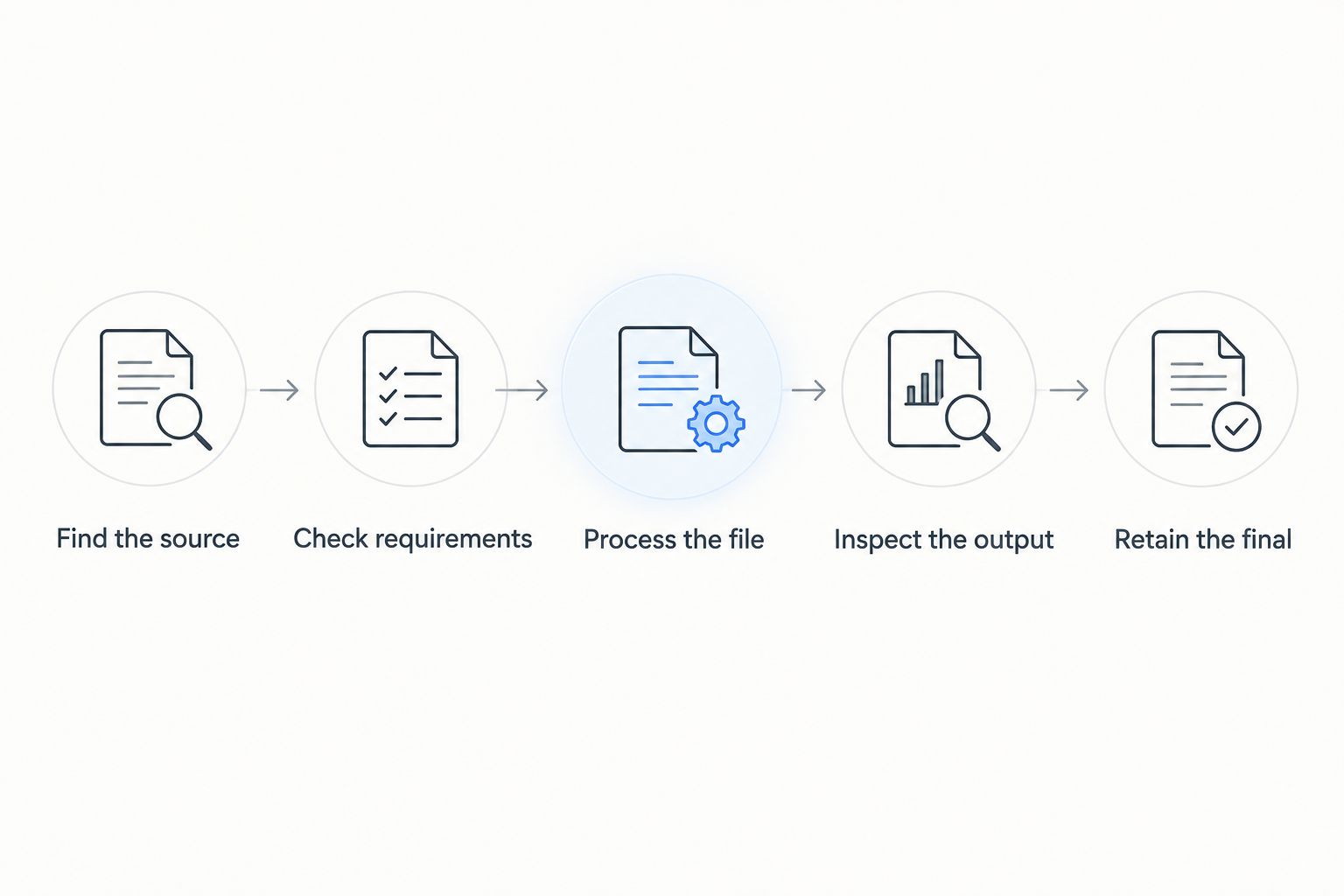
Use a representative, non-sensitive document rather than a feature list. Follow the work from the initial need to the finished file, and record where you have to stop or switch tools.
- Find the source: Identify the existing file or locate a suitable template.
- Check requirements: Confirm the recipient’s document and submission rules.
- Process the file: Make the edits, conversions, or signatures the task requires.
- Inspect the output: Open the final file and check its contents and format.
- Retain the final: Keep the completed document according to your needs.
This sequence exposes the real difference between finding paperwork and finishing paperwork. It also prevents a good template search or editor preview from standing in for a successful result.
Final verdict: choose around your starting point
Choose Zendocs if you are an existing-file operator
You receive documents and need to convert, edit, sign, or manage them online. Your main problem is processing the file, not finding a template. The document-processing tool is the better fit for that profile.
Choose TemplateRoller if you are a form finder
You need to locate a suitable form or template before you can begin. Your immediate problem is document discovery. The template library is the better starting point for that profile.
| Dimension | Winner |
|---|---|
| Existing-file starting point | Document-processing tool |
| Form and template discovery | TemplateRoller |
| Cross-format processing needs | Document-processing tool |
| Combined editing-and-signing need | Document-processing tool |
| Official-form verification | Tie: check the issuing authority |
| Sensitive-file suitability | Tie: assess handling terms |
| Pricing fit | Task-specific; compare the same outcome |
FAQ
Is Zendocs better than TemplateRoller?
Zendocs is the better fit for converting, editing, signing, and managing existing documents online. TemplateRoller is the better starting point when you need to find a form or template.
Which should I choose if I already have a PDF?
Choose around the changes your PDF needs. An existing file that requires editing, conversion, or signing points toward a document-processing tool rather than a template search.
Which is better for finding forms?
TemplateRoller is the better starting point for finding forms and templates. Check the selected document against the recipient’s requirements before completing it.
Does finding a template mean it is the current official form?
No, finding a template does not establish that it is the current official form. Confirm the version and submission instructions with the issuing authority.
What should I check before paying for a document tool?
Check the current terms against the complete task you need to finish. Review plan scope, renewal and cancellation conditions, and the requirements for obtaining your finished file.
Can I use either service for confidential documents?
Use either service for confidential documents only when its handling terms meet your requirements. Review privacy, access, retention, and deletion information before uploading sensitive content.
How should I compare the tools in 2026?
Compare them using a representative, non-sensitive document and a clearly defined final output. Check the full path from finding or uploading the source to inspecting and retaining the completed file.
One last thing
Write down what “finished” means before choosing: a located template, an edited PDF, a converted file, or a signed document. That short description tells you which service to evaluate first—and stops you from buying a solution to the wrong starting problem.


